
When it comes to how well Time Doctor works and if it’s worth the cost, it depends on who you ask.
Long-term G2 users like Brahm M. think it has a chaotic billing system, shady charges on your account, and a customer support team that’s not so helpful:
“I’ve been a customer since 2020 and used the software daily, but my recent experience has been frustrating. The billing system is chaotic, and support has been unhelpful. I downgraded my user base to migrate off the software, then upgraded again with the same lower user count — but I was charged at the older user count, which I have removed.”
“The support representative seemed confused, repeatedly referencing my old user count despite my explanation. After much back-and-forth, they finally understood the issue but said they’d need to “investigate” and check timestamps, delaying resolution further.”
For other users like Eve, it’s a bit of both worlds. While the price can stretch a bit (even for a small team), it does justify the time saved.
“With quite a few people in my team it does cost a bit but I’m sure I save enough to cover the cost by saving time and it highlighting any issues in the team.”
“It makes doing my payment run each month so much easier as I know the exact hours worked by my team. It’s also very helpful for picking up any issues from my team – the activity reports and screenshots every 15 mins show me when a team member isn’t working as they should so that I can quickly address any issues with them. It’s quick and easy to set up and makes my life a lot easier as a team leader!”
Judging from these user reviews, the verdict on whether Time Doctor is worth it or not isn’t clear-cut.
That’s why we wrote this Time Doctor review to show you what it’s like using the tool. Think of it as what the Gen Zs call ‘Day in the life’, but for a time tracking and productivity platform.
Time Doctor Review: Products, Key Features, Functionalities, Pros, Cons, and Pricing
Overview
Time Doctor is a workforce analytics and time tracking software. It’s designed for companies that want visibility into how employees spend their work hours.
It’s especially popular with remote, hybrid, and distributed teams, offering tools to track time, measure productivity, and generate actionable insights for managers and employees.
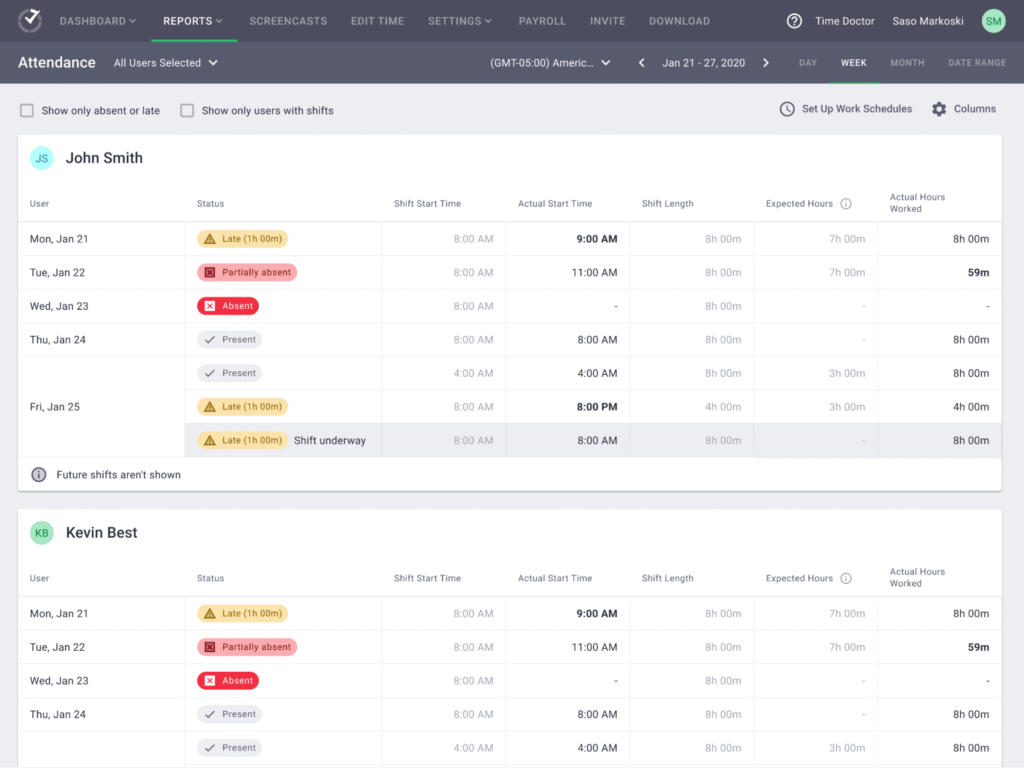
The platform operates by installing a desktop app (Windows, macOS, Linux) or mobile app (iOS, Android) that runs in the background while employees work.
To begin recording, Time Doctor uses two layers:
Time Layer (Work Sessions)
The app captures the exact start and stop of work, linking that time to projects, tasks, or clients.
This can be done manually (pressing start/stop on a timer) or automatically (the system recognizes when a user starts engaging with work apps).
Activity Layer (Proof of Work)
While the clock runs, Time Doctor monitors what the employee actually does. It tracks which apps and websites are being used, measures keystroke and mouse activity, and can take periodic screenshots or video snippets.
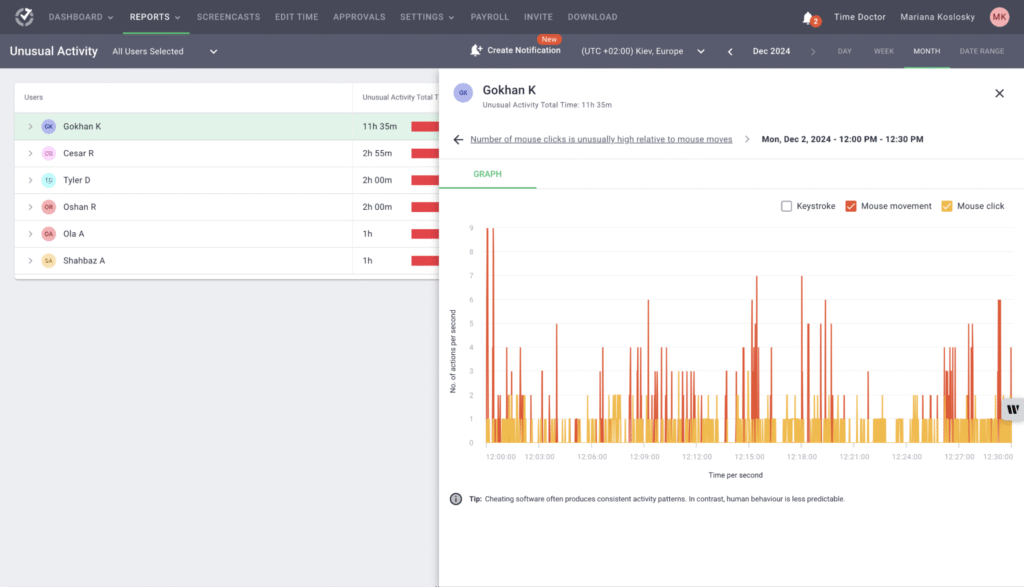
This ‘dual-tracking’ model enhances accuracy. For example:
If an employee leaves their desk but forgets to stop the timer, the system detects inactivity and pauses tracking. If a user browses onto unproductive sites, Time Doctor sends a ‘distraction alert’, reminding them to refocus.
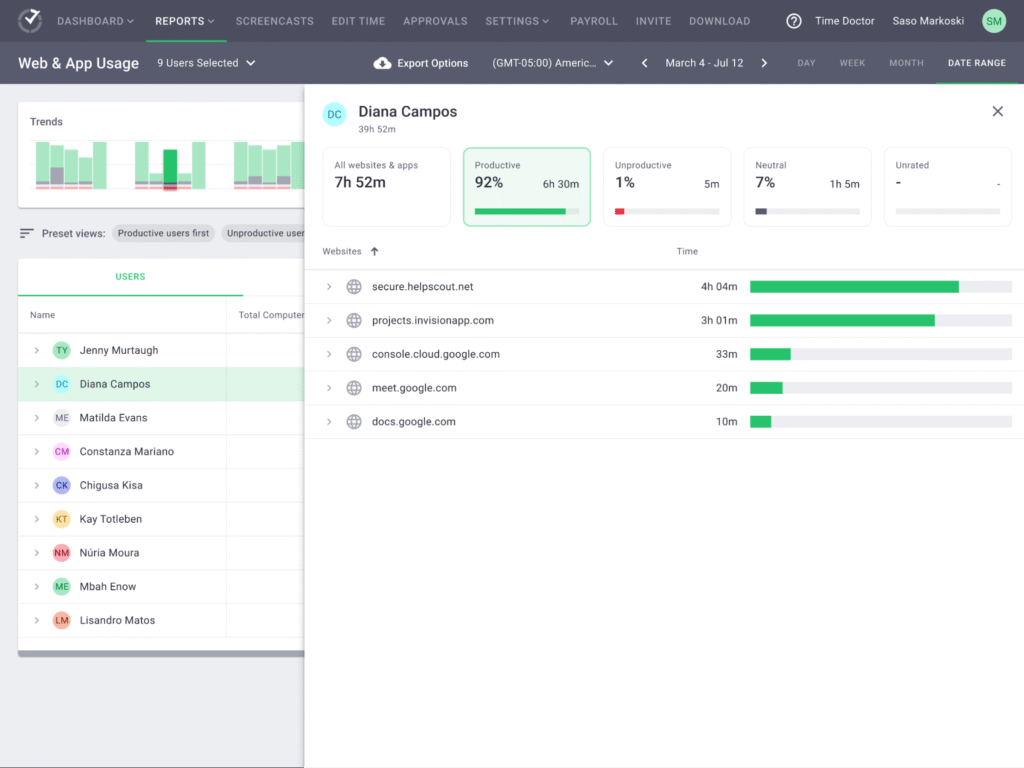
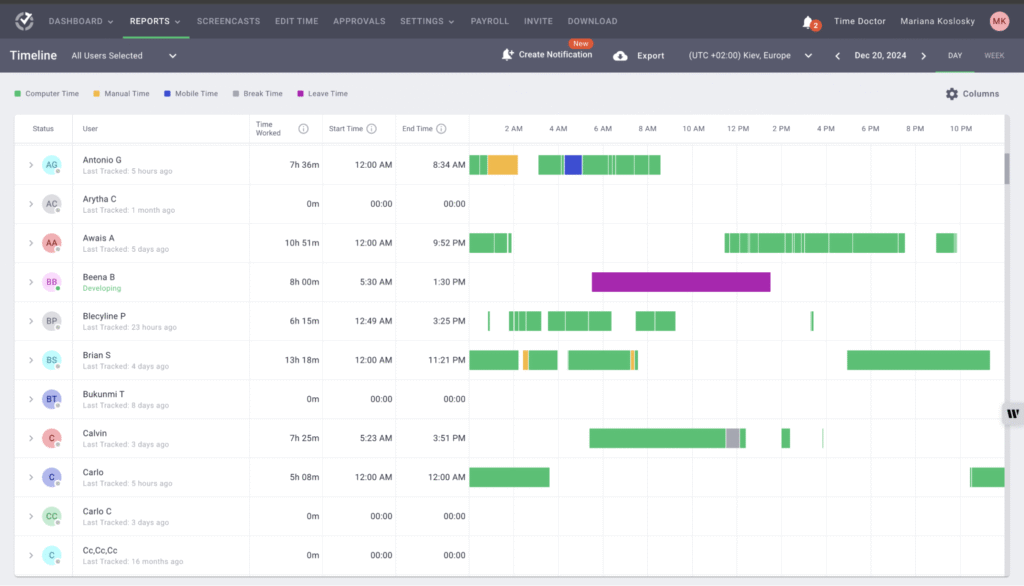
Admins and managers can also access a cloud-based dashboard offering detailed individual and team activity tracking. It includes productivity reports, trends, activity ratings (productive vs. unproductive), and visual employee time breakdowns across tasks and projects.
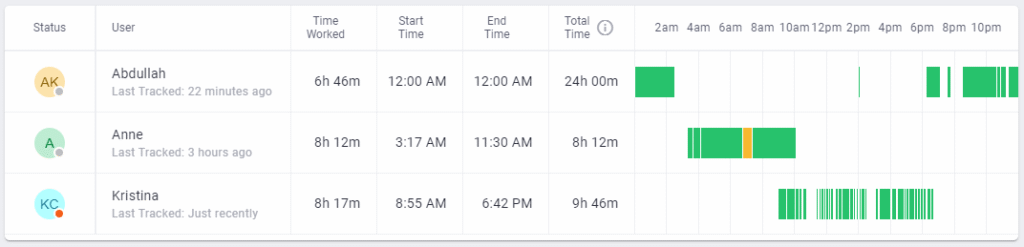
In addition, Time Doctor integrates with 60+ third-party tools like Asana, Jira, Trello, Slack, Zendesk, and more. These integrations sync tracked hours with project management or customer support systems, creating a single source of truth for productivity.
Related → The 10 Best Time Doctor Alternatives & Competitors
Time Doctor Products
Time Doctor offers four main products (tagged as ‘use cases’): employee monitoring, workforce analytics, productivity analytics, and distributed workforce.
Employee Monitoring
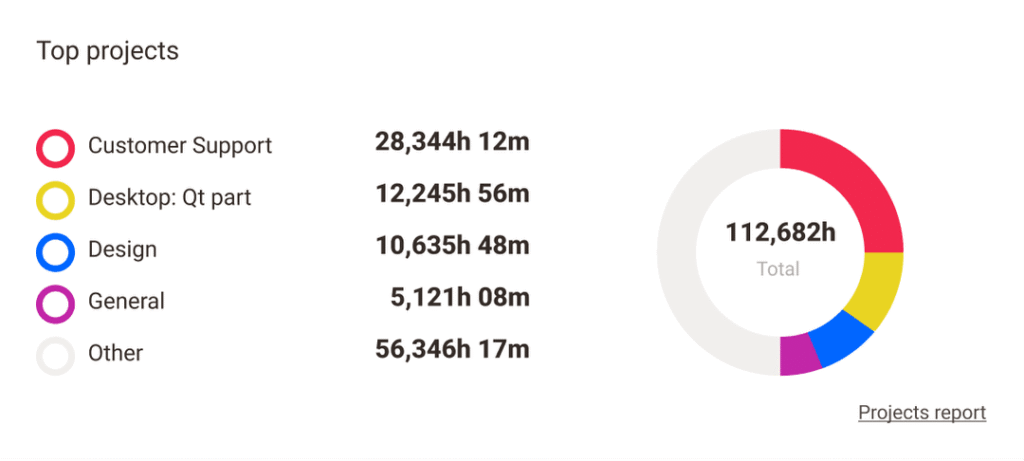
This Time Doctor feature gives managers and business owners a transparent, real-time view of how employees are working throughout the day. It does this by collecting behavioral, application, and activity-based data.
You can use it to track work hours and learn how productive time is being spent, where attention is being lost, and how workflows can be optimized.
The productivity monitoring process is also customizable. Companies can choose the visibility depth they want, from simple task-time reporting to highly detailed application use and screen captures.
Key features include:
- App and website usage monitoring: Every app opened and every website visited is logged, categorized, and measured by active time spent. This allows companies to set benchmarks for acceptable use and get alerts when non-work activities dominate a work session.
For example, Time Doctor can differentiate between productive apps (like Jira, Slack, Figma) and potentially distracting ones (social media, shopping, streaming platforms). - Screenshot and screen recording capture: Takes periodic screenshots of employee desktops and also captures video recordings of work sessions. The screenshots can be randomized or triggered by activity rules, ensuring they represent actual work rather than staged windows.
- Customer productivity categorization: Allows companies to customize how apps and sites are classified for their own workflows.
- Real-time productivity ratings: Time Doctor processes raw monitoring inputs into productivity scores that update live. Managers can see at any given moment whether an employee is engaged in high-value tasks or is idle and distracted.
Workforce Analytics
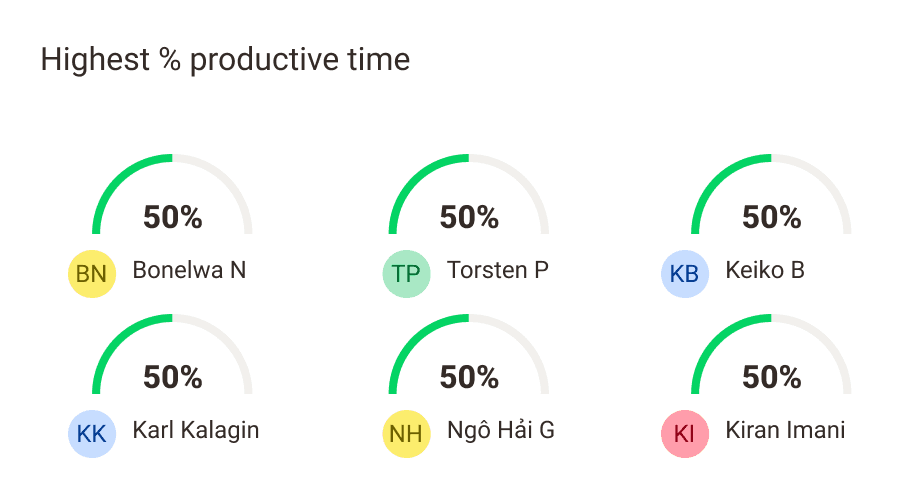
This feature helps companies understand what their employees are doing alongside team, department, and organization productivity trends.
It works by aggregating the millions of micro-events captured by Employee Monitoring (time logs, app usage, task switches, idle times), then presenting the results in dashboards and scheduled reports.
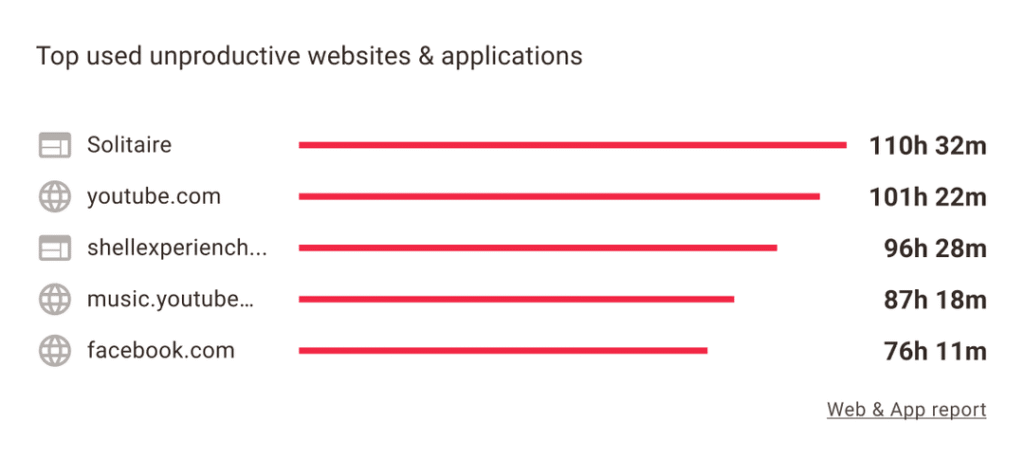
These analytics can be filtered by role, department, geography, or custom groupings. They give high-level executives and line managers insights they can act on.
Key features include:
- Workforce capacity planning: Calculates workforce capacity by analyzing how many productive hours are logged relative to expected workloads. This helps managers spot whether teams are overburdened or underutilized.
- Burnout and engagement indicators: Studies patterns that suggest unhealthy working habits. Consistently long workdays, minimal breaks, or sharp increases in after-hours activity trigger alerts in the Workforce Analytics module.
- Historical performance reports: Maintains detailed logs over months and years, enabling historical analysis. Managers can compare performance before and after a policy change, tool adoption, or restructure.
- Benchmark AI: Compares productivity between teams or regions, highlighting which groups are performing above or below benchmarks.
Productivity Analytics
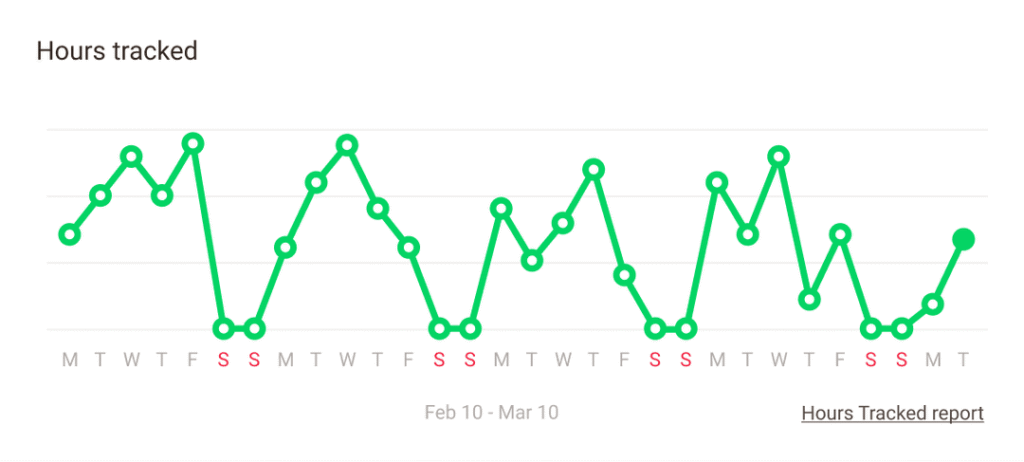
This takes the raw time-tracking and monitoring data from individual employees, then applies analytics models to evaluate productivity, focus levels, and alignment with organizational priorities.
Unlike Workforce Analytics, which takes a higher-level view of organizational patterns, Productivity Analytics focuses on performance optimization at the individual and team levels.
The aim here is to give leaders and managers clarity on whether their teams are working on the right things, how effectively they’re doing so, and what barriers are preventing better performance.
Key features include:
- Goal alignment metrics: Allows managers to set productivity goals (like time spent on client work, specific projects, or billable activities). It then measures employee activity against those benchmarks.
- Daily and weekly productivity scorecards: Each employee and team receives a scorecard that summarizes productivity levels during a chosen period.
- Focus vs. distraction analysis: Time Doctor analyzes application usage, task duration, and interruptions. It highlights when employees are deeply engaged versus when they’re frequently distracted.
- Coaching alerts: Allows managers and admins to set up custom email notifications based on employee productivity and attendance data.
Distributed Workforce
This feature centralizes employee activity data (regardless of location) into a unified system. It’s built for the modern workplace where teams are spread across regions, time zones, and work environments.
With this module, managers know exactly how hybrid and remote teams contribute compared to in-office peers. It enables them to optimize staffing, plan resources, and maintain a consistent performance culture.
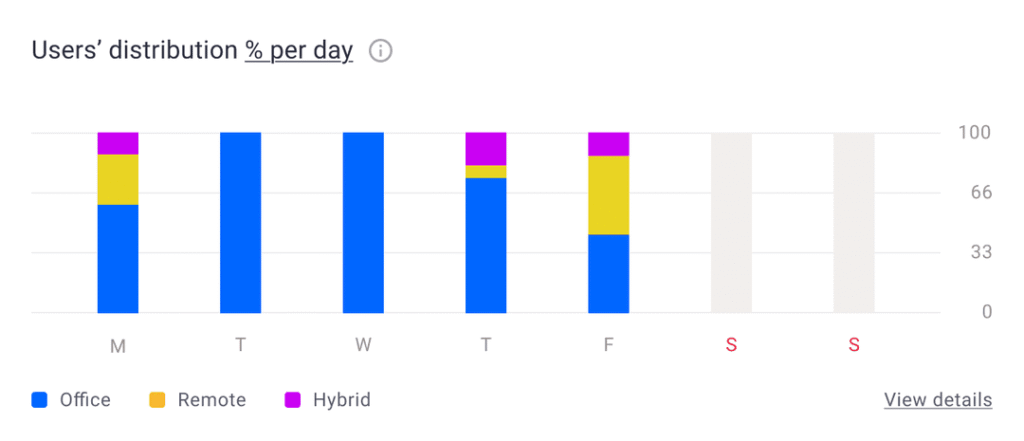
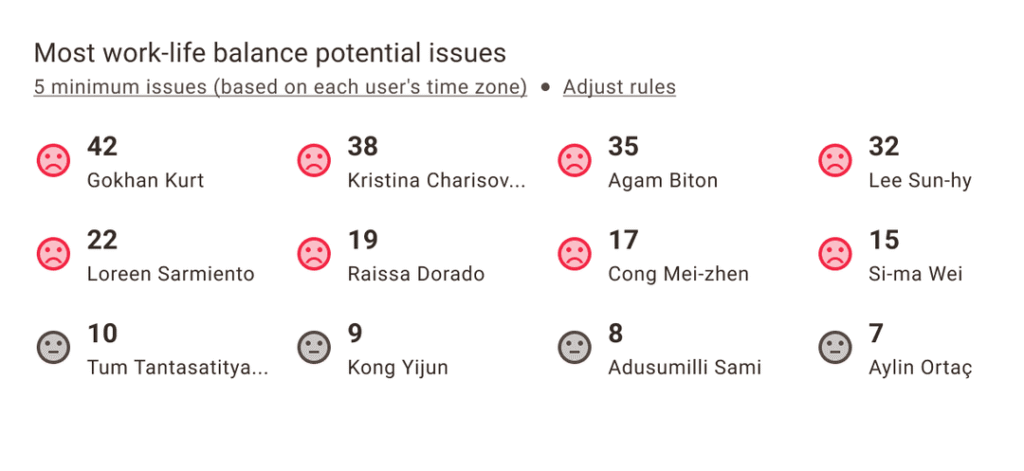
It also offers a dashboard to visualize imbalances such as consistently higher workloads on remote teams or underutilization in certain locations. This allows leaders to balance assignments fairly, avoiding friction and morale issues across distributed groups.
Key features include:
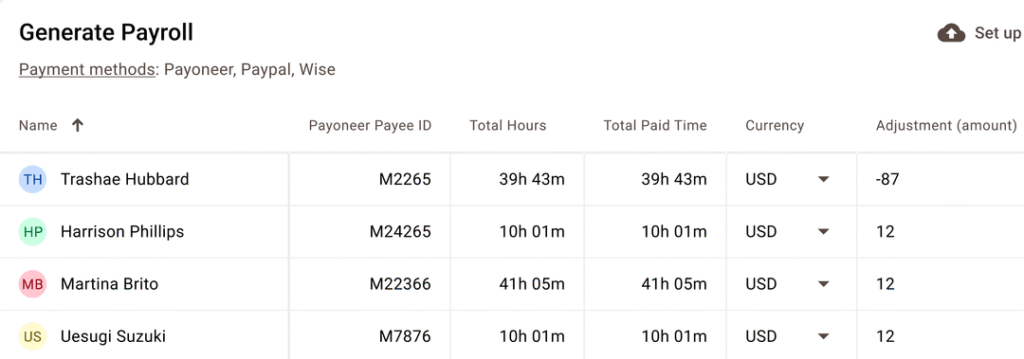
- Global payroll: Integrates with global payroll providers (e.g., Wise, PayPal, Gusto), enabling accurate billing regardless of employee location.
- Offline tracking: Even when an internet connection drops, Time Doctor continues logging work activity. Once the connection is restored, data syncs back to the central dashboard.
- Well-being indicators: Surfaces signals like extended idle periods, after-hours work, or sudden dips in activity, flagging potential disengagement or burnout risks among remote employees.
- Role-based visibility controls: Lets administrators configure role-based access (owner, admin, manager, regular user, and client).
For example, you can set it so that regional managers see only their geography, while executives get global visibility. This creates a governance framework suited to large, multi-location enterprises.
Cost of Time Doctor
Time Doctor offers three pricing plans: Basic, Standard, and Premium, with monthly per-user pricing. There’s also an enterprise option for large organizations.
Basic Plan: $6.67 Per User/month
This is the entry-level option, focusing on essential time and productivity tracking. It offers:
- Unlimited screenshots (captured at intervals).
- Time tracking with tasks and projects.
- Timeline report with export to CSV.
- 3 months of data storage.
Best for: Freelancers, early-stage startups, or very small teams who only need a record of hours worked and basic visibility into employee activity.
Limitations:
- Limited storage: Only three months of data retention, which is a huge limitation for businesses that run quarterly or annual performance reviews.
- No integrations: This tier doesn’t include integrations with project management tools, payroll systems, or productivity apps. This means you’ll need manual processes for payroll and reporting.
- No advanced tracking features: You won’t get distraction alerts, idle time analysis, or advanced analytics. You simply have a time clock with automatic screenshots.
Standard Plan: $11.67 Per User/month
This offers more advanced monitoring and reporting, making it practical for small-to-mid-sized companies.
Key features include:
- All currently listed Basic features.
- Unlimited integrations (with tools like Trello, Jira, Slack, Asana, Salesforce, etc.).
- Up to 6 months of data storage.
- Inactivity alerts.
- Expanded reporting: time use, productivity ratings, and project reports.
- URL and app tracking with categorization.
- Basic payroll management (exporting timesheets into payroll platforms).
Best for: Companies managing multiple employees and projects who want both accountability and productivity insights.
Limitations:
- Short data history: Six months of retention is better than Basic, but still limiting for companies that want annual comparisons or long-term analytics.
- No video capture: Only screenshots are included. No continuous video screen recording.
- Limited customization: While integrations are unlocked, some advanced features (like SSO or role-based access control) are only available in Premium.
Premium Plan: $16.70 Per User/month
The Premium plan is the full package, offering the depth and flexibility needed for large or enterprise-level teams.
It includes everything in Standard, plus:
- 2 years’ data storage.
- Video screen recording in addition to screenshots.
- VIP priority support.
- Client login access (allowing external stakeholders to view project-related activity).
- Workforce management and forecasting features (capacity planning, workload balancing).
- Single sign-on (SSO) via Okta, Azure AD, etc.
- Advanced reporting and custom exports.
Best for: BPOs, agencies, and large organizations with distributed teams where compliance, oversight, and scalability are crucial.
Limitations:
- Price point: At $16.70/user/month, costs scale quickly for larger teams. A company of 100 employees would be spending $1.6k+ a month.
- Employee resistance: Video recording can feel invasive, and employees may push back hard against such monitoring. Companies need strong cultural buy-in to implement it without harming morale.
- Complex setup: While integrations and SSO are powerful, setting them up requires IT resources. Smaller teams may find the additional tools overkill compared to Standard.
Enterprise: Custom Pricing
For very large businesses (hundreds to thousands of employees), Time Doctor offers a custom package.
This typically includes:
- All Premium features currently listed.
- Dedicated account manager and onboarding.
- Customizable BI dashboards.
- Enhanced compliance settings (monitoring tailored to regional labor laws).
- API-level integrations for custom workflows.
Limitations:
- Opaque pricing: Enterprise plans are quote-based, so costs vary widely and may include long-term contracts.
- Vendor lock-in: With custom builds and deep integration, companies can become heavily reliant on Time Doctor’s ecosystem, making it costly to switch later.
- Overhead in change management: Deploying enterprise-level monitoring often requires HR, IT, and legal oversight to manage compliance and acceptance across a large, distributed workforce.
Time Doctor Pros
Advanced Reporting
Time Doctor provides managers with detailed insights such as trend reports, variance analysis, benchmarking across teams, and capacity planning metrics.
These insights make it possible to forecast staffing needs and spot underperformance early.
Amber B, Director of Operations for a small business, likes the detailed analytics Time Doctor offers in overseeing her remote team:
“Time Doctor features like inputting a schedule, setting up management teams, and monitoring productivity with screenshots and keystrokes are incredibly helpful for fully remote teams. Our team has been remote since before Covid-19 hit, and we have utilized Time Doctor to help manage our team, payroll, and reporting for years. It is easy to put in schedules. Customer support is responsive and helpful. The toolbar stays open during the workday, or can be hidden if necessary. We are able to track specific projects and tasks on a daily basis.”
Comprehensive Employee Monitoring
Time Doctor offers task tracking, app/website monitoring, idle detection, and visual proof (screenshots/video).
This level of depth provides managers with transparency over how time is spent, ensuring billing accuracy for clients and accountability for employees.
One G2 user said:
“Time Doctor is a great program to stay in control of your employees and ensure they are being productive.”
Payroll and Client Transparency
By linking logged hours with payroll and invoicing systems, Time Doctor reduces disputes over billing and assists clients in paying for only verified productive time.
“I really like Time Doctor for its robust tracking features that give me a clear picture of our team’s productivity. It helps me keep tabs on total hours worked, as well as what’s considered productive versus unproductive time, and even idle time. While I don’t usually pay too much attention to small mismatches — after all, everyone is human — it’s been invaluable for spotting significant discrepancies that I would have never discovered otherwise. This level of transparency makes our reporting and invoicing process much more accurate.”
Time Doctor Cons
Poor Idle Time Detection
Time Doctor isn’t the best at capturing employee productivity.
Oftentimes, when you switch context (projects/tasks), the tracking desyncs or misrepresents it as ‘idle time’.
One user, Paul C, head of sales and marketing for a small business, said:
“The only thing I don’t like about Time Doctor is how it tracks paid breaks. Our employees do not need to take the full 15min or 30min break at an exact time or interval. So for example an employee takes a 5min break but then wants to take another 5min the time resets for 15min and doesn’t start countdown from the previous remaining time of the break.”
Steep Learning Curve for Managers
Reports, dashboards, and analytics require training to interpret effectively.
Without proper onboarding, managers risk misusing data or focusing too much on micromanagement rather than optimization. One Time Doctor reviewer said:
“Sometimes navigating to the right piece of data is a little difficult. One thing i find a little frustrating is when I set a date range for a data set, that date range changes if I pick another employee or task or go to a different menu. if you don’t notice, you get wrong information.”
It’s Difficult to Use
Time Doctor’s core features require too many clicks, making it difficult to navigate the platform.
One user called it ‘time-consuming’, especially when you have lots of agents to review:
“It can be confusing at times. Having to look at and compare multiple reports can be time-consuming if you have a lot of agents to review. Time Doctor does require time and attention. Nothing for our agents is 100% straightforward.”
When Time Doctor Is Worth It
Time Doctor is worth the investment when an organization needs visibility, accountability, and data-driven insights into how work gets done.
You’ll get the most out of it where productivity is directly tied to billable hours, project deliverables, or remote accountability.
This makes it best suited for:
Distributed and Remote Teams
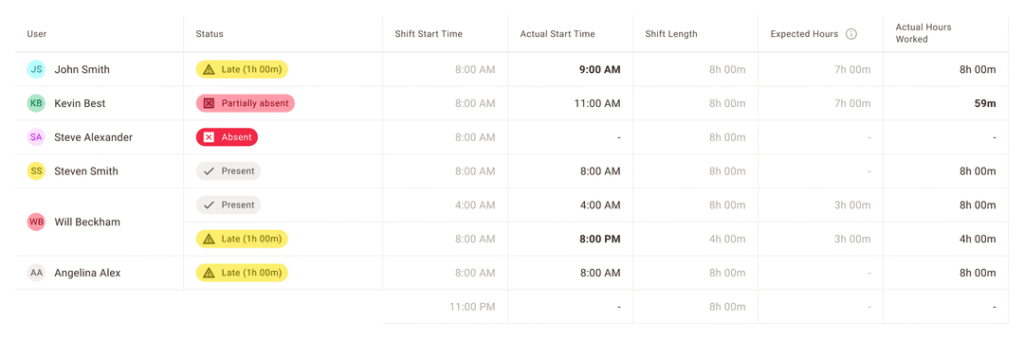
If your workforce is spread across time zones, countries, or home offices, Time Doctor solves the visibility challenge.
Managers no longer need to guess whether remote staff are engaged; they can see real-time activity, track project contributions, and analyze performance patterns.
Agencies and BPOs
Agencies and business process outsourcing firms often bill clients by the hour or project. Time Doctor helps by ensuring every tracked second is mapped to a project or client, providing screenshots for proof of work, and streamlining invoicing.
It eliminates disputes over billable hours and builds trust with clients by providing transparent records.
Compliance-Sensitive Environments
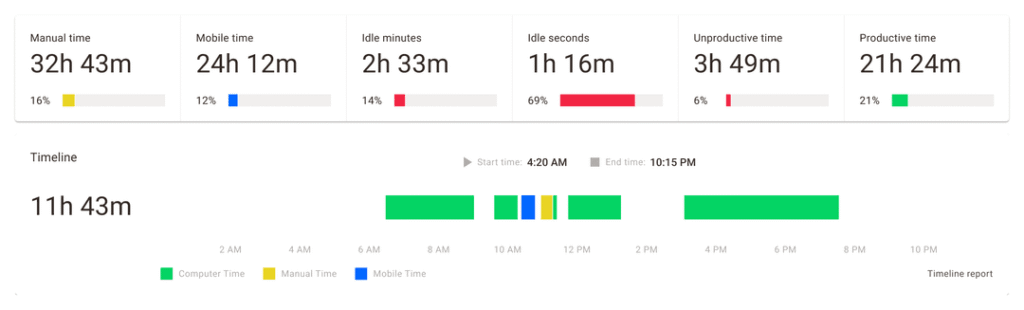
In industries like finance, healthcare, or government contracting, compliance requires strict oversight of who accessed what, when, and for how long.
Time Doctor’s monitoring features (screenshots, app/URL logs, and keystroke activity) create audit-ready records. When you combine this with its Premium features (2-year data history and SSO support), it satisfies both security and regulatory needs.
When Time Doctor Is NOT Worth It
Time Doctor is a capable tool, but it isn’t always the right fit. Its limitations become clearer when you compare its scope to what some organizations actually need from a workforce solution.
When You Manage Complex, Multi-Layered Teams
For small teams, Time Doctor is straightforward.
But as your workforce scales across departments, regions, or roles, the platform’s structure can feel restrictive. Features like role-based monitoring, advanced policy creation, or granular user grouping are limited. For many enterprises, Time Doctor isn’t well adapted to complexity.
When You Rely on Field or Mobile Teams
While Time Doctor offers a mobile version, it’s much more limited compared to what you get on the desktop.
Plus, it doesn’t provide GPS tracking or geofencing, which are essential for teams in industries like construction and logistics.
When You Need Unlimited Data Retention
The Basic and Standard plans cap historical data storage (three months and six months, respectively).
For companies that need year-over-year productivity comparisons or long-term trend analysis, these limitations are restrictive unless you move to the Premium tier.
When You Need Deeper Analytics
Time Doctor does a solid job of tracking hours and categorizing activity, but its reporting doesn’t go much deeper than that; you get surface-level visibility at best.
For companies that want workforce analytics with deeper behavioral insights, advanced anomaly detection, or detailed forecasting, the platform can feel too limited.
7 Time Doctor Alternatives Worth Trying
1. Teramind
See how Teramind compares to Time Doctor →
Teramind is an advanced workforce analytics, insider threat detection, and productivity management platform.
It’s designed for organizations that want visibility into workforce behavior while protecting sensitive data.
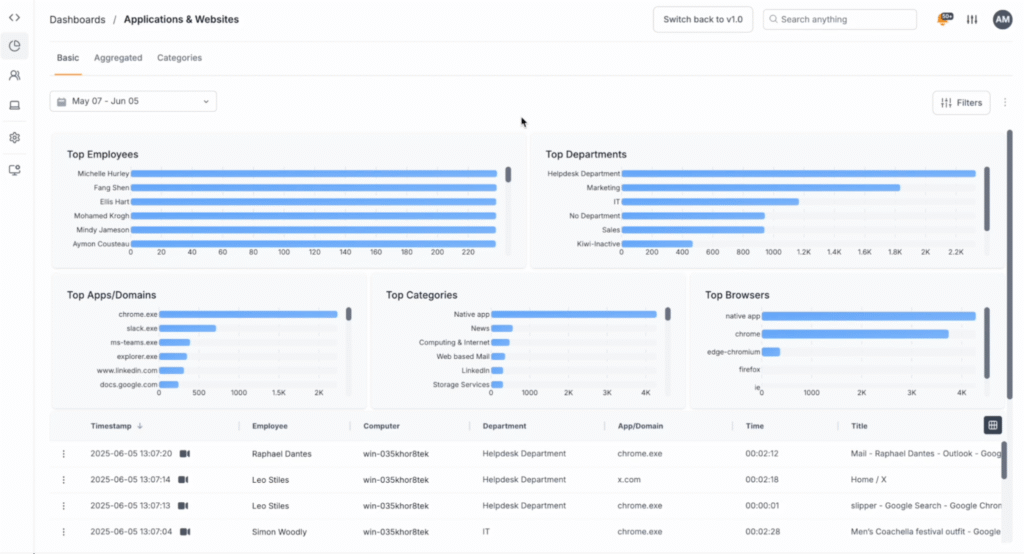
Unlike Time Doctor’s basic time tracking offering, Teramind works at a deeper layer, capturing detailed activity across applications, files, networks, and communication channels.
This includes keystrokes, mouse movements, emails, chats, file transfers, print jobs, and even screen recordings of sessions.
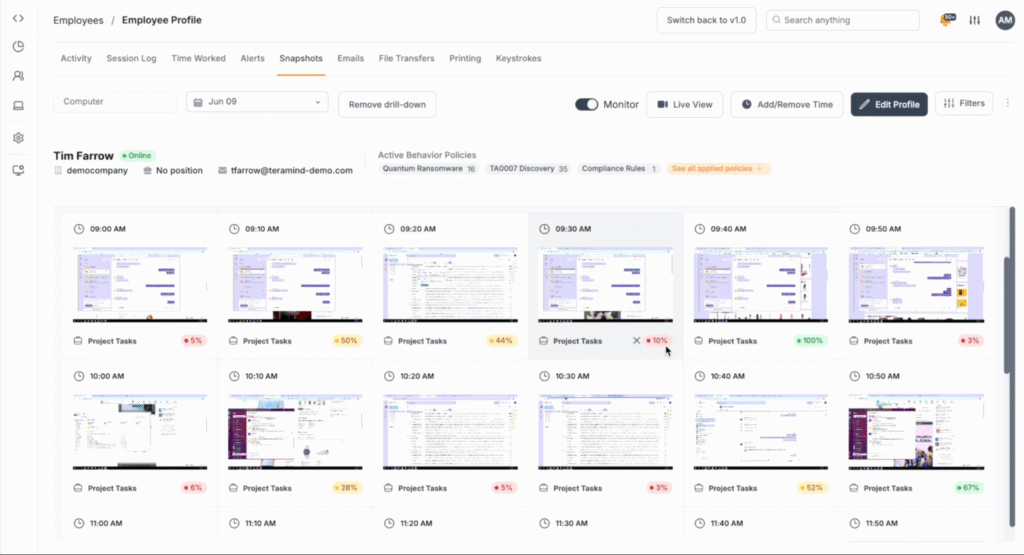
Teramind also provides the context behind the time spent. It reveals:
- Which applications are in use.
- Whether that app usage is productive or unproductive.
- How employees are handling sensitive documents.
- What patterns of behavior might indicate risk or inefficiency.
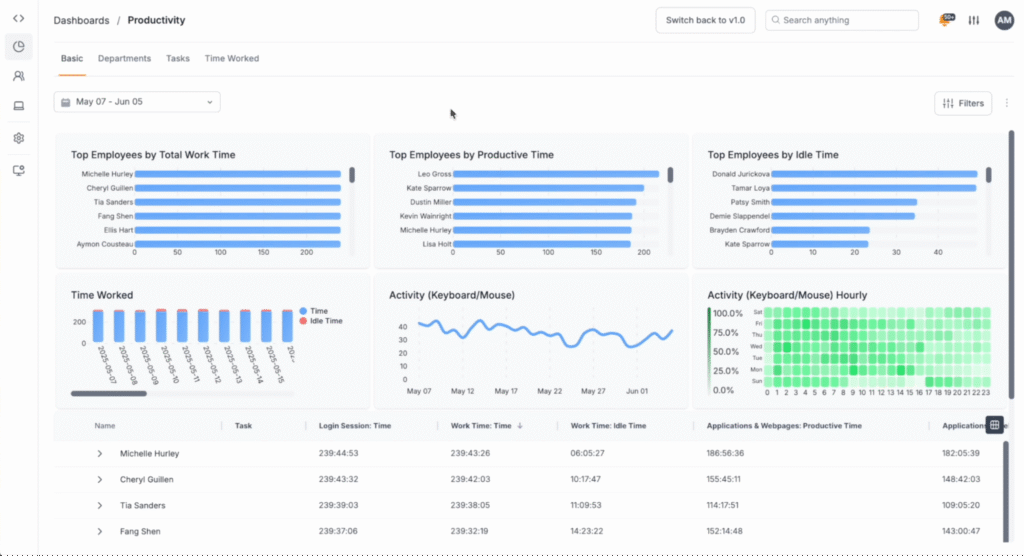
There’s also the policy-driven control engine; this allows companies to enforce their internal rules in real-time.
For example, if an employee attempts to upload a confidential report to a personal Dropbox account, Teramind can immediately block the action, log it for auditing, and alert the security team.
In addition, Teramind’s machine learning algorithms build baselines of ‘normal’ behavior for each employee. When activity deviates from this baseline, such as a sudden spike in database exports, unusual login hours, or attempts to access restricted areas, the system flags it as ‘anomalous’.
What Are Teramind’s Key Features?
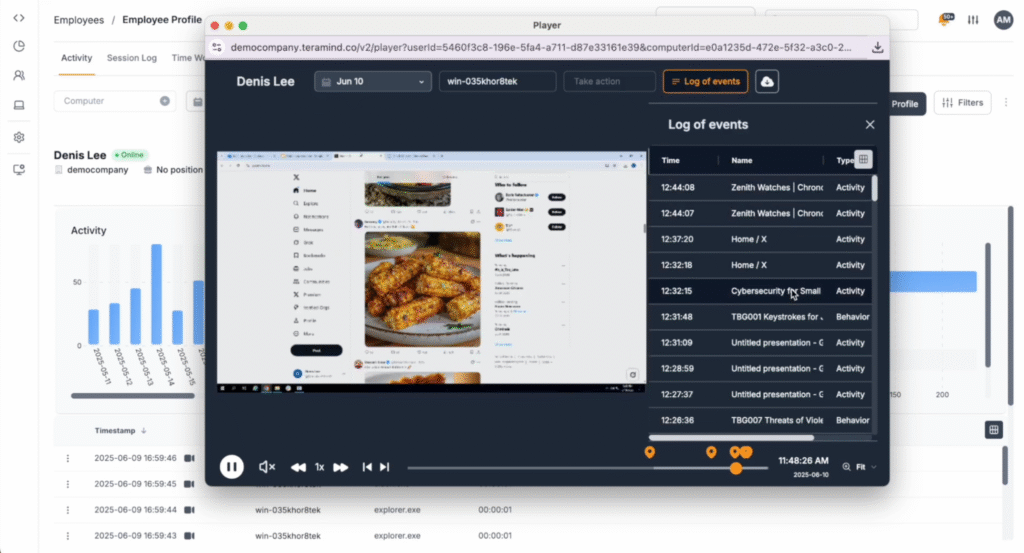
- Live screen monitoring: Teramind can display employee screens in real time, enabling supervisors or investigators to watch live activity as it unfolds. This is especially useful during investigations into suspicious behavior or when offering hands-on support to remote workers. The screens can also be recorded for playback later, creating a forensic trail.
- Keystroke logging: Every key pressed by a monitored user can be logged, giving context into what is being typed, whether in documents, emails, or web forms. This feature helps detect sensitive data being copied or malicious activity, such as unauthorized database queries.
- Optical Character Recognition (OCR) monitoring: Allows Teramind to read text inside images, scanned documents, or screenshots. For example, if an employee tries to share a scanned contract or takes a screenshot of sensitive data, Teramind can detect the action.
- Session recording and playback: Every action performed on a system can be captured as a video-like replay. Security teams can rewind to see exactly what happened, when, and why.
- File and document tracking: Monitors how files are created, modified, copied, moved, or shared. Whether data is transferred via email, cloud apps, or USB devices, Teramind tracks the full lifecycle.
- Email and chat monitoring: All communications across email clients and messaging platforms (like Slack, Microsoft Teams, or Skype) can be captured and analyzed. This feature aims to protect a company and dissuade employees from leaking confidential information, engaging in misconduct, or violating compliance rules.
See Teramind’s features all in one place → Take an online product tour
Who is Teramind Best For?
Teramind is great for regulated industries, enterprise security-first environments, and organizations requiring both productivity and compliance transparency.
2. Hubstaff
See how Teramind compares to Hubstaff →
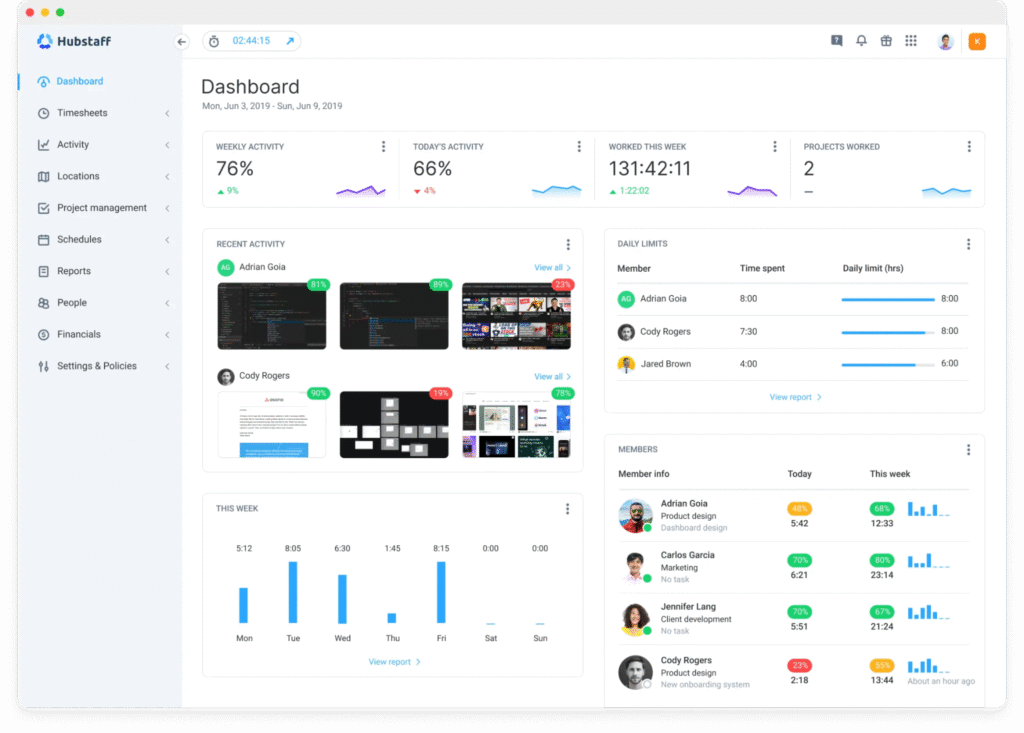
Hubstaff is a time tracking and workforce management software. It enables remote, field-based, and hybrid teams to translate work hours into actionable insights.
The app syncs tracked data (such as timesheets, activity logs, and screenshots) to a centralized dashboard. Here, managers can generate detailed reports, automate payroll, build invoices, and manage project budgets, scheduling, and attendance.
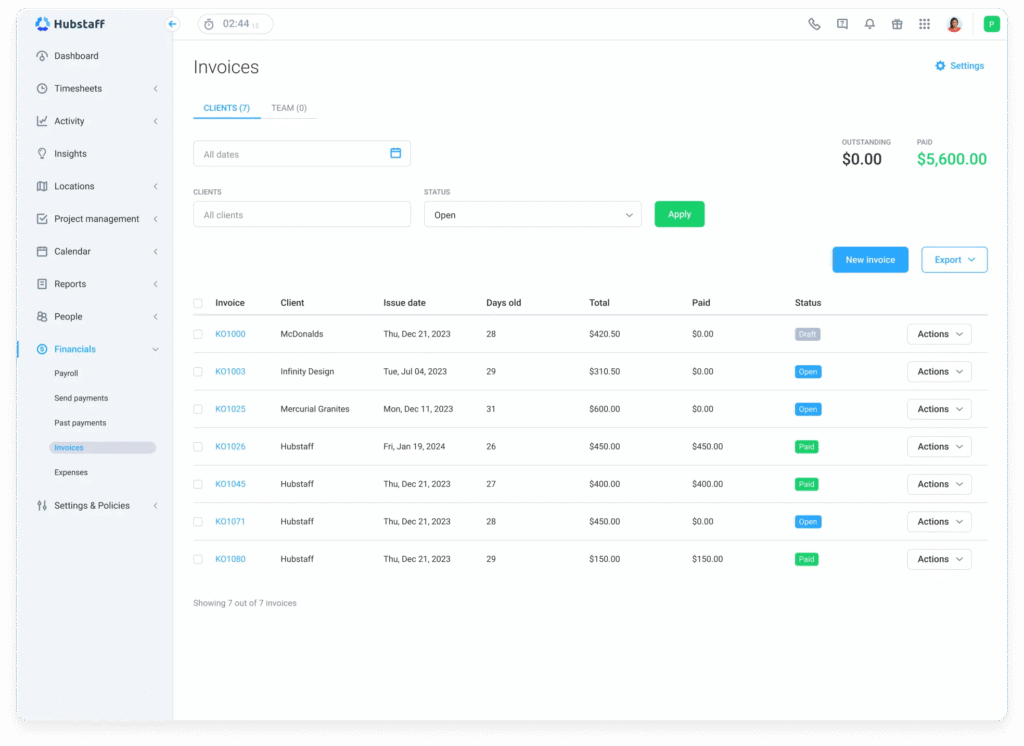
Unlike Time Doctor, employees have control over when tracking begins and ends — even without a manager’s permission. They can clock in when they start work and clock out when they finish.
Employees can also delete their own tracked data, including screenshots, if they believe time was tracked incorrectly.
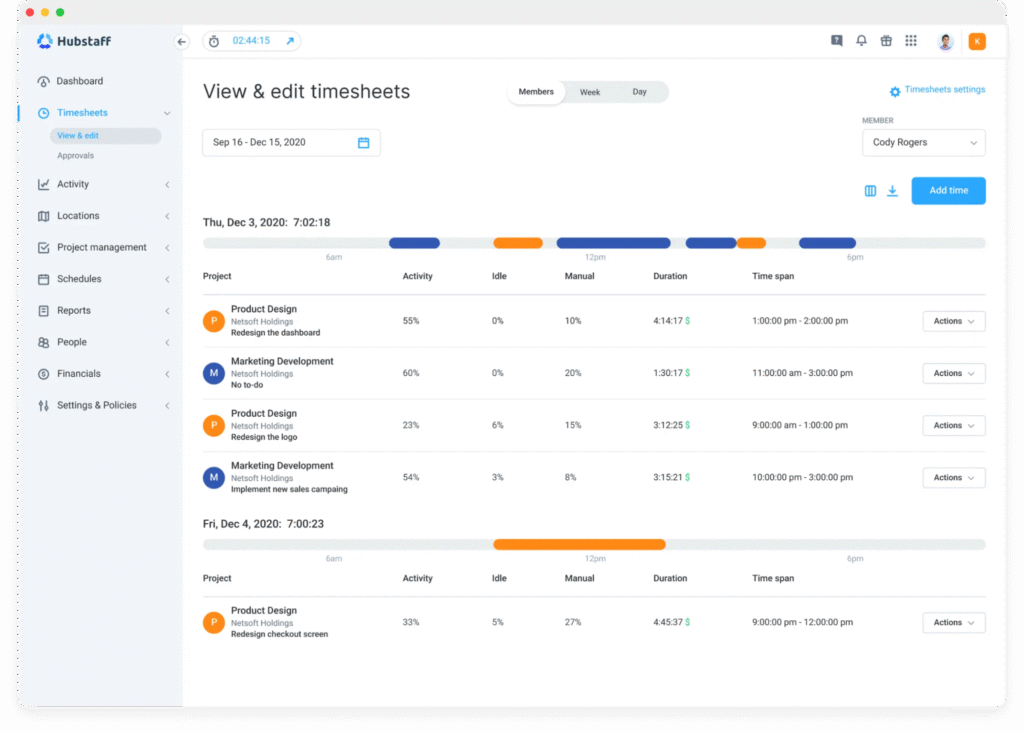
Key Features
- Geofenced time tracking: Field teams benefit from GPS logging and geofenced job sites; they automatically clock employees in/out when they arrive at designated locations.
- Employee scheduling and attendance tracking: Hubstaff offers shift scheduling, time-off management, notifications for late or missed shifts, attendance tracking, and overtime monitoring.
- Built-in agile tools with Hubstaff tasks: Teams can organize work using Kanban boards, sprints, roadmaps, automated standups, and task templates, all integrated with time tracking.
Who is Hubstaff Best For?
Hubstaff is well-suited for distributed, hybrid, or field teams that require transparency and flexibility without compromising user privacy.
See how Hubstaff compares to Time Doctor →
3. DeskTime
See this list of DeskTime alternatives →
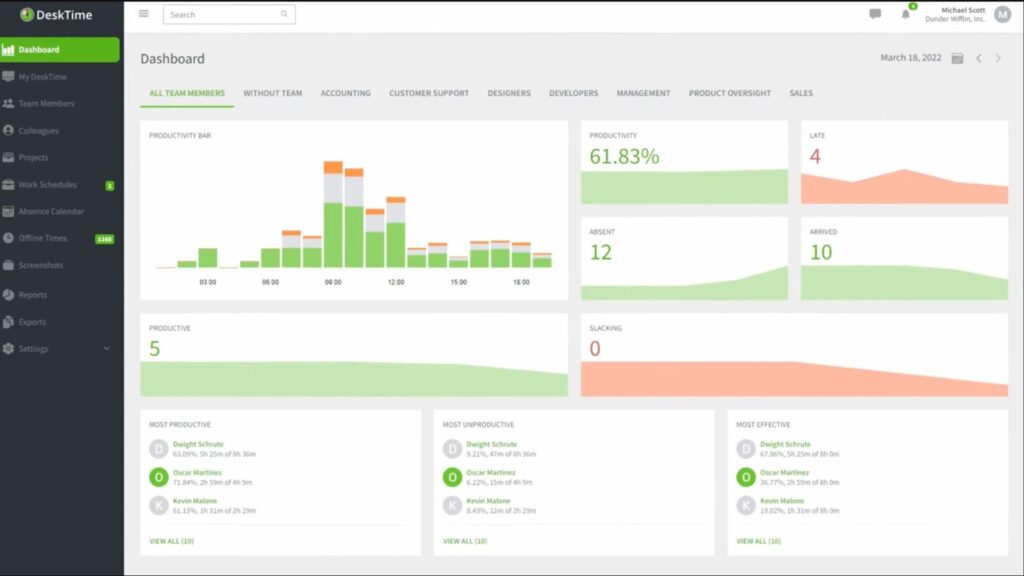
DeskTime is an automatic time tracker and productivity analysis tool that breaks down how you and your team spend work hours. It operates in the background, capturing work patterns from the moment a user turns on their computer until they shut it down.
The platform offers a dashboard where managers and team members can quickly see productivity levels, idle times, task distribution, and work-life balance metrics like time spent in breaks or after hours.
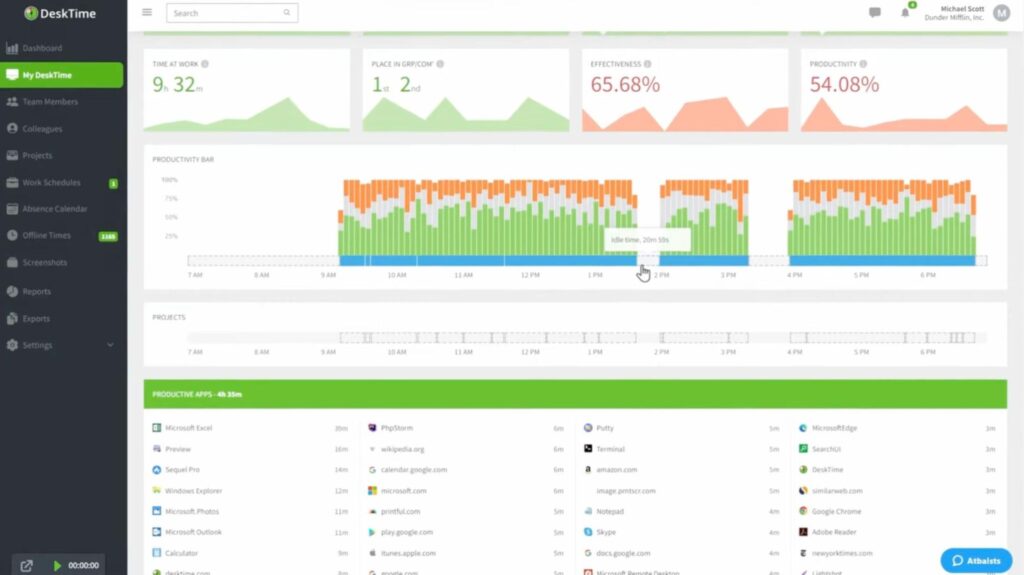
Key Features
- Project and task tracking: You can assign tracked time to specific projects or tasks. This feature allows for project cost calculation by multiplying hours spent by hourly rates. Freelancers love this because it makes client invoicing automatic and transparent.
- Absence and shift scheduling: Teams can log vacations, sick days, or remote shifts in a built-in calendar. Managers see who’s working, who’s late, or who’s on leave, all in one dashboard.
- Mobile app sync: For teams on the go, the mobile app lets you manually track time, view your dashboard, or log offline work when you don’t have internet.
Who is DeskTime Best For?
DeskTime is a good option for remote and hybrid teams needing visibility into employee workflow and time usage. It’s also good for small to medium-sized businesses looking to improve productivity, prevent burnout, and monitor fair time billing.
4. Toggl Track
See how Time Doctor compares to Toggl Track →
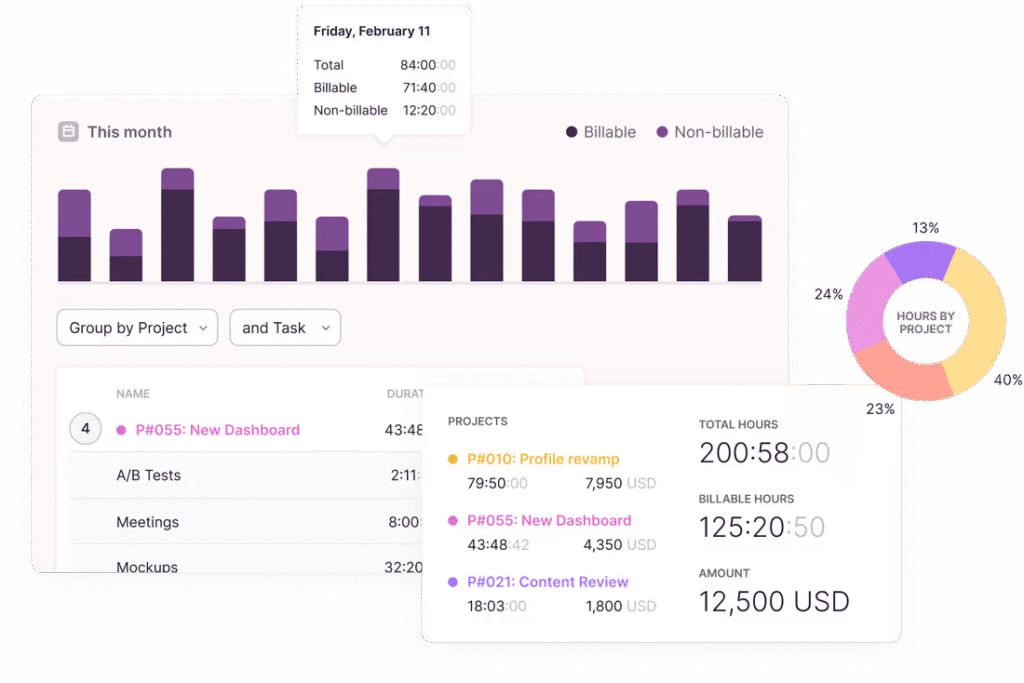
Toggl Track is a cloud-based time-tracking tool built for individuals, freelancers, and teams who want a simple but powerful way to log hours, measure productivity, and manage projects.
It’s a top favorite for professionals who bill clients by the hour, project managers who need visibility into workloads, and organizations that want time data without invasive monitoring.
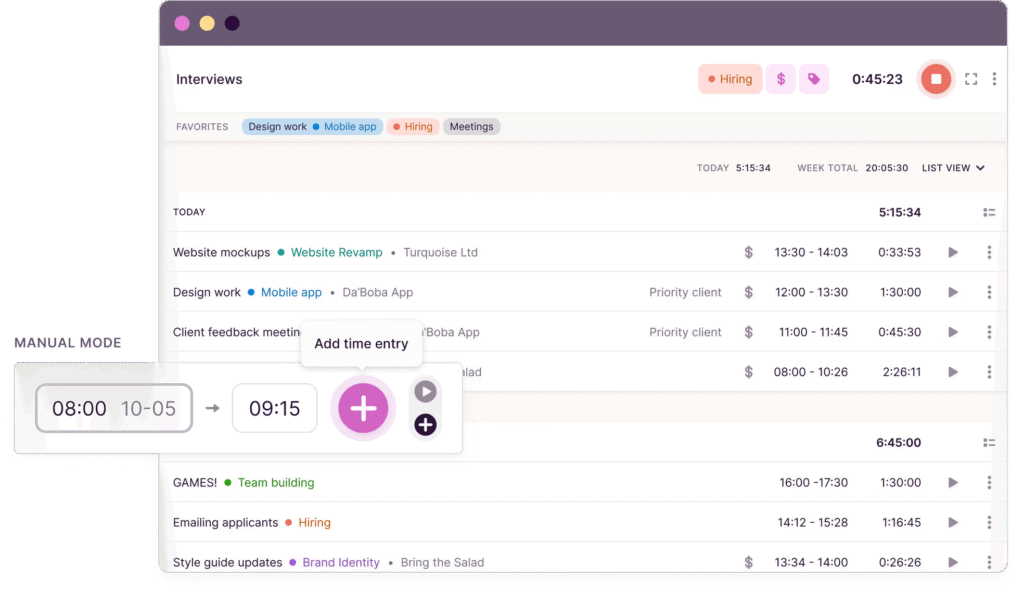
Toggl Track works using a one-click timer system where you start a timer when you begin a task and stop it when you’re done.
For people who forget, Toggl adds features like idle time detection, reminders, and even background tracking to catch activities you may have missed.
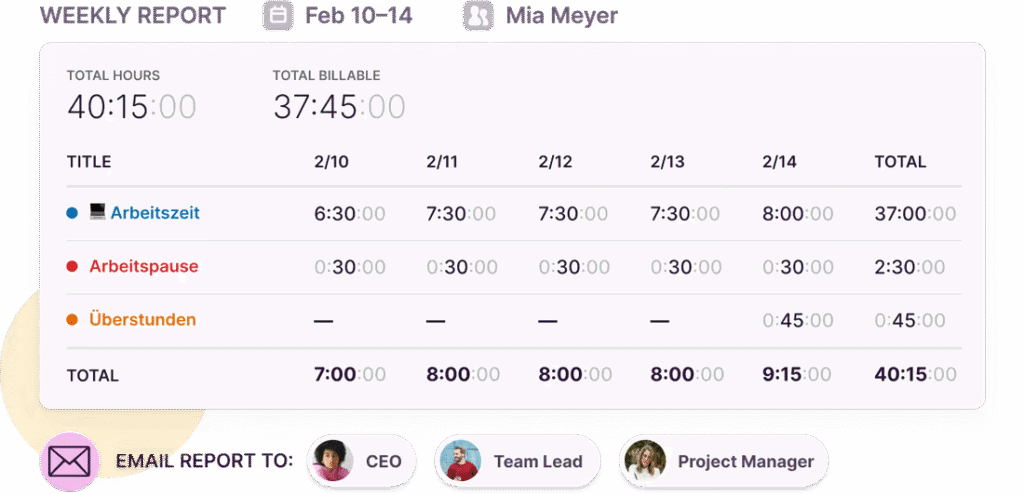
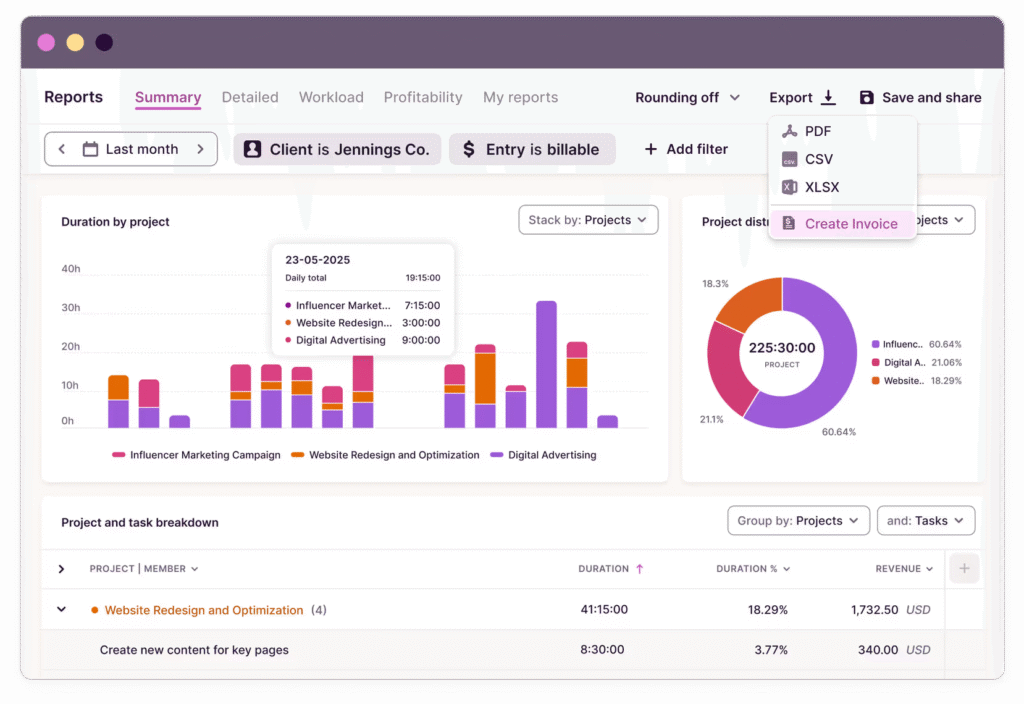
From there, the tool organizes time entries into projects, clients, and tasks, giving structure to your timesheets. The logged time flows into reports and dashboards that visualize where effort is going. These reports can be exported for payroll, invoicing, or client transparency.
Key Features
- Pomodoro timer: Built-in reminders that encourage you to take breaks at set intervals, following the popular Pomodoro productivity method. It blends time tracking with healthier work patterns.
- Billable rates and invoicing: You can assign billable rates to projects and clients. When time is tracked, Toggl automatically calculates earnings. This is especially valuable for freelancers or agencies that need fast, accurate invoicing.
- Team dashboards: Managers can view who’s tracking time, how much work is logged, and which projects are consuming the most effort. This keeps workloads visible without micromanaging.
Who is Toggl Track Best For?
Toggl Track is good for creative agencies, consultants, freelancers, and agile teams that want clean time tracking without any complexity.
5. ActivTrak
See how Teramind compares to ActivTrak →
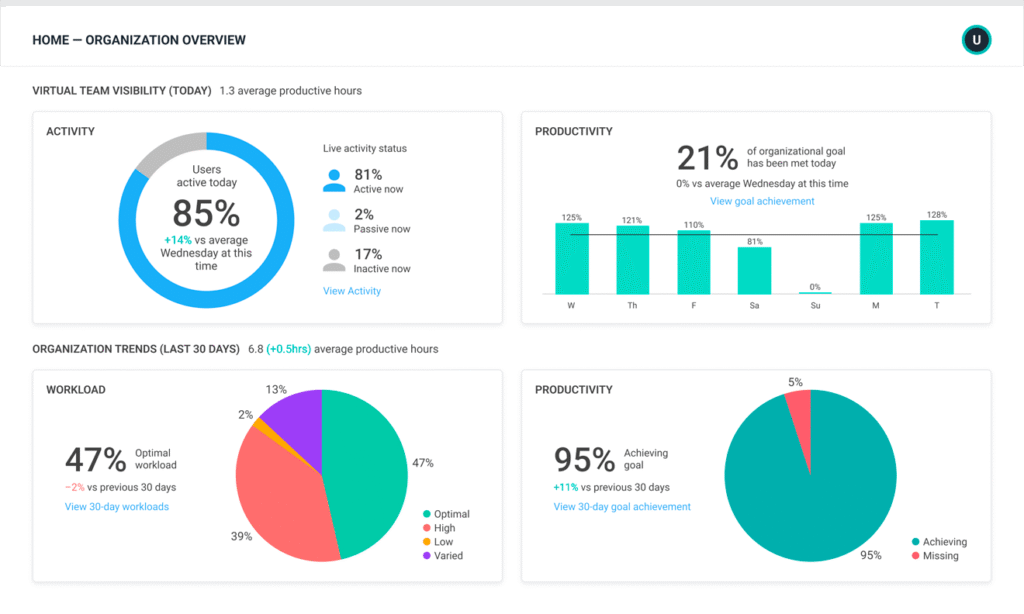
ActivTrak is an employee monitoring and workforce analytics platform that gives businesses deep visibility into how work happens.
Unlike lighter time-tracking tools like Toggl Track or Time Doctor, ActivTrak leans toward data-driven workforce management. It collects activity data from endpoints, analyzes productivity patterns, and surfaces insights to improve performance.
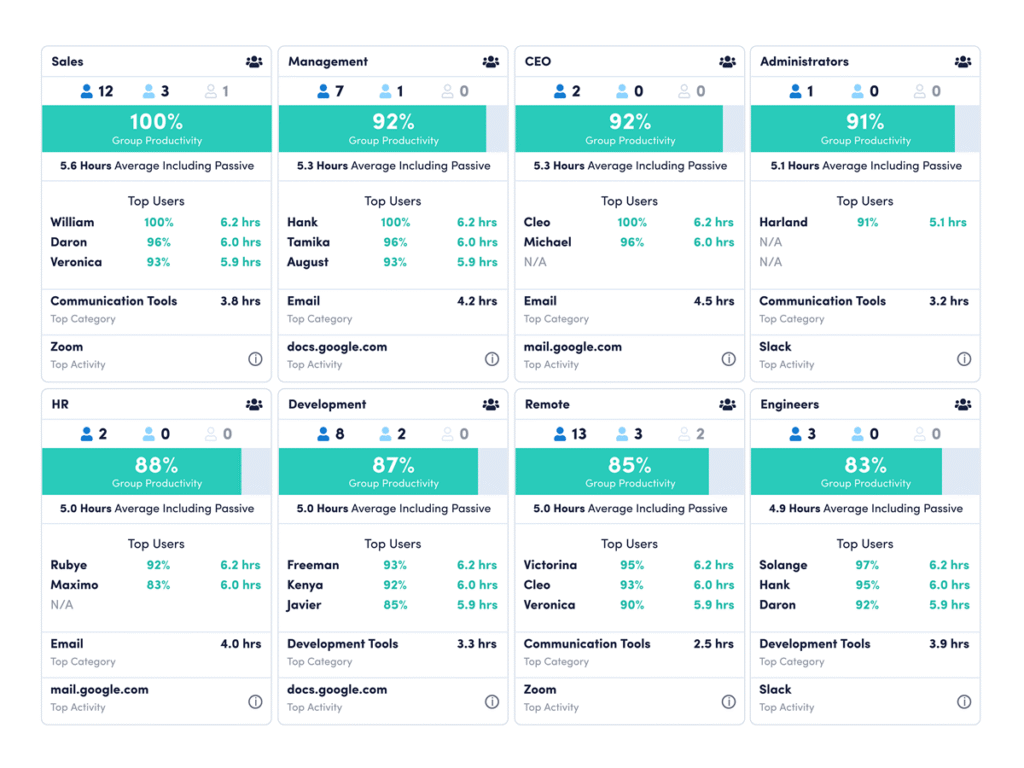
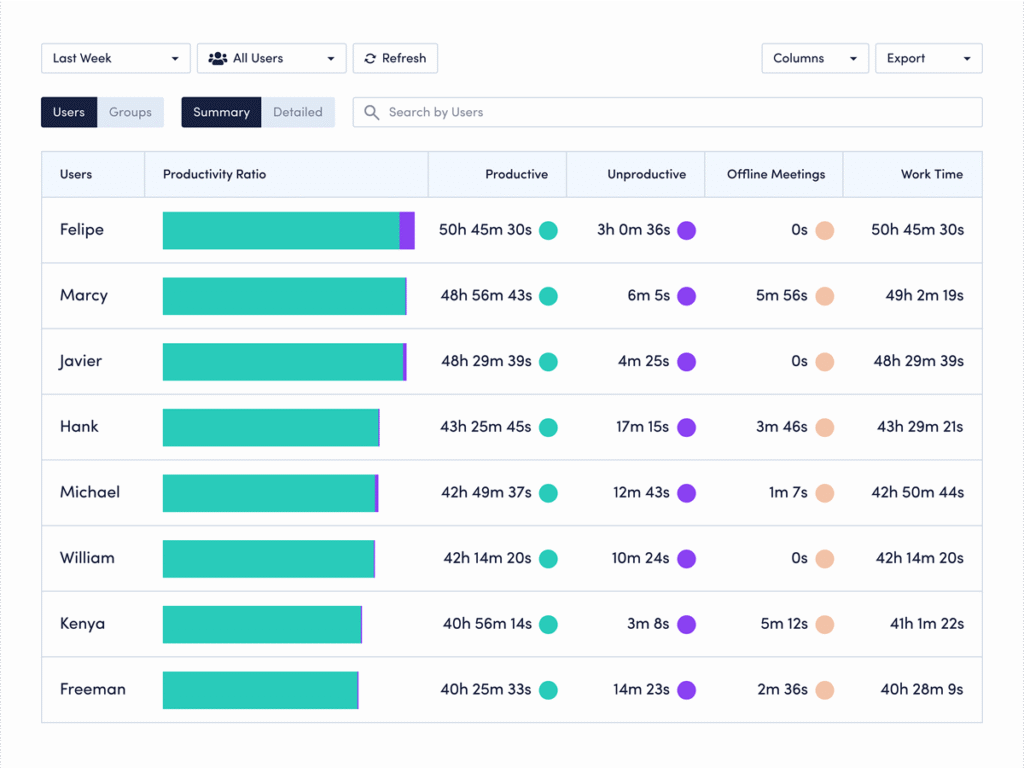
For example, using raw data from trends like peak focus hours and workload distribution across teams, you can track:
Team productivity:
Employee productivity:
In addition, when stricter monitoring is required, ActivTrak can capture screenshots at intervals or record full session playback. Screenshots can also be triggered by Alarm Rules — for example, capturing evidence if someone visits sensitive websites.
Key Features
- Focus time analysis: The tool tracks how long employees spend on uninterrupted, productive tasks versus multitasking or switching between windows.
- Productivity insights: It automatically categorizes applications and websites into productive or unproductive, based on roles. It then generates productivity scores and trends.
- Workload balance: It identifies when employees are underutilized, overworked, or at risk of burnout. This helps managers redistribute tasks more fairly and sustain team well-being.
Who is ActivTrak Best For?
ActivTrak is best for leaders focusing on optimizing workflows, reducing burnout, and making data-informed decisions.
See how Time Doctor compares to ActivTrak →
6. Monitask
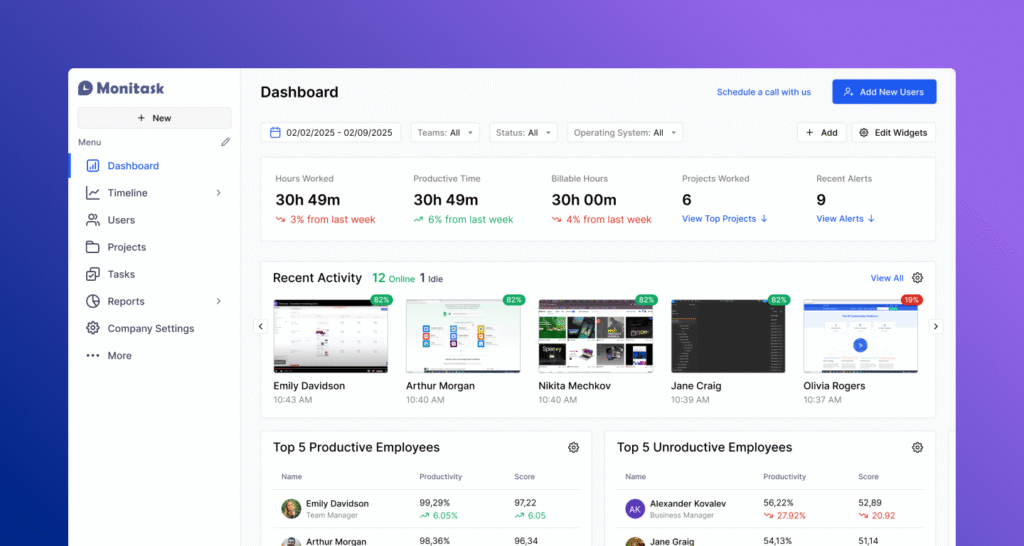
Monitask is an all-in-one time tracking app, employee monitoring, and lightweight project management platform. It’s designed for remote teams, freelancers, agencies, BPOs, and other distributed workforces.
Once active, Monitask captures a range of productivity signals, including periodic screenshots, keyboard and mouse activity, application and website usage, and even keystroke counts (without recording actual keystrokes), ensuring privacy is respected.
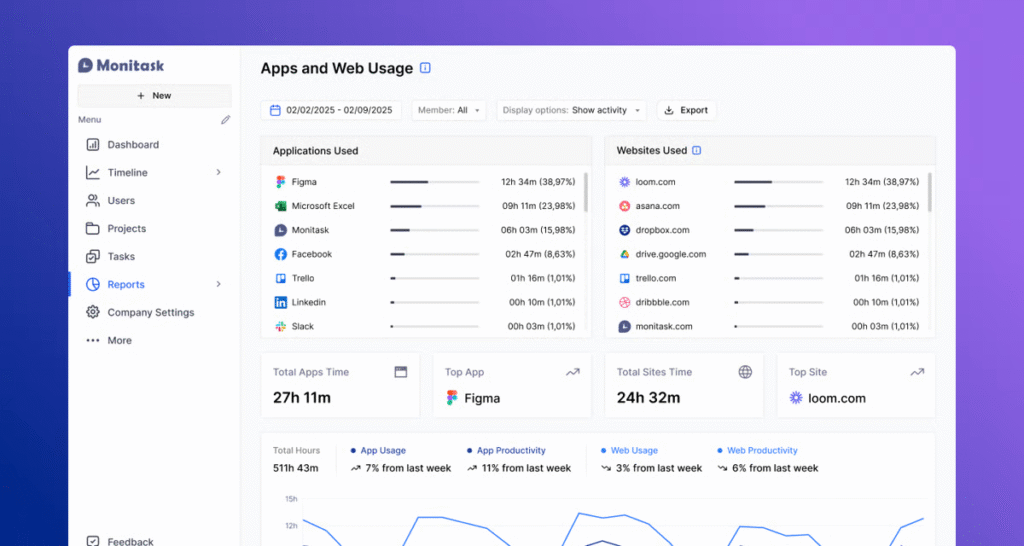
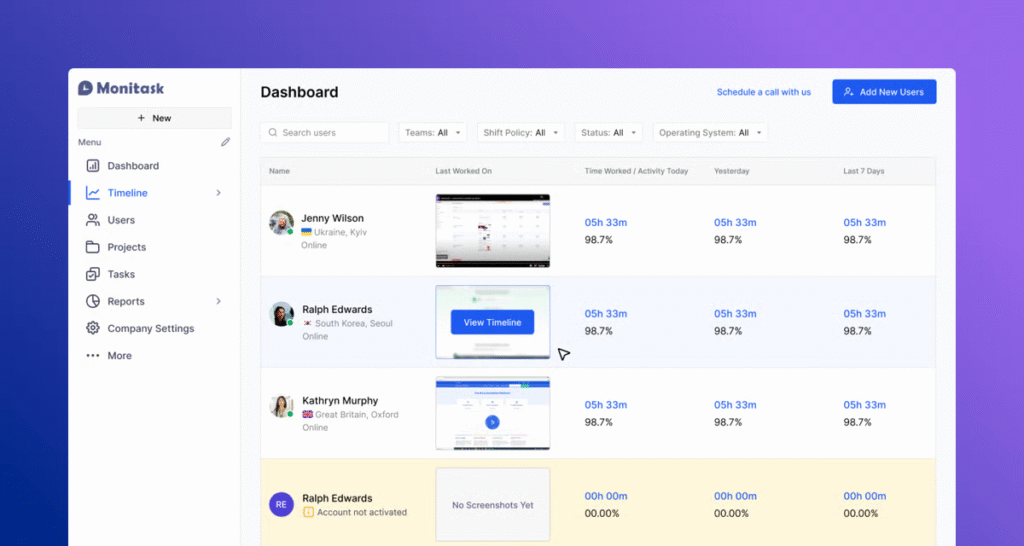
Managers and teams can review this activity via a live dashboard, which shows who’s online, their activity levels, and proof-of-work in real time.
Key Features
- Randomized screenshots: At intervals set by the manager (for example, every 3-10 minutes), Monitask captures a screenshot of the employee’s screen. Screenshots are stored securely in the cloud and can be blurred if sensitive information is at risk.
- Automated time logging: Employees clock in via the Monitask app, which automatically records active time. Idle time (no keyboard/mouse activity) is excluded, ensuring more accurate timesheets.
- Project management features: Managers can assign employees to specific projects/tasks, helping to track time spent per project and keeping team efforts aligned.
Who is Monitask Best For?
Monitask works best in environments where strict oversight is acceptable, like outsourcing, call centers, or contractor-heavy businesses.
See how Monitask compares to ActivTrak →
7. Insightful
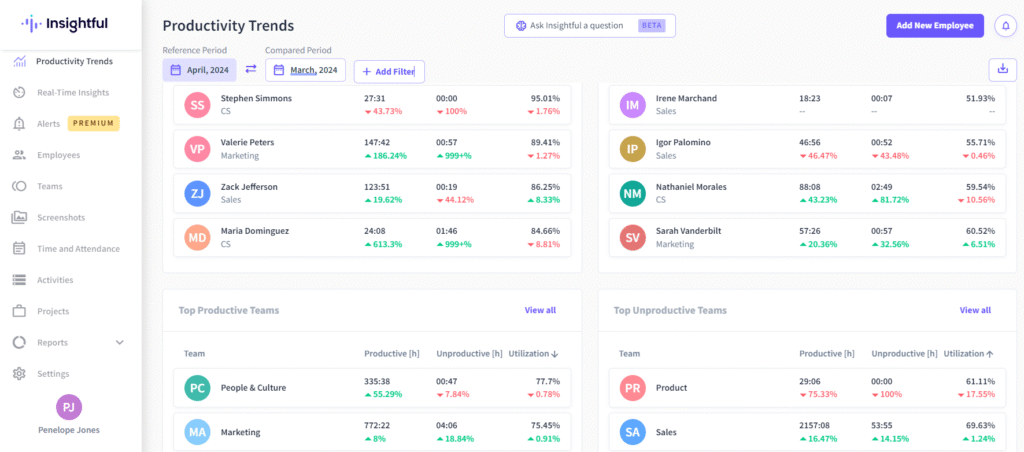
Insightful (formerly Workpuls) is an employee monitoring and workforce analytics platform. It focuses on helping companies understand how to optimize productivity and manage distributed or hybrid teams.
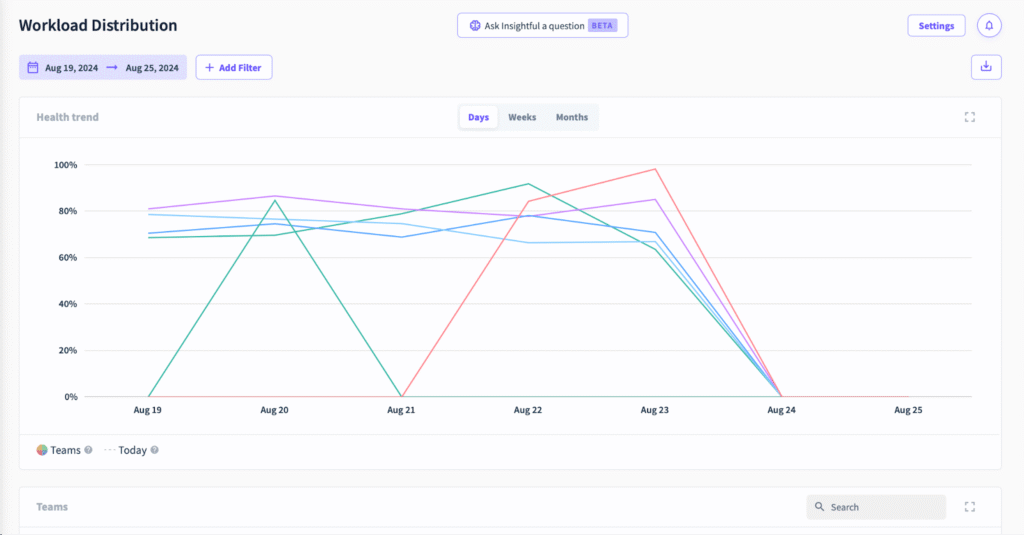
A standout feature on the platform is the ‘Timesheets’ that track employee productivity and time management. It gives a breakdown of break, idle, and work time, depending on the manager’s preference. Users can also toggle between ‘Day View’ and ‘Shift View’ to review their time data.
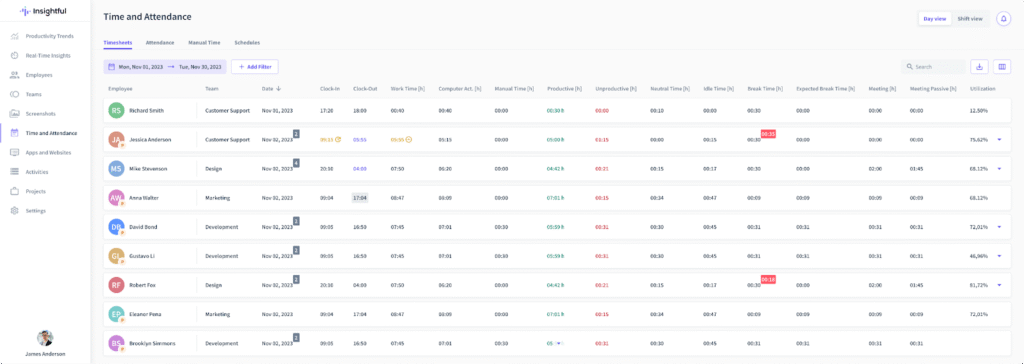
Managers and admins can also access the Insightful dashboard to visualize data in real-time. From here, they can view individual and team productivity levels, generate reports, and track time across projects.
Key Features
- Stealth and visible modes: Companies can choose how transparent the monitoring is. In stealth mode, the app runs silently; in visible mode, employees can see their activity being logged.
- Productivity labeling: Admins can label apps and websites as “productive,” “neutral,” or “unproductive” depending on the role. For instance, LinkedIn might be productive for recruiters but unproductive for accountants.
- Automatic time tracking and screenshots: The platform logs time automatically without requiring manual input. It detects when employees are working, when they go idle, and when they switch between apps. Idle time is excluded to keep reports accurate. For stricter proof-of-work scenarios, Insightful can take periodic screenshots.
Who is Insightful Best For?
Insightful is an ideal choice for operations teams that need help balancing workloads and identifying inefficiencies.
See how Time Doctor compares to Insightful →
What Makes Teramind the Best Time Doctor Alternative?
Time Doctor built its reputation on helping teams track hours and keep tabs on daily activity. But for many businesses, knowing when employees are actively working and what tasks they’re working on isn’t enough.
Our clients tell us they need deeper visibility, actionable insights, and tools that can help improve employee performance while protecting company data.
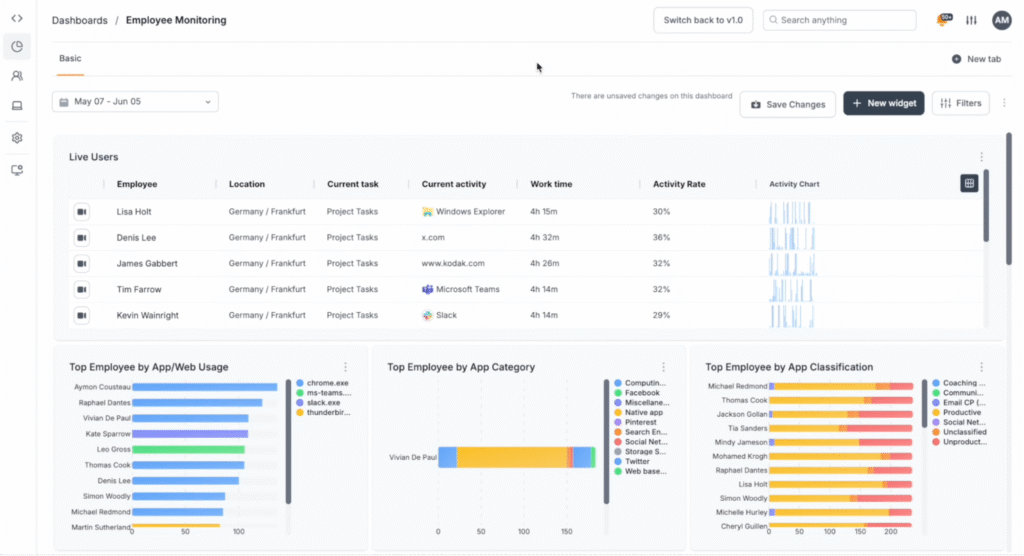
That’s the advantage Teramind has over Time Doctor. It paints you a complete picture of how work happens inside your organization.
For companies operating in industries where security, compliance, or sensitive data are non-negotiable, Teramind gives you the peace of mind that Time Doctor can’t.
And for leaders focused on performance, Teramind’s granular insights help uncover inefficiencies, streamline processes, and build a healthier, more productive work culture.
Try Teramind today → Explore a live demo of the platform


