Forcepoint DLP has held a large share of the enterprise data protection market for years, and for good reason. It’s comprehensive, mature, and delivers the policy-driven control that large organizations with complex security requirements need.
If you’re protecting data across endpoints, networks, cloud applications, and email at scale, Forcepoint checks the boxes. You get extensive content detection, granular policy frameworks, and seamless integration with security ecosystems.
However, the same depth that makes Forcepoint powerful for Fortune 500 security operations can make it overwhelming for mid-market teams.
Maybe you’re finding that Forcepoint’s complexity exceeds what your team can realistically manage. Or maybe the cost no longer aligns with your budget or the value you’re getting. Or you’ve moved to cloud-first operations and need a lighter-weight solution.
This guide breaks down 12 alternatives to Forcepoint that solve data protection differently. Some are more affordable. Some are easier to deploy. And some are better suited to specific use cases, such as cloud-native operations or insider threat detection.
What Are the Top 12 Forcepoint DLP Alternatives on the Market Right Now?
| Tool | UEBA and behavioral analytics | Forensic visibility | Unified policy management | Privacy and regulatory compliance | Deployment focus |
| Teramind DLP | Strong | Session recordings and playback | Yes | Yes | Endpoint-centric with insider analytics |
| Symantec DLP (Broadcom) | Moderate to Strong (ICA/UEBA) | Yes | Yes | Extensive templates | Enterprise-grade, full coverage |
| Proofpoint DLP | Yes (Insider threat context) | Yes | Yes | Compliance reporting | Email & cloud-centric DLP |
| Fortra DLP (Digital Guardian) | Yes (Threat analytics) | Yes | Yes | Yes | Strong IP and R&D protection |
| Trellix DLP (McAfee) | Basic | Yes | Yes | Yes, templates | Policy-centric enterprise |
| Cyberhaven | Strong (Lineage analytics) | Yes | Yes | Yes | Data lineage & cloud focus |
| Nightfall DLP | Limited (ML context, not full UEBA) | Moderate | Yes | Yes | SaaS and cloud app scanning |
| Safetica | Yes (risk scoring) | Activity logging | Yes | Yes | Endpoint-first with insider risk |
| Microsoft Purview DLP | Yes (via Insider Risk) | Yes | Yes | Native Microsoft compliance | Microsoft 365 ecosystem |
| Zscaler DLP | Not core (policy + traffic) | Moderate | Yes | Yes (cloud/web) | Cloud inline, Zero Trust |
| CrowdStrike Falcon (Falcon Data Protection) | Strong (endpoint & identity) | Yes (EDR + telemetry) | Via console | Yes | Endpoint + threat context |
| Endpoint Protector DLP | Basic (contextual) | Yes | Yes | Yes | Endpoint + device control |
1. Teramind
Teramind offers a comprehensive data loss prevention platform that combines endpoint monitoring, user behavior analytics, and real-time content inspection to protect sensitive data.
Unlike legacy DLP tools like Forcepoint, Teramind uses behavioral context to detect risky user behavior, enforce granular policies, and stop data exfiltration before it happens.
It also provides deep visibility into how sensitive information is accessed, used, and moved across endpoints, networks, email, web apps, and more.
How Does Teramind DLP Work?
See Teramind’s DLP solution in action → Take an interactive product tour
When deployed, Teramind’s DLP platform continuously observes user behavior and data interactions across the business.
As end users interact with sensitive data, the system cross-references those actions against behavioral baselines and policy definitions.
When deviations or violations are detected, the platform can automatically alert administrators, block risky actions, or record detailed session evidence for further analysis.
For example:
You can monitor employee email traffic sent to external addresses and filter by specific employees, clients, or domains. Teramind can alert you if an employee has attached sensitive business information to an email.
What Are Teramind’s Key Features?
See Teramind’s capabilities all in one place → Explore a live product demo
- Behavioral Analytics Engine: Establishes baselines of normal user behavior and uses anomaly detection to identify deviations that signal insider threats or risky activity.
- User Activity Monitoring (UAM): Continuously tracks all user actions (e.g., applications used, websites visited, file interactions, email activity, and more) across endpoints. This data feeds into DLP policies and analytics, providing a complete picture of how data moves and who interacts with it.
- Content Inspection with OCR: Using Optical Character Recognition (OCR), Teramind can extract and analyze text within images and screenshots in real-time.
- Session Recording and Forensic Playback: Captures detailed recordings of user sessions (e.g., screen activity, file transfers, keystrokes), which can be replayed during investigations. This gives security teams forensic evidence to understand how a system or data breach occurred, support audit requirements, or validate alerts with context.
- Policy and Rules Management: Teramind lets administrators define granular policies that govern how sensitive data should be handled across endpoints, devices, and communication channels. For example, policies can trigger automatic responses such as warnings, blocks, lockdowns, or escalations (based on context, content, and user risk levels).
Why Do Organizations Choose Teramind Over Forcepoint DLP?
- You See What Actually Happened: Screen recording gives you visual proof of data exfiltration attempts. You can watch how users tried to move data, which applications they used, and what they accessed.
- Deployment Takes Minutes: Teramind’s lightweight agent installs quickly (roughly 10-30 minutes) without consuming system resources or requiring extensive bandwidth. Get protection running fast and start seeing value immediately instead of waiting through painful rollouts.
- Your Team Can Easily Manage It: Pre-built rules for common scenarios (insider threats, data exfiltration, malware attacks, and compliance) work out-of-the-box. And unlike Forcepoint, your team can operate Teramind without becoming full-time DLP administrators or hiring consultants.
- It Protects Against the Tactics That Bypass Traditional DLP: OCR captures clipboard operations, print-to-PDF conversions, and other methods designed to evade content inspection.
- Enforcement Happens in Real-time, Before Damage Occurs: You can block risky actions instantly — e.g., prevent USB writes, stop unauthorized uploads, intercept sensitive emails, and block unauthorized AI tools. Users also get immediate feedback on why actions were blocked.
What Do Real Users Say About Teramind?
- “Its intuitive interface and comprehensive monitoring capabilities make it easy to track and analyze user activity effectively. The real-time alerts and detailed reports help quickly identify risks and ensure compliance, enhancing overall security.” → Read Full Review
- “Teramind can be drilled right down to the second of what an employee is doing. You can watch live feed, recorded feed, set up analytics to compare quickly and many other things. The customer support has been wonderful and any issues are taken care of within 24 hours.” → Read Full Review
- “One of the most valuable aspects of Teramind is its behavior alerts and customizable policies. These tools allow us to monitor communications, track potentially risky behavior, and understand overall employee sentiment.” → Read Full Review
- “We’ve set up automated productivity reports for various departments, allowing us to clearly see how our employees are using their time. Teramind offers a wide range of visual reports that help us compare productivity levels across employees and track when they are most active.” → Read Full Review
What is Teramind’s Pricing?
Test Teramind before committing → Try a live deployment of the platform
Here’s a breakdown of Teramind’s pricing tiers (based on 5 seats, billed annually):
- Starter ($14/seat/month): Best for basic productivity use cases and identifying risky users. Includes quick visual evidence capture, live playback, and website/app tracking.
- UAM ($28/seat/month): Designed for comprehensive productivity optimization and security detection. This tier includes everything in Starter plus full digital activity telemetry, UEBA (User and Entity Behavior Analytics), forensics, and unlimited behavior rules.
- DLP ($32/seat/month): Best for comprehensive intent-based security detection and response. It includes everything in UAM plus content-based data exfiltration prevention and automated actions to block data leaks in real-time.
- Enterprise (Custom pricing): Tailored professional services for the most demanding large-scale enterprises and government organizations. Includes everything in DLP plus in-app parsing for fraud detection, an OCR engine, and unlimited activity-based behavior rules.
All paid plans shown above reflect an 8% discount for annual billing compared to the monthly rates.
2. Symantec DLP (Broadcom)
Best for: Large enterprises seeking mature, comprehensive DLP with proven stability and extensive coverage across all channels.
See how Teramind compares to Symantec DLP →
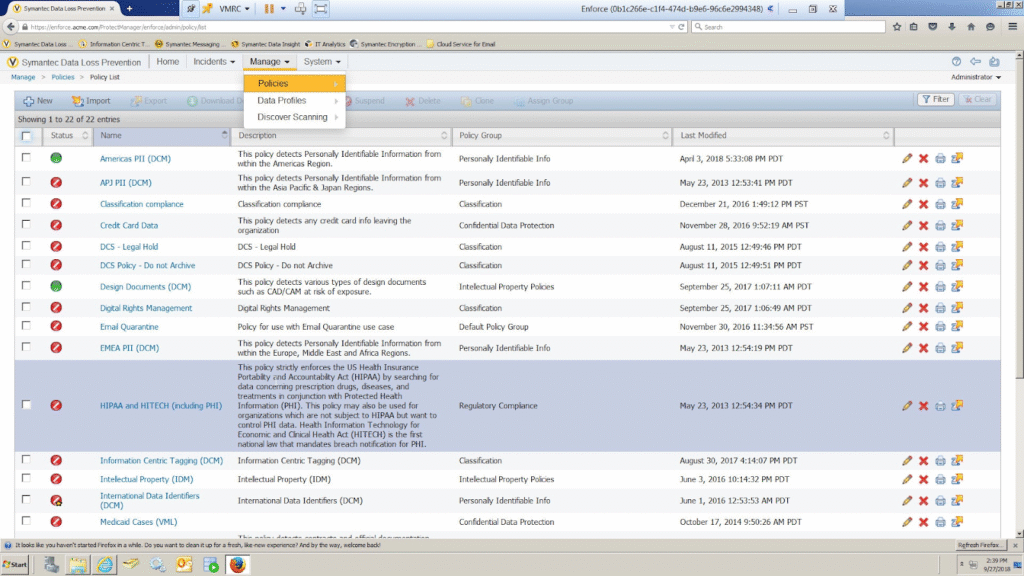
Symantec Data Loss Prevention (DLP) offers a broad, multi-vector approach covering data at rest, in motion, and in use across endpoints, networks, cloud applications, storage, and communication channels.
Similar to most DLP solutions, it combines content inspection, classification, and prevention capabilities with a centralized management console. This helps enforce consistent policies and support compliance with regulatory standards such as GDPR, HIPAA, and PCI-DSS.
Key Features
- Centralized Policy Management (Enforce Platform): Enables administrators to define, test, and deploy consistent policies across all monitored channels and environments.
- Incident Management and Reporting: Consolidate alerts, policy violations, and contextual data into curated views and dashboards. Administrators can prioritize incidents, drill into details, and generate compliance reports for audits or governance reviews.
- Endpoint DLP Controls: Governs how sensitive data can be used or moved on user devices, even when offline. Endpoint agents can intercept attempts to copy data to USB drives, upload to web services, email sensitive files, or print proprietary information.
Pros
- “This solution offers comprehensive data protection for endpoints, networks, and the cloud, and I appreciate its thorough content inspection capabilities.” → Read Full Review
Cons
- “It tends to generate a high number of false positives, which means it requires considerable tuning to function effectively.” → Read Full Review
Pricing
Contact Broadcom to see Symantec DLP’s pricing options.
3. Proofpoint DLP
Best for: Organizations prioritizing email security and threat intelligence integration where data loss correlates with advanced attacks.
See how Teramind compares to Proofpoint DLP →
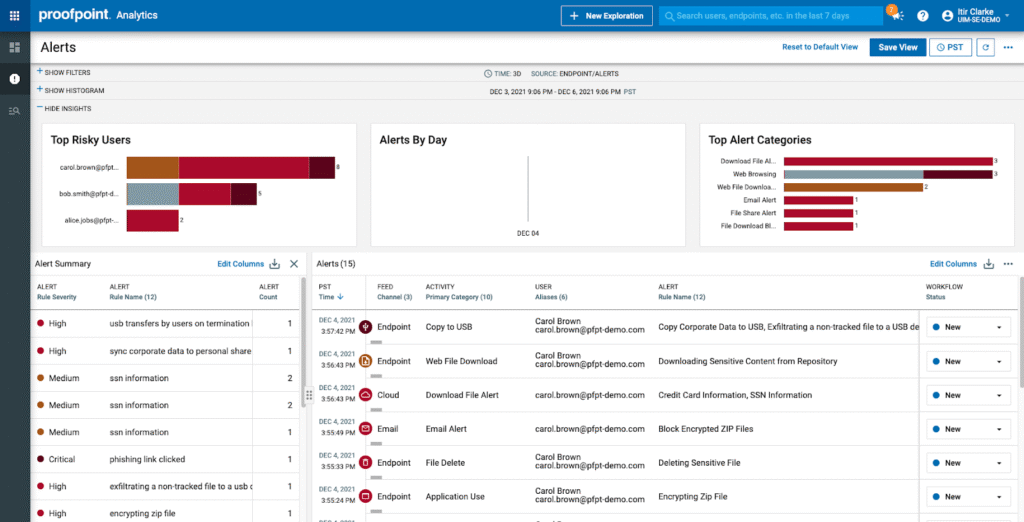
Proofpoint DLP has its strengths in email security and advanced threat protection. This is due to its deep integration with Proofpoint’s broader email gateway infrastructure, threat intelligence, and cloud security offerings.
It’s a good option if you’re looking to detect data loss in active threats such as business email compromise (BEC) attempts, credential theft leading to data exfiltration, or insider collusion with external attackers.
The platform also correlates DLP events with email security signals (spoofed domains, suspicious attachments, anomalous login locations, known threat actor patterns) to surface sophisticated attacks.
Key Features
- Email DLP: It inspects inbound, outbound, and internal email traffic in real-time to detect sensitive content. It prevents data exfiltration through attachments, message bodies, or embedded links.
- Cloud App DLP (CASB Integration): Extends protection to SaaS platforms such as Microsoft 365, Google Workspace, Box, and Salesforce. Through CASB-style integrations, Proofpoint inspects files and activities in sanctioned cloud apps to detect risky sharing, misconfigurations, or policy violations.
- Information Protection Policies: Provides centralized policy creation and management across all Proofpoint DLP channels. Security teams can use predefined templates for regulations like the GDPR or PCI DSS, or create custom policies tailored to internal data classifications.
Pros
- “Proofpoint DLP helps us to protect our email and Data Loss. The interface is very user-friendly. If I have any questions, I can call tech support and they will guide me to solve my issues.” → Read Full Review
Cons
- “After using Proofpoint DLP over the course of several years, I feel the amount of tuning and false positive alerts never ends.” → Read Full Review
Pricing
Visit Proofpoint’s website to request a quote.
Check out a list of Proofpoint alternatives →
4. Fortra DLP (formerly Digital Guardian)
Best for: Data-rich organizations in regulated industries needing deep visibility, context-aware protection, and optional managed services.
See how Teramind compares to Fortra DLP →
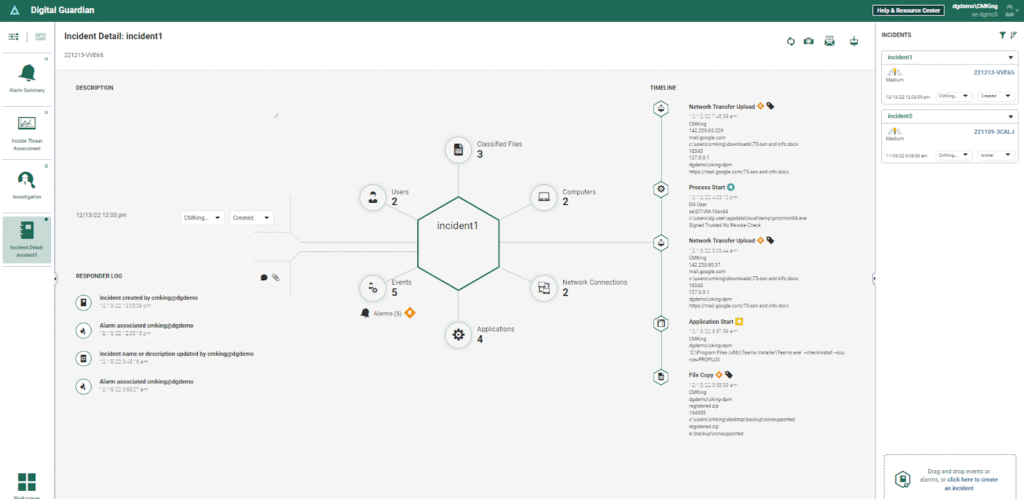
Fortra DLP, built on the Digital Guardian platform, is designed to protect sensitive information across endpoints, networks, and cloud environments.
It’s especially well known for its strength in intellectual property (IP) protection. This makes it a common choice for organizations in manufacturing, technology, defense, and R&D-heavy industries where source code, designs, and proprietary data are core business assets.
Fortra DLP operates by continuously monitoring user behavior and data interactions, while correlating that activity with network and cloud signals. As sensitive data is accessed, moved, or modified, the platform evaluates the action against classification rules, behavioral baselines, and policy logic.
Key Features
- Analytics and Reporting Cloud (ARC): A cloud-based insider analytics engine that ingests endpoint and network event data. It applies machine learning to identify genuine threats and filters out normal activity that would otherwise generate false alarms.
- Data-aware Endpoint Agents: Lightweight agents for Windows, macOS, and Linux that monitor all data interactions (e.g., file creation, modification, access, transfer, deletion)
- Network DLP with SSL Inspection: Inline network appliances that monitor and control data flowing across email (SMTP, POP3, IMAP, Exchange), web traffic (HTTP/HTTPS), file transfers (FTP, SFTP), and messaging protocols.
Pros
- “ARC platform has improved with new analysis offerings.” → Read Full Review
Cons
- “As with many DLP solutions, the platform may generate false positives because of its strict rule-based detection. This can lead to increased alert noise and necessitate extra tuning and operational effort.” → Read Full Review
Pricing
Fill out a form on Fortra’s website to get a customized quote.
Check out a list of Fortra alternatives →
5. Trellix DLP (formerly McAfee)
Best for: Enterprises on the Trellix/McAfee security infrastructure wanting unified management and correlated threat intelligence.
See how Teramind compares to Trellix DLP →
Trellix DLP is an enterprise-grade data loss prevention platform that emerged from the merger of McAfee Enterprise and FireEye. Accordingly, it has decades of development maturity behind it.
It provides comprehensive data protection across endpoints, networks, cloud applications, email, and storage repositories.
Trellix DLP also integrates with the wider Trellix security ecosystem, including endpoint protection, network security, and SIEM/XDR capabilities.
This makes it a good choice for large, complex organizations that need centralized policy management, extensive customization capabilities, and the ability to enforce data protection across different environments.
Key Features
- Registered Document Protection (RDP): Creates cryptographic hashes of entire documents or document templates (e.g., M&A plans, design blueprints, source code files). This allows Trellix to detect when those documents (or substantial portions of them) appear anywhere in the environment, regardless of file name changes, format conversions, or moderate editing.
- Data Discovery: Scans data at rest across file servers, databases, SharePoint repositories, and cloud storage to locate and classify sensitive information.
- Centralized Policy Management: Allows administrators to create, manage, and deploy DLP policies from a single console across endpoints, networks, and storage locations. Policies can be aligned with regulatory standards or customized for internal data classifications.
Pros
- “It is especially effective at monitoring and blocking any attempts to exfiltrate sensitive information from your company.” → Read Full Review
Cons
- “Managing evidence produced by DLP incidents can be quite challenging, especially in cases like Trellix DLP SaaS, where third-party storage providers are used.” → Read Full Review
Pricing
Trellix’s pricing isn’t publicly disclosed. Request a demo on its website for more information.
Check out a list of Trellix DLP alternatives →
6. Cyberhaven
Best for: Organizations protecting intellectual property through automated data lineage tracking and context-based classification.
Cyberhaven is a modern data protection platform built around a different approach to DLP — which it calls Data Detection and Response (DDR).
Instead of relying solely on static rules and content matching, Cyberhaven focuses on data lineage — i.e., tracking how data is created, transformed, and moved over time.
The platform is designed for cloud-based, collaboration-heavy environments where sensitive data constantly moves between SaaS apps, endpoints, browsers, and users.
Key Features
- Data Lineage Tracking: Records how sensitive data is created, copied, modified, shared, and moved across applications and endpoints
- Browser Extension Enforcement: Uses a Browser Extension to monitor and enforce data protection controls directly within web and SaaS applications. This enables real-time detection of risky actions such as copy-paste, downloads, uploads, and sharing from cloud apps.
- Policy-based Controls: Administrators can define rules governing how sensitive data can be accessed, shared, or exfiltrated. Policies can trigger actions such as blocking, warning, or logging events based on data type, user role, or risk context.
Pros
- “Cyberhaven has user-controlled override functions that work on email, web, USB, and peripheral data transfers to keep availability “always on” in my enterprise.” → Read Full Review
Cons
- “Creating custom policies with multiple conditions is not always straightforward. If you’re used to creating a SQL-style query to “filter” data, where each statement reduces events.” → Read Full Review
Pricing
You must book a demo to see Cyberhaven’s pricing.
Check out a list of Cyberhaven alternatives and competitors →
7. Nightfall
Best for: Cloud-native companies needing fast, API-based DLP for SaaS applications and developer secrets detection.
See how Teramind compares to Nightfall DLP →
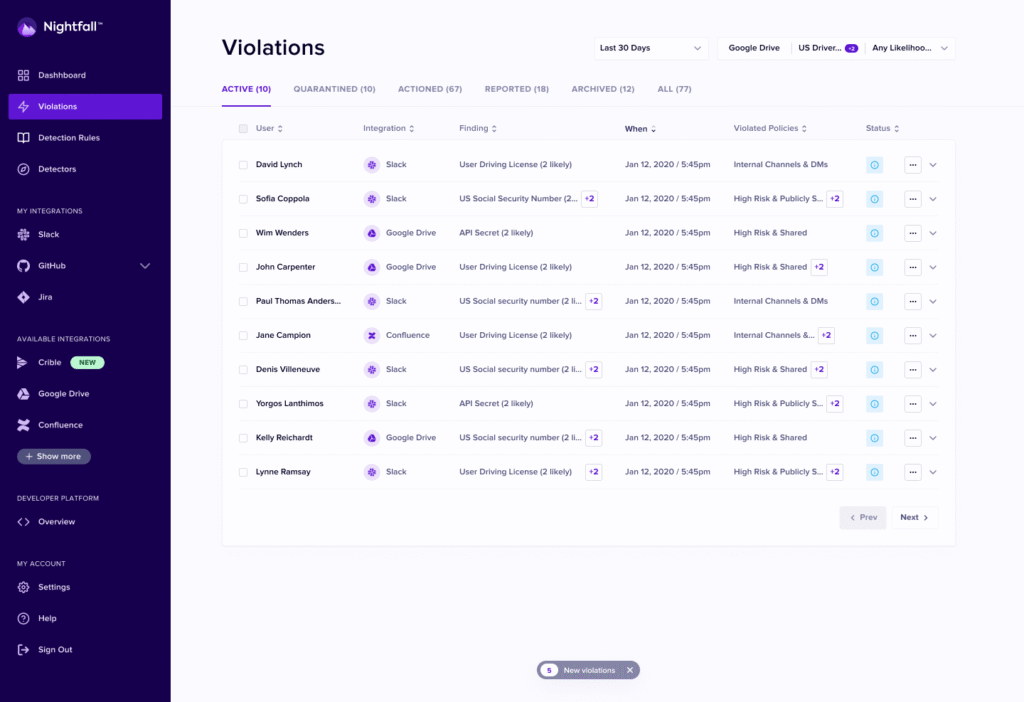
Nightfall is a cloud-native data loss prevention platform built specifically for SaaS applications and modern collaboration tools.
It provides API-based data protection across platforms like Slack, Microsoft Teams, Google Workspace, GitHub, Jira, Confluence, Salesforce, and dozens of other cloud services where sensitive data lives.
Nightfall is deployed via API keys, with pre-built detectors for common sensitive data types and real-time remediation that prevents data exposure without disrupting user productivity.
Key Features
- Continuous Data Scanning: Nightfall regularly scans SaaS environments for newly created or modified content. This ensures sensitive data doesn’t silently accumulate over time in cloud apps or collaboration tools.
- Machine Learning Data Classifiers: AI-powered classification models that detect 100+ types of sensitive data, such as API keys, OAuth tokens, passwords, and private keys within code repositories, chat messages, and documents.
- Real-time Remediation Actions: Instant policy enforcement that remediates violations as they occur without requiring manual review. Actions include redacting content, deleting messages, quarantining files, revoking access, or notifying users and security teams.
Pros
- “I appreciate how Nightfall AI reduces noise by significantly cutting down on false positives, which in turn allows our security team to focus on true positives.” → Read Full Review
Cons
- “Customer support is slower than we would like. We’ve had tickets/requests sitting for several days without updates.” → Read Full Review
Pricing
See Nightfall’s website for pricing options.
8. Safetica
Best for: European organizations requiring GDPR-compliant employee monitoring.
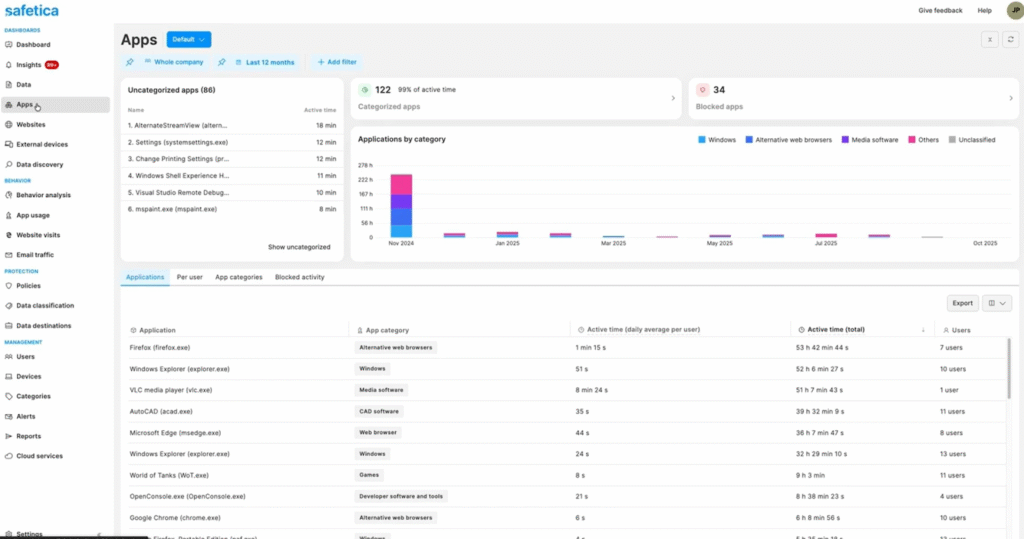
Safetica is an enterprise DLP and insider risk management platform. It helps organizations prevent data leaks while maintaining visibility into how employees work with sensitive information.
It takes a balanced approach by combining classic DLP controls with behavioral insights and contextual analysis. Safetica is also a popular option for mid-sized and distributed organizations that need strong endpoint-focused data protection, clear user behavior visibility, and compliance support.
Key Features
- Shadow IT Discovery: Detection of unauthorized cloud services, file-sharing sites, personal email, messaging apps, and collaboration tools that employees use outside official IT channels.
- GDPR-compliant Employee Monitoring: Privacy-native monitoring framework built to comply with European data protection regulations, including the GDPR’s requirements for lawful processing, data minimization, transparency, and employee rights.
- Microsoft 365 Security: Audits file events in SharePoint, OneDrive, Teams, and monitors outgoing emails in Exchange.
Pros
- “One of the things I value most is its ability to detect and block leaks of sensitive data. If someone tries to send confidential information — such as ID numbers, phone numbers, or client documents — outside the company, the system detects it and can block it or alert the administrator.” → Read Full Review
Cons
- “There are many options and policies to configure, and at first, it can take time to understand how to adjust them correctly. I have also noticed that if the rules are not well calibrated, it can block some legitimate actions, which forces you to fine-tune the configuration little by little until you achieve the ideal point.” → Read Full Review
Pricing
Visit Safetica’s website to take a product tour and request pricing.
Check out this list of Safetica alternatives →
9. Microsoft Purview DLP
Best for: Microsoft 365-centric organizations wanting native integration without third-party complexity or additional costs.
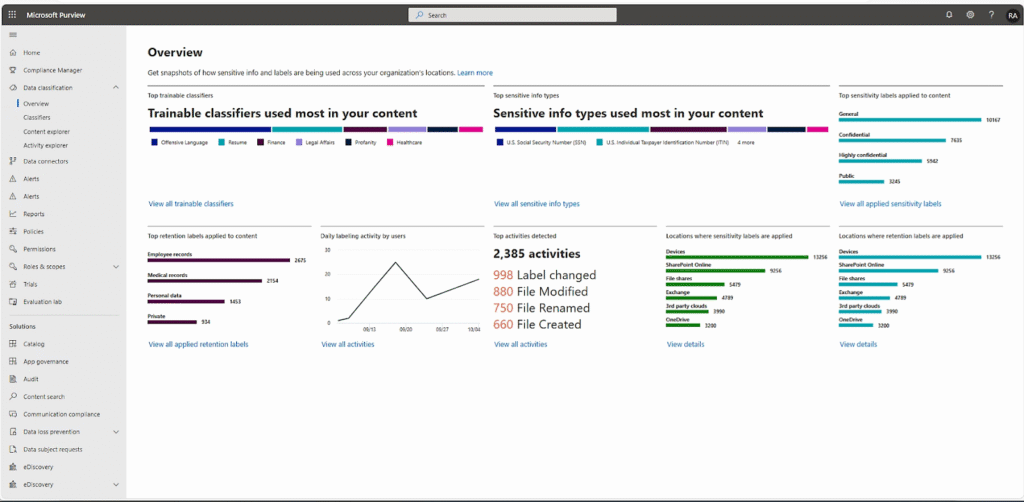
Microsoft Purview DLP is the native data loss prevention solution embedded within Microsoft’s broader information protection and compliance ecosystem.
It provides integrated data protection across the Microsoft 365 suite (Exchange Online, SharePoint, OneDrive, Teams, Outlook, Edge browser, and Windows endpoints).
For organizations already invested in Microsoft’s infrastructure, Purview offers the advantage of native integration without requiring third-party agents, separate consoles, or complex deployments.
Key Features
- Sensitive Information Types (SITs) Library with 400+ Pre-built Classifiers: A comprehensive catalog of pre-configured data classifiers that recognize common sensitive data patterns.
- Endpoint DLP for Windows with Defender Integration: Native endpoint monitoring for Windows 10/11 devices that detects sensitive data movement to USB drives, network shares, cloud storage, and more.
- Policy Tips and User Notifications: Provides real-time, in-context feedback to users when they attempt to share sensitive data in violation of policy. Users may receive warnings, justification requests, or blocking alerts.
Pros
- “MS DLP is very useful to secure our compliance data. It helps us to detect various types of private data across various workloads, and we can block or monitor that data as per our requirement.” → Read Full Review
Cons
- “After complex builder logic, it doesn’t provide an option to update multiple rules through PowerShell, which makes our job lengthy if we want to update multiple rules.” → Read Full Review
Pricing
Visit the Microsoft website for up-to-date pricing information.
Check out this list of the best data loss prevention tools →
10. Zscaler
Best for: Distributed workforces needing zero trust protection without endpoint agents.
Zscaler is a cloud-native data protection capability embedded within the Zscaler Zero Trust Exchange. It provides inline data protection for all internet and cloud application traffic via SASE (Secure Access Service Edge).
The platform inspects all user traffic (web uploads, email, file transfers) as it passes through Zscaler’s global cloud security platform, which acts as a secure proxy between users and the internet.
This cloud-delivered model makes Zscaler particularly effective for protecting distributed workforces, remote employees, and organizations undergoing cloud transformation.
Key Features
- Advanced Data Classification: Uses dictionaries, pattern matching, and Exact Data Match (EDM) techniques to accurately identify sensitive information such as PII, PHI, financial data, and intellectual property.
- Endpoint DLP via Zscaler Client Connector: Extends enforcement to endpoints by steering traffic through the Zero Trust Exchange. It allows organizations to protect data without deploying heavyweight endpoint DLP agents.
- Incident Workflow: Provides visibility into DLP violations, including user details, data types involved, and enforcement actions taken.
Pros
- “It provides top-class secured access […] and VMs. Change in location requires login to the Zscaler. It provides overall access security to the system.” → Read Full Review
Cons
- “The systems’ filters and protocols hinder access to websites or applications that are essential for work. This occasionally causes frustration and impedes productivity.” → Read Full Review
Pricing
Zscaler offers two platform bundles with optional add-ons, although it gates the exact costs behind a form.
11. CrowdStrike Falcon
Best for: Organizations with existing Falcon deployments wanting unified endpoint security.
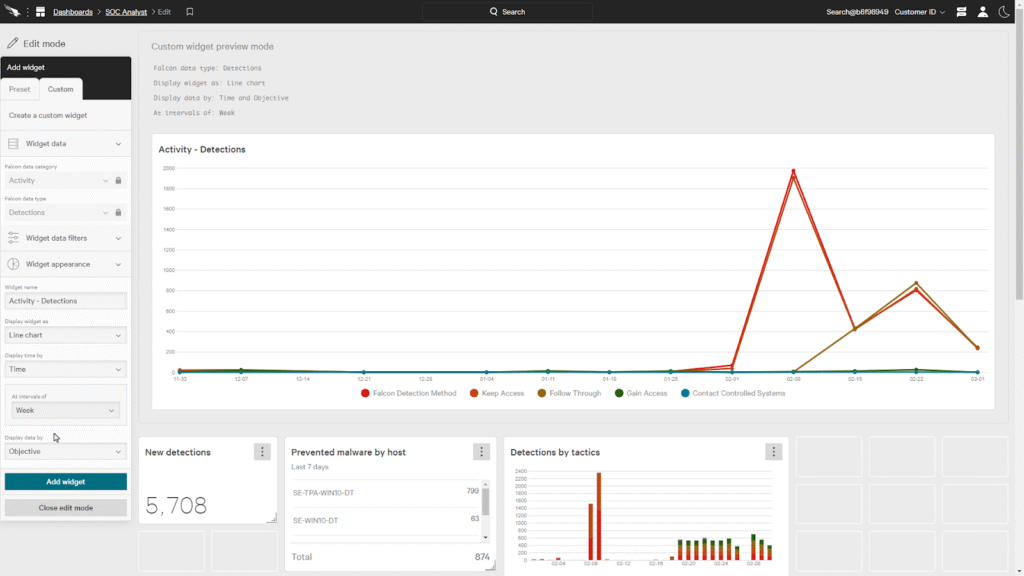
CrowdStrike Falcon is a cloud-native cybersecurity platform best known for endpoint protection and threat detection. However, it has expanded into data protection and insider risk through its Falcon modules.
Within the Falcon platform, data protection capabilities are tightly integrated with endpoint detection and response (EDR), identity protection, and threat intelligence.
This allows security teams to correlate sensitive data access with endpoint behavior, credential abuse, and attack indicators.
Key Features
- Falcon Insight (EDR): This is CrowdStrike’s endpoint detection and response engine that collects detailed telemetry from endpoints. It tracks file access, process execution, network activity, and user behavior in real-time.
- Falcon OverWatch: Managed threat hunting service that proactively searches for stealthy adversary activity across customer environments. OverWatch analysts can identify suspicious behaviors involving data access.
- Falcon Fusion (SOAR): Allows teams to build automated workflows that respond to data-related detections — such as isolating endpoints, alerting teams, or triggering investigations.
Pros
- “Crowdstrike Falcon is a multi-feature EDR platform that replaces traditional antivirus platforms using a single lightweight agent. Its menu navigation is very user-friendly and clear.” → Read Full Review
Cons
- “One thing I dislike about CrowdStrike Falcon is that some of the advanced features can feel a bit overwhelming for new users, and the pricing can be on the higher side.” → Read Full Review
Pricing
Crowdstrike offers three pricing tiers: Go, Pro, and Enterprise. Costs start at $59.99 per device, billed annually. A 15-day free trial and custom pricing options are also available.
12. Endpoint Protector DLP
Best for: Teams that need strong device control and endpoint-level prevention, particularly against USB, removable media, and web-based data exfiltration.
See how Teramind compares to Endpoint Protector →
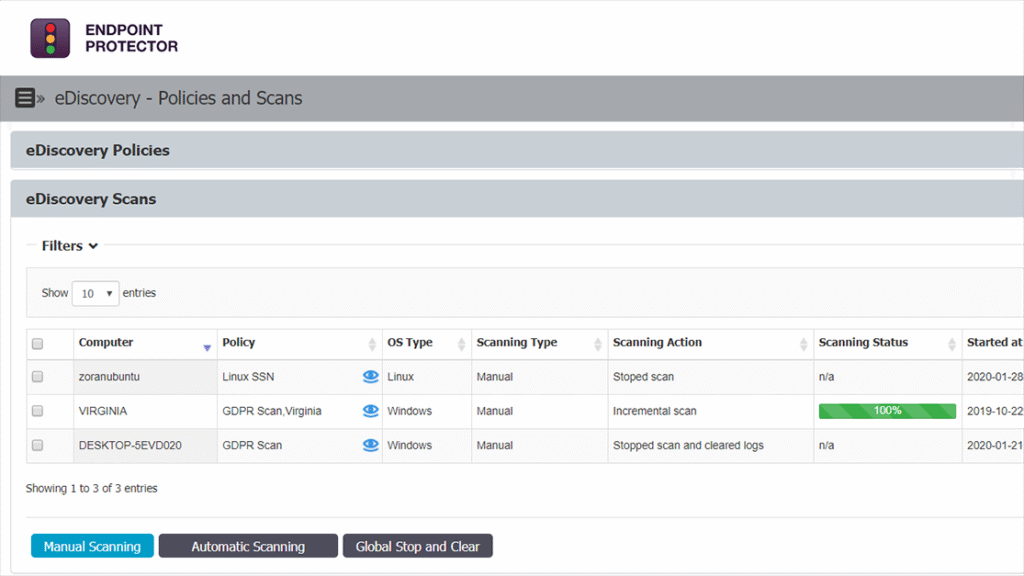
Endpoint Protector DLP, developed by CoSoSys, is an endpoint data loss prevention platform. It controls how sensitive data is accessed, transferred, and exfiltrated from user devices.
It’s best known for its strong device control, content-aware protection, and cross-platform support. This makes it a practical choice for organizations that need tight control over endpoints without deploying overly complex infrastructure.
Key Features
- Centralized Management Console: Provides a single interface to configure policies, manage devices, review incidents, and generate reports. Administrators can deploy rules consistently across all endpoints and quickly adjust enforcement as requirements change.
- Removable Media Protection: Ensures that sensitive files cannot be copied to external storage without authorization. It does this by monitoring file transfers in real-time and applying content-based rules before data leaves the device.
- Cross-platform Endpoint Support: Supports Windows, macOS, and Linux endpoints, enabling consistent DLP enforcement across heterogeneous environments.
Pros
- “It works smoothly across Windows, Linux, and macOS, and the setup was super quick. The console is easy to use, policies are clear, and device control actually does what it should do.” → Read Full Review
Cons
- “Setup takes a bit of time, especially when fine-tuning policies for different teams.” → Read Full Review
Pricing
Visit Netwrix’s website to request a personalized quote.
FAQs
Why Look for Alternatives to Forcepoint DLP?
Forcepoint’s capabilities are undeniable, but the platform’s strengths can also be its limitations depending on your organization’s size, resources, and operational priorities.
The best way to understand where Forcepoint struggles is to hear from teams actually using it day-to-day.
Heavy Agent Deployment That Slows Everything Down
Forcepoint’s endpoint agents are resource-heavy and complex to deploy. They also consume significant bandwidth and system resources, slowing endpoint performance.
As you add more DLP policies — especially intensive ones like ‘source code detection’ — the agent gets even heavier.
Plus, the policies don’t always work reliably. One user reported that detection rules consistently fail to catch violations, even after proper configuration.
Difficult Configuration That Requires Specialized Expertise
Advanced settings are hard to configure, especially if you’re not a DLP specialist. This complexity makes onboarding slower for new administrators, as it requires extensive training.
Performance also degrades when handling large datasets, with scans and reports slowing down under volume.
Clunky Incident Management That Wastes Time
The incident monitoring interface lacks intuitive filtering and grouping. In fact, one SOC Analyst reports difficulty organizing incidents by user or save filter configurations, forcing manual drag-and-drop organization every time they review alerts.
This repetitive workflow slows down incident response and makes it harder to identify patterns or prioritize threats.
Missing Features and Capabilities That Don’t Match Sales Promises
Forcepoint often doesn’t deliver what’s promised during sales. For example, when scanning multiple databases, it can’t identify which specific database sensitive data originated from.
This makes it nearly unusable for organizations with complex database environments. Also, the CASB component lacks enterprise features that competitors include as standard.
Although customization is possible, it’s often expensive and requires additional effort to reach acceptable functionality.
What Key Features Do You Need in a Forcepoint DLP Alternative?
User and Entity Behavior Analytics (UEBA)
Content-based DLP policies can tell you that a file contains credit card numbers. However, UEBA tells you whether the person moving that file is a trusted employee doing their job or a disgruntled insider preparing to leave.
This behavioral context separates genuine threats from normal business activity, reducing false positives while catching risks that content inspection alone misses.
What to Look For:
Your Forcepoint DLP alternative should integrate with your HR systems (detecting terminations, performance reviews).
It should also track sentiment and engagement patterns, while correlating multiple risk signals, such as unusual access, failed login attempts, and external file uploads.
Visual Forensics and Screen Recording for Investigation
A good Forcepoint DLP alternative should be able to record screens and capture screenshots when triggered by policy violations or risky behavior.
The aim is to provide visual evidence of exactly what users did (which applications they used, what data they accessed, and how they attempted exfiltration).
Screen capture is faster to review, easier for non-technical stakeholders to understand, and more defensible in legal proceedings or termination cases.
What to Look For:
Recording should trigger automatically based on risk thresholds.
In addition, ensure the recording is indexed and searchable so you can jump to specific events rather than scrubbing through hours of footage.
Unified Policy Management
If configuring Forcepoint DLP policies requires dedicated administrators or expensive consultants, you need alternatives that allow your existing security team to manage DLP without becoming full-time DLP experts.
This includes pre-built policy templates for common scenarios (PII protection, source code, financial data), visual policy builders, clear testing and validation tools, and plain-language explanations of what each policy will do.
What to Look For:
Centralized policy creation and enforcement, where rules can be applied consistently across environments and adjusted without complex reconfiguration.
This means having visual interfaces or simple conditional logic rather than requiring regex or scripting.
Privacy-first Compliance (GDPR, CCPA, Regional Data Protection)
Built-in support for privacy regulations that restrict how employee monitoring and data collection can be conducted in Europe (GDPR), California (CCPA), and other regional privacy laws.
What to Look For:
Support for anonymization or pseudonymization, configurable data retention periods, and documentation proving compliance with regional regulations.
Ensure your Forcepoint DLP alternative also comes with consent management, data minimization, and audit trails documenting data handling practices.
Reliable Cloud and SaaS Application Coverage
If your organization has moved to cloud-first operations, endpoint-heavy DLP platforms designed for traditional networks (like Forcepoint) leave massive gaps.
You need platforms that natively understand cloud workflows – monitoring file sharing in Google Drive, detecting risky Slack messages, and controlling data in other SaaS applications.
What to Look For:
Verify native API integrations for the specific SaaS applications your organization uses.
Check whether the platform can scan data at rest (existing files in cloud storage) or only monitors new activity.
What Makes Teramind an Ideal Data Loss Prevention Alternative?
We’ve given you all the best alternatives to Forcepoint.
Some are just as complex but more stable. Others trade complexity for cloud-native simplicity. A few excel in specific scenarios — e.g., Microsoft shops, zero trust architectures, and developer-heavy environments. They’re all good options depending on what you need.
But if the following drove you here:
- Forcepoint’s operational overhead is too costly…
- Its deployment timelines stretch into months…
- Its policies require dedicated specialists to configure…
…then you need to look at Teramind.
With our platform, you’ll see exactly what users do with your data:
- Screen recordings show you exactly what happened during exfiltration incidents.
- Risk scoring identifies users exhibiting genuine vulnerabilities (such as data hoarding, downloading at unusual hours, departure patterns).
- When something risky happens, you can block it in real-time instead of discovering it days later. With Teramind, enforcement happens before damage occurs. Real-time blocking prevents risky actions such as USB writes, unauthorized uploads, and sensitive email sends, the moment they’re attempted.
- Users also get immediate feedback explaining why actions were blocked and what’s needed for legitimate exceptions.
See how Teramind’s DLP solution works → Explore a free interactive demo