Trellix (formerly McAfee Enterprise) offers strong data loss prevention, broad endpoint security, and enterprise-grade control over sensitive data.
But maybe you’re looking for something more advanced than traditional DLP. Something that offers a greater level of visibility into what your employees are doing and where your data goes.
In this guide, we list the top Trellix DLP competitors to consider in 2026, focusing on solutions that reflect how data risk manifests today — and how modern security teams like to manage it.
What Are the Top 10 Trellix DLP Alternatives?
| Solution | Behavioral Detection | Unified Visibility | Insider Risk | Endpoint Controls | Cloud/SaaS DLP |
|---|---|---|---|---|---|
| Teramind | Continuous user behavior visibility | Endpoint, app, and web telemetry | Core strength | Deep endpoint telemetry | Yes (via connectors) |
| Forcepoint DLP | Partial (RAP); Context-aware | Broad across channels | Limited (implicit via context) | Yes | Yes (CASB/API) |
| Fortra | Context-aware classification | Endpoint, network, and cloud | Yes | Deep endpoint | Yes |
| Cyberhaven | Data lineage & user behavior | Full end-to-end visibility | Yes (scoring) | Lightweight sensors | Yes |
| Mimecast Incydr | Behavioral patterns | Endpoint and cloud | Yes | Endpoint and cloud | Yes |
| Symantec DLP | Traditionally content-based | Wide across vectors | Limited (implicit) | Yes | Yes |
| Microsoft Purview | Content & ML-driven context | Cloud and endpoint | Emerging | Yes | Cloud/SaaS |
| Safetica | User behavior & alerts | Endpoint and cloud | Yes | Yes | Cloud apps |
| Trend Micro iDLP | Content-centric | Varies by module | Minimal | Yes | Cloud add-ons |
| Endpoint Protector | Content & context | Endpoint and cloud | Limited | Strong endpoint | Cloud support |
1. Teramind
Teramind takes a fundamentally different approach from traditional, policy-heavy DLP tools like Trellix.
It doesn’t rely on static rules and pattern matching; instead, it combines user activity monitoring, data loss prevention, and insider risk management into a single platform.
This makes Teramind especially effective in environments where risk accrues over time in a series of small, contextual actions.
How Does Teramind Work?
See Teramind’s DLP solution in action → Take an interactive product tour
Teramind uses full activity telemetry across endpoints, applications, and user sessions. This allows it to capture how data is accessed, created, modified, and moved — whether through files, browsers, cloud apps, emails, or screenshots.
Then, it ties those actions directly to individual users.
What Are Teramind’s Key Features?
See Teramind’s capabilities all in one place → Explore a live product demo
- User Behavior Analytics: Establishes baseline user behaviors to identify deviations, such as abnormal access sequences or unusual data transfers.
- Content Analysis Engine: Uses sophisticated inspection technology to identify sensitive information (PII, PHI, PCI, etc.) even when embedded in complex file formats or non-searchable documents.
- Optical Character Recognition (OCR): Extracts and analyzes text from images and screenshots to prevent data exfiltration through visual means.
- Multi-Channel Monitoring: Provides comprehensive visibility across various vectors, including endpoints, network traffic, and external applications such as unauthorized AI tools.
- Real-Time Intervention: Allows for immediate responses to data security incidents, such as blocking actions, notifying users, or terminating sessions.
- Smart Rules and Automated Alerts: AI-powered alerts newsfeed that notifies security teams of emerging risks.
- Role-Based Access Controls: Implements the principle of least privilege through customizable security policies tailored to specific roles or departments.
- Compliance and Forensics: Maintains tamper-proof activity logs, screen recordings, and forensic records to fulfill regulatory requirements like the GDPR, HIPAA, and PCI-DSS.
- Specialized Monitoring: Includes capabilities for tracking printed documents, social media activity, and user sessions within Citrix or RDP environments.
Why is Teramind a First-choice DLP Solution for Security Teams?
- “Its intuitive interface and comprehensive monitoring capabilities make it easy to track and analyze user activity effectively. The real-time alerts and detailed reports help quickly identify risks and ensure compliance, enhancing overall security.” → Read Full Review
- “Teramind can be drilled right down to the second of what an employee is doing. You can watch live feed, recorded feed, set up analytics to compare quickly and many other things. The customer support has been wonderful and any issues are taken care of within 24 hours.” → Read Full Review
- “One of the most valuable aspects of Teramind is its behavior alerts and customizable policies. These tools allow us to monitor communications, track potentially risky behavior, and understand overall employee sentiment.” → Read Full Review
What is Teramind’s Pricing?
Try Teramind before committing → Test a live deployment of the platform
Here’s a breakdown of Teramind’s pricing tiers (based on 5 seats, billed annually):
- Starter ($14/seat/month): Best for basic productivity use cases and identifying risky users. Includes quick visual evidence capture, live playback, and website/app tracking.
- UAM ($28/seat/month): Designed for comprehensive productivity optimization and security detection. This tier includes everything in Starter plus full digital activity telemetry, UEBA (User and Entity Behavior Analytics), forensics, and unlimited behavior rules.
- DLP ($32/seat/month): Best for comprehensive intent-based security detection and response. It includes everything in UAM, plus content-based data exfiltration prevention and automated actions to block data leaks in real-time.
- Enterprise (Custom pricing): Tailored professional services for the most demanding large-scale enterprises and government organizations. Includes everything in DLP plus in-app parsing for fraud detection, an OCR engine, and unlimited activity-based behavior rules.
All paid plans shown above reflect an 8% discount for annual billing compared to the monthly rates.
2. Forcepoint DLP
Best for: Enterprises requiring risk-adaptive data protection that adjusts security controls based on user behavior.
See how Teramind compares to Forcepoint →
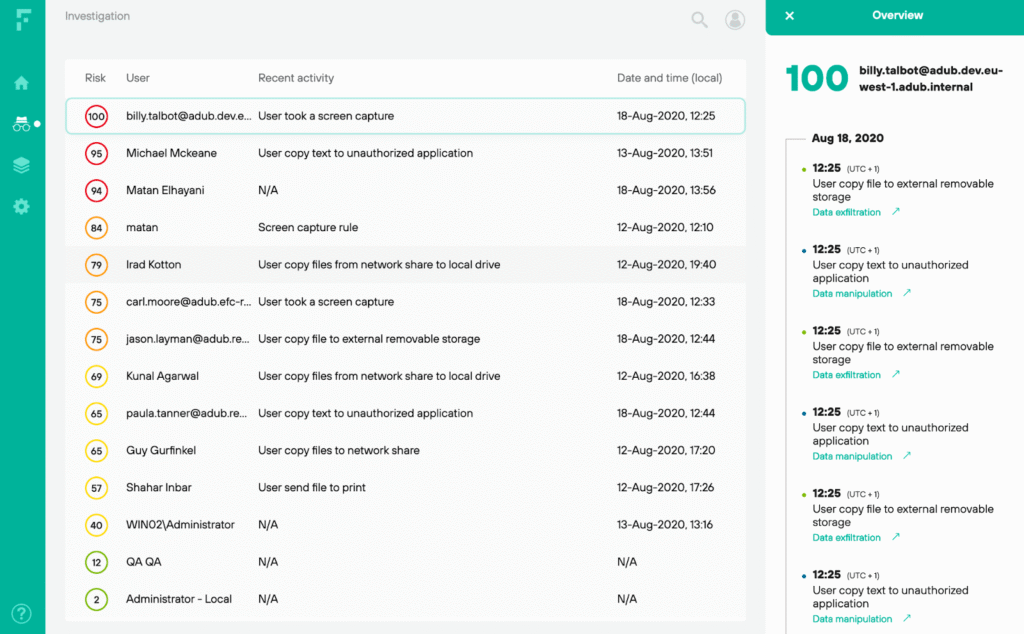
Forcepoint Data Loss Prevention (via Forcepoint ONE) is an enterprise-grade solution that provides unified data protection across network, endpoint, cloud, and email channels through a single management console.
The platform stands out through its integration with Forcepoint’s Risk-Adaptive Protection framework, which adjusts data security controls dynamically based on user risk scores.
Its content inspection engines combine fingerprinting, machine learning classification, and pattern matching to identify sensitive data across structured and unstructured formats.
Key Features
- Risk-Adaptive Protection (RAP): Dynamically adjusts data controls based on user behavior and contextual risk signals. It factors in data sensitivity classifications and contextual attributes like location, device posture, and application risk scores.
- Pre-defined Templates and Classifiers: Includes an extensive library of 1,700+ pre-defined policy templates and classifiers tailored for industry regulations and common sensitive data types (GDPR, PII, PHI, financial information).
- CASB and cloud integration: Integrates with cloud services through its CASB and API connectors, enabling visibility and enforcement in platforms like Microsoft 365, Google Workspace, and other SaaS tools.
What Users Say About Forcepoint DLP
- “I definitely recommend you to use it. The integration process is as simple and fast as possible.” → Read Full Review
- “I wouldn’t say I like its document part because if I read the documentation for the 1st time installation, I could not understand anything. I got stuck. And I felt difficulty in learning the Forcepoint Data Loss Prevention.” → Read Full Review
Pricing
Visit Forcepoint’s website to request pricing information.
See this list of Forcepoint alternatives and competitors →
3. Fortra (formerly Digital Guardian)
Best for: Data-centric security programs prioritizing data classification and context, with optional managed DLP services.
See how Teramind compares to Fortra →
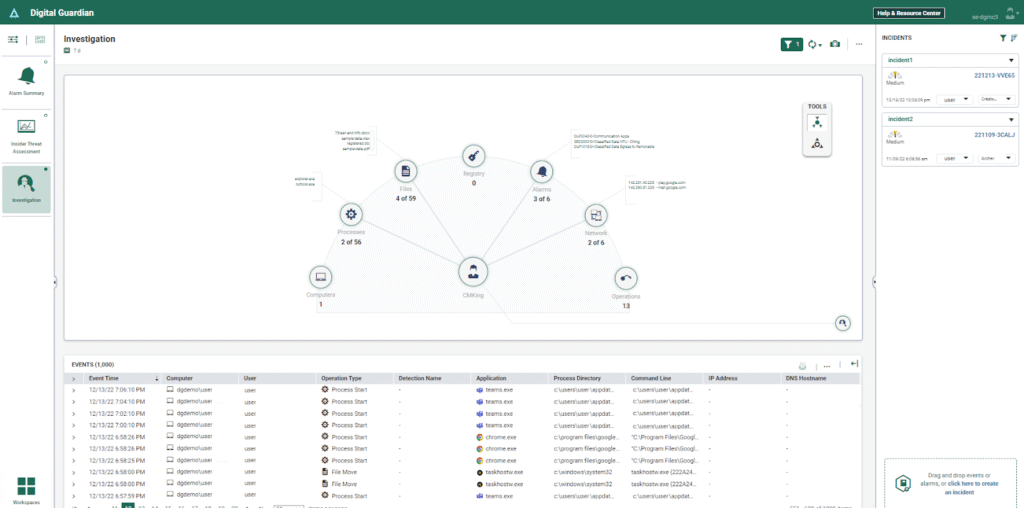
Fortra (formerly Digital Guardian) is a data loss prevention and protection platform that gives enterprises deep visibility and granular control over sensitive data.
The platform’s architecture is built around the concept that protecting sensitive data requires understanding data context: who created it, how it’s classified, how it’s being used, and where it’s traveling.
To this end, Fortra’s endpoint agents and network sensors capture detailed event activity. It can discover, classify, monitor, and protect both structured and unstructured information across endpoints, networks, cloud storage devices, and email.
Key Features
- Managed Detection and Response (MDR): Fully managed DLP service where security analysts monitor your data events 24/7, investigate policy violations, tune detection rules, and provide incident response support.
- Endpoint Data Loss Prevention: Offers deep visibility into sensitive data activity on Windows, macOS, and Linux systems. Fortra also captures events at the system, user, and data level, whether devices are on or off the corporate network.
- Deployment Flexibility: Supports both on-premises and cloud-delivered deployment models, as well as hybrid configurations.
What Users Say About Fortra
- “I have noticed that the dashboard performance can sometimes be sluggish, with insights taking more time to generate than anticipated.” → Read Full Review
- “The software surpasses expectations in safeguarding our data, offering outstanding security features that ensure the protection of our critical information.” → Read Full Review
Pricing
Fill out a form on Fortra’s website to get a customized quote.
See this list of Fortra alternatives →
4. Cyberhaven
Best for: Preventing sophisticated data theft through automated data lineage tracking and AI/LLM data exposure detection.
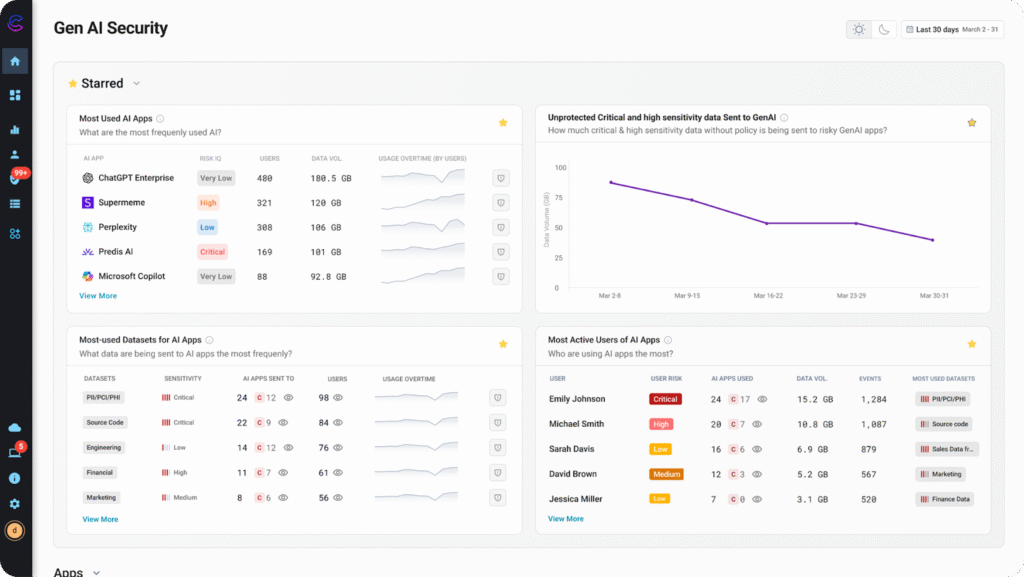
Cyberhaven represents a next-generation approach to data loss prevention. It combines traditional DLP functions with data lineage and insider risk awareness into a unified platform often referred to as Data Detection and Response (DDR).
The solution maps every piece of sensitive information back to its source and follows its path (where it originates, how it moves, who interacts with it, and where it travels) across endpoints, cloud services, apps, and user behaviors.
This continuous understanding of data context improves detection accuracy and reduces false positives.
Key Features
- Data Lineage Tracking: Continuously follows a piece of data from its point of origin through every interaction, including files, cloud apps, user actions, and sharing events.
- Lightweight Cross-environment Sensors: Uses lightweight agents, cloud API connectors, and browser extensions to capture telemetry across endpoint, web, and cloud environments.
- Real-time Remediation and User Coaching: Cyberhaven’s flexible response model allows organizations to intervene appropriately while minimizing disruption to legitimate work.
What Users Say About Cyberhaven
- “Creating custom policies with multiple conditions is not always straightforward. If you’re used to creating a SQL-style query to “filter” data, where each statement reduces events.” → Read Full Review
- “Cyberhaven has user-controlled override functions that work on email, web, USB, and peripheral data transfers to keep availability “always on” in my enterprise.” → Read Full Review
Pricing
You must book a demo to see Cyberhaven’s pricing.
See this list of Cyberhaven alternatives and competitors →
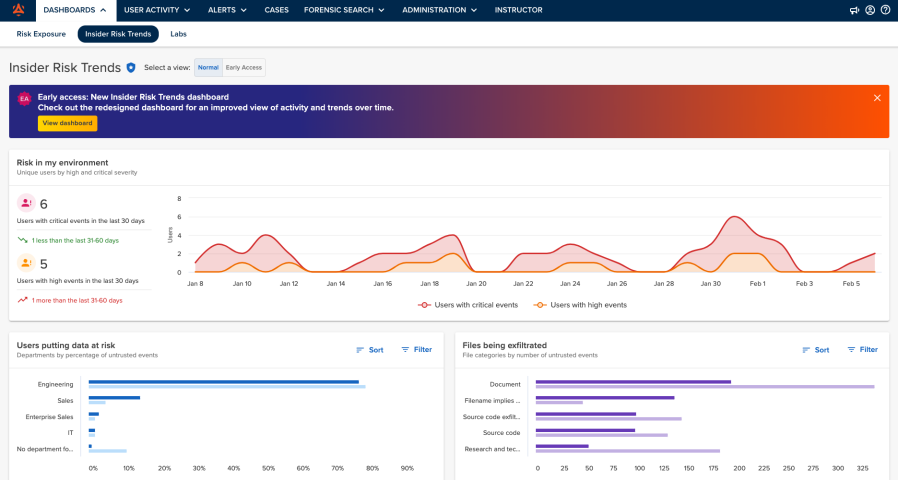
5. Mimecast Incydr
Best for: Organizations where sensitive data primarily flows through SaaS tools and shared drives.
See how Teramind compares to Mimecast Incydr →
Mimecast Incydr is an insider risk detection platform. It’s specifically designed to address data loss scenarios involving trusted employees rather than external threat actors.
It watches for anomalous patterns, high-risk user actions, and potentially unauthorized data exfiltration in real time. This includes monitoring how sensitive data moves across user accounts, devices, and cloud services (especially SaaS tools like Microsoft 365 and Google Workspace).
Since its acquisition by Mimecast, Incydr has also strengthened its integration with email-centric workflows and security ecosystems.
Key Features
- Incident Triage: Mimecast Incydr organizes events into manageable cases and augments them with contextual signals. This makes it easier for security analysts to decide which incidents are urgent and which are routine.
- Forensic Timeline Reconstruction: Analysts can view step-by-step activity on a file or account, helping teams trace how sensitive data was used.
- Departing Employee Detection: Connects to Workday or Bamboo HR to identify employees who may be preparing to leave the organization and take proprietary data with them.
What Users Say About Mimecast Incydr
- “If you don’t have the fastest internet, it usually will take a few hours to run through all the files. Especially if you have an older computer model; it definitely affects its speed.” → Read Full Review
- “It’s very easy to set up the software. Its application interface is very user-friendly; love the minimalist UX/UI design, yet it’s easy to navigate.” → Read Full Review
Pricing
Contact Mimecast’s sales team for pricing options.
See this list of Mimecast Incydr alternatives →
6. Symantec DLP (Broadcom)
Best for: Large organizations that prioritize content inspection, exact data matching, and strict compliance enforcement.
See how Teramind compares to Symantec DLP →
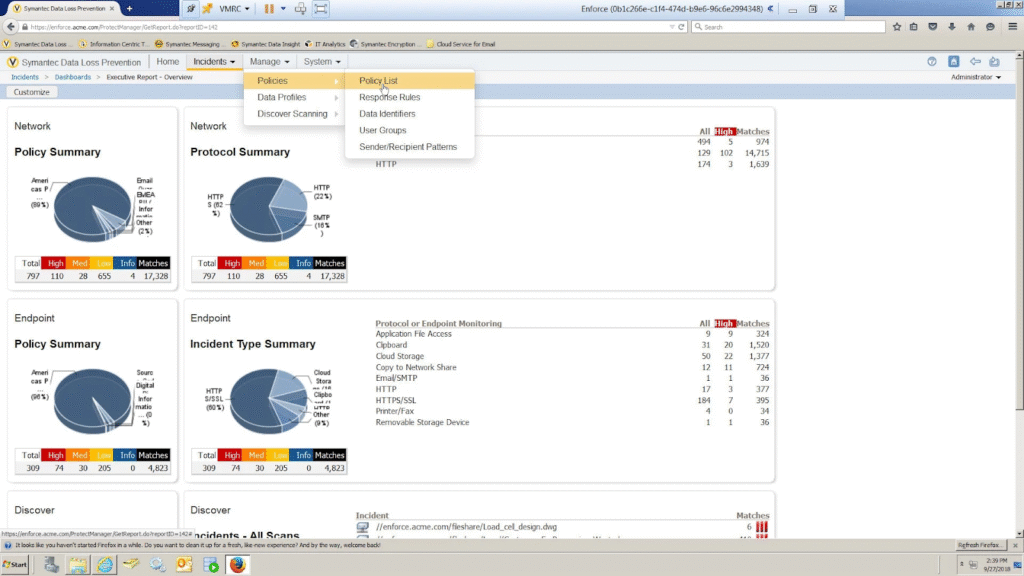
Symantec Data Loss Prevention is one of the most mature and widely deployed solutions in the market. It offers comprehensive data protection across network, endpoint, cloud, and storage environments through a unified policy engine.
The platform’s longevity has resulted in extensive integration capabilities with third-party security tools, along with pre-built detection templates for hundreds of regulatory frameworks.
However, similar to Trellix DLP, Symantec’s breadth of capability also brings complexity. Large rule bases, extensive deployment footprints, and the need for careful tuning can require significant expertise and resources to maintain.
Key Features
- Network Prevent: Deploys as monitor-mode appliances that inspect traffic across web protocols, email (SMTP), FTP, HTTP/HTTPS, and cloud application APIs to enforce DLP policies at the network edge.
- Endpoint Prevent: Provides granular control over data movement on Windows, Mac, and Linux systems. It monitors file transfers, removable media, network shares, email clients, web browsers, cloud sync applications, and printing operations.
- Symantec DLP Discover: Scans file servers, SharePoint repositories, databases, and cloud storage platforms to identify where sensitive data resides in your environment and assess exposure risk.
What Users Say About Symantec DLP
- “I think it should be more effective on network traffic on endpoint devices, and also it should monitor all AI software such as Cursor, Gemini, and ChatGPT.” → Read Full Review
- “I like that Symantec Data Loss Prevention is easy to use, not problematic, and always runs as expected, with a stable performance. The agents are very stable and effortless, and since we deployed them to all our endpoint devices, there have been no errors.” → Read Full Review
Pricing
Contact Broadcom to see Symantec DLP’s pricing options.
See how Mimecast Incydr and Symantec compare →
7. Microsoft Purview DLP
Best for: Organizations already standardized on Microsoft 365, Windows, Azure, and Entra ID.
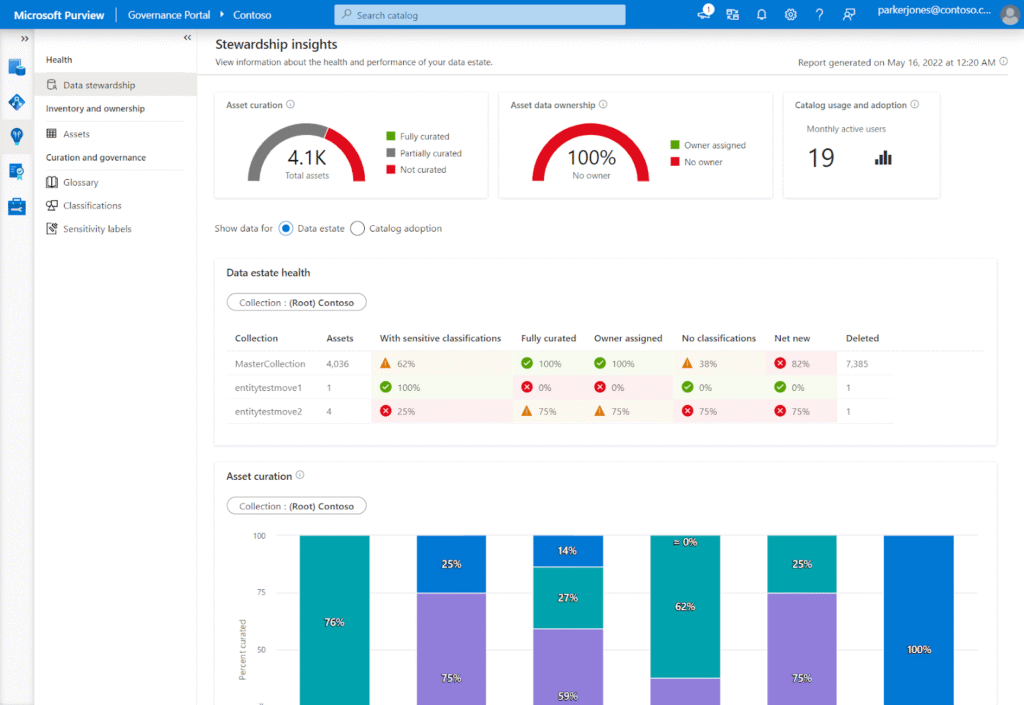
Microsoft Purview Data Loss Prevention (DLP) is Microsoft’s cloud-native solution built into the Microsoft Purview compliance and data governance platform.
It helps organizations identify, classify, monitor, and protect sensitive information wherever it lives or travels. This includes data residing in Microsoft 365 services like Teams, OneDrive, Power BI, SharePoint, Exchange, and Microsoft 365 Copilot.
Purview is designed to unify data governance, protection, and compliance controls under a single, scalable framework that fits naturally into Microsoft environments.
Key Features
- Unified Alerting and Remediation: Teams can configure alerts, triage incidents, and take corrective actions directly from the DLP alerts page, with the option to extend workflows into SIEM or SOAR tools for automated handling.
- Sensitive Data Classification and Labeling: Uses built-in and custom classifiers to automatically detect and label sensitive information such as financial, health, or personally identifiable data.
- Integration with Microsoft Security Ecosystem: Extends DLP signals into tools like Microsoft Defender XDR and Microsoft Sentinel, enabling cross-platform investigations and enriched alerts.
What Users Say About Microsoft Purview DLP
- “After complex builder logic, it doesn’t provide an option to update multiple rules through PowerShell, which makes our job lengthy if we want to update multiple rules.” → Read Full Review
- “Its interface allows users to set up DLP, making it easier to understand. It also allows us to try out a test to have an idea before going to production.” → Read Full Review
Pricing
Visit the Microsoft website for up-to-date pricing information.
Check out this list of the best data loss prevention tools →
8. Safetica
Best for: European mid-market organizations needing straightforward DLP with GDPR-compliant, privacy-conscious monitoring.
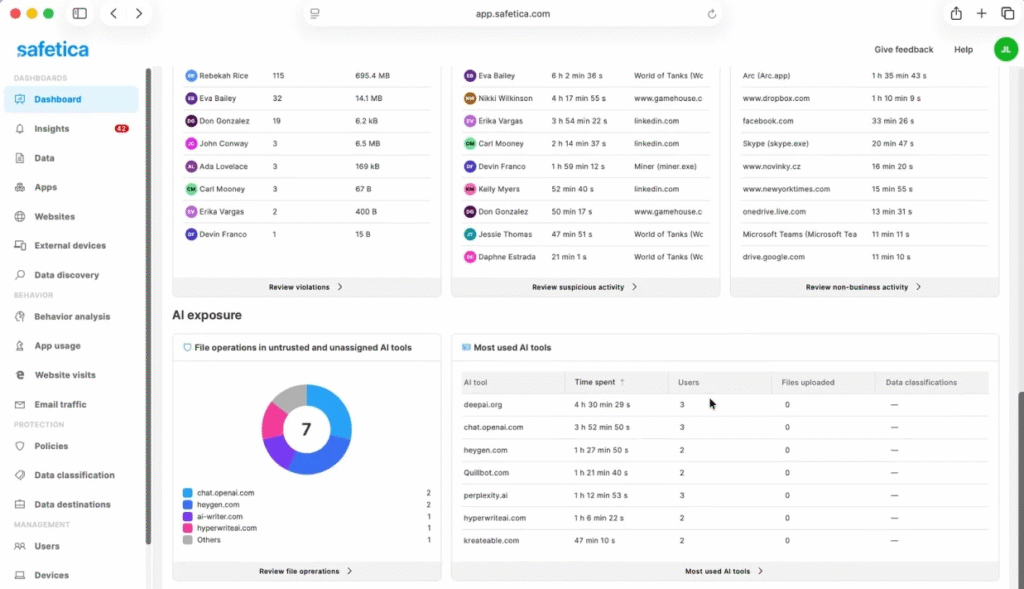
Safetica is designed around giving organizations clear visibility into how sensitive data is actually used, without adding unnecessary complexity.
It focuses on everyday employee behavior: which applications people use, how files are shared, and when confidential data is accessed or moved. This behavioral analysis makes it easier to understand real data risk as it happens.
From there, Safetica combines deep data discovery with practical protection controls to prevent risky actions before they turn into incidents. It helps organizations identify potential insider threats early, while also guiding employees toward better data-handling habits through awareness and education.
Key Features
- Cloud Data Protection: Extends DLP controls to cloud storage and productivity platforms such as Microsoft 365. The platform helps organizations monitor and govern data as it flows through collaboration ecosystems.
- Endpoint and Device Controls: Enforces DLP policies across workplace devices, including laptops and BYOD environments.
- Insider Risk Detection: Combines data access patterns with contextual signals to identify abnormal or risky behavior before it leads to a serious incident.
What Users Say About Safetica
- “It is a tool that runs in the background, protecting data and preventing leaks, but without interrupting users or affecting the performance of the equipment.” → Read Full Review
- “The initial setup can take time, especially if it’s your first time working with a DLP solution. There are many options and policies, and until you fully understand how they relate to each other, the process can feel a bit technical.” → Read Full Review
Pricing
Visit Safetica’s website to take a product tour and request pricing.
See this list of Safetica alternatives and competitors →
9. Trend Micro iDLP
Best for: Organizations wanting DLP integrated with EDR/XDR to correlate data loss events with threat intelligence.
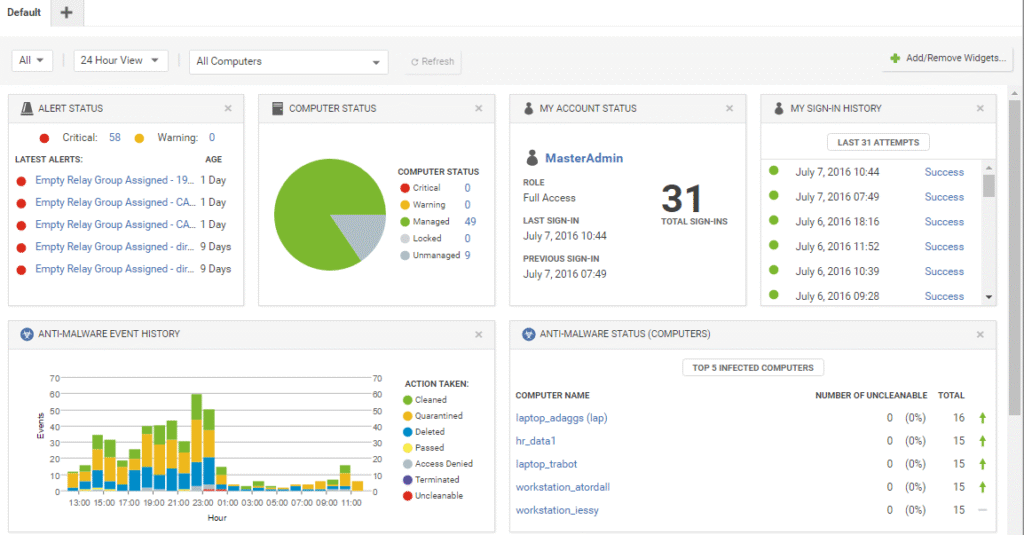
Trend Micro iDLP is built directly into Vision One’s broader cybersecurity platform. It works alongside endpoint detection and response (EDR), email security, and cloud workload protection.
Because it’s part of the ecosystem, the DLP engine can correlate data loss events with threat intelligence, malware activity, and attack signals. This context helps teams quickly tell the difference between routine policy violations and high-risk incidents tied to active data breaches or insider threats.
Key Features
- Endpoint Protection: Monitors data interactions on devices and triggers notifications when policy rules are violated or suspicious behavior is detected.
- Advanced Data Identification: Uses predefined templates and customizable rules to detect sensitive information such as PII, financial data, and proprietary content. It can be configured to recognize specific data types and ensure appropriate controls are applied.
- Unified Policy Enforcement: Enables teams to create and apply DLP policies across multiple Trend Micro modules, such as endpoint, network, and email.
What Users Say About Trend Micro iDLP
- “Trend Vision One is a unified and intuitive dashboard, which makes it very easy to monitor, investigate, and respond to security events across the entire environment.” → Read Full Review
- “I find the reporting part lacking. Currently, in Trend Vision One, reports cannot be scheduled with attachments; they only include links to view the report, which is a limitation. Trend Micro does not have DLP features for MAC OS.” → Read Full Review
Pricing
Visit Trend Micro’s website to request a quote.
10. Endpoint Protector
Best for: Cross-platform environments requiring consistent DLP enforcement across Windows, macOS, and Linux endpoints.
See how Teramind compares to Endpoint Protector →
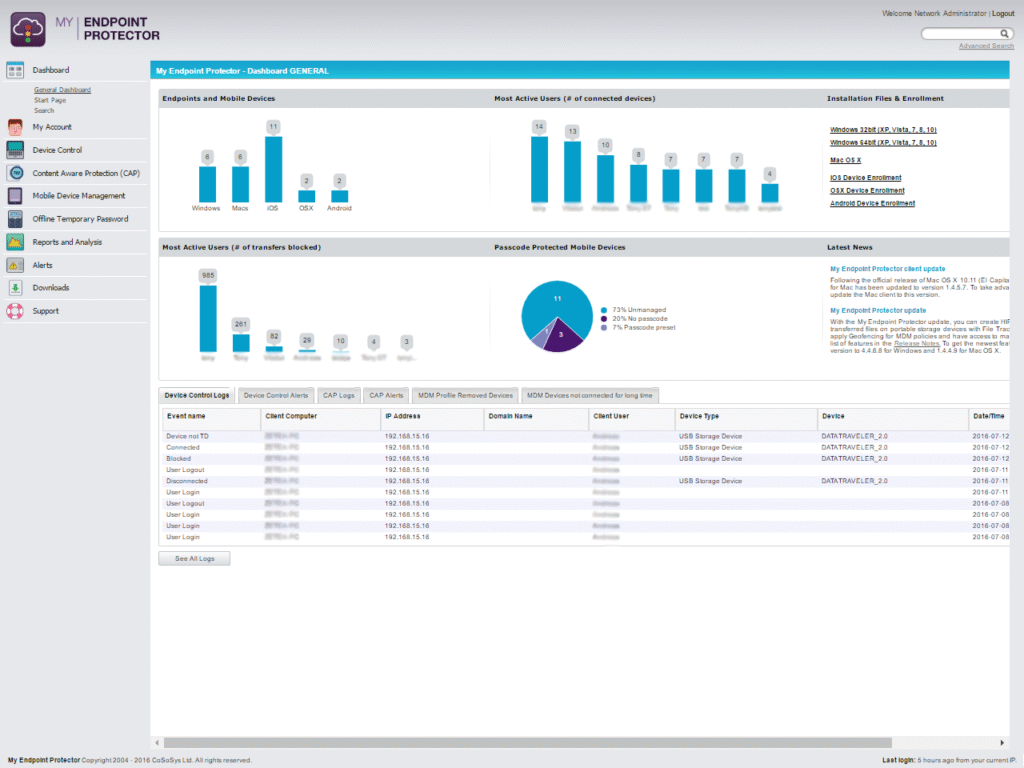
Endpoint Protector is built to give security teams strong data protection controls across Windows, macOS, and Linux endpoints.
Its core focus is endpoint protection, with extended visibility into network traffic and cloud uploads. This makes it a practical fit for hybrid environments where sensitive data constantly moves between devices, SaaS apps, and collaboration tools.
Key Features
- Policy Automation: Teams can define recurring policy conditions or time-based controls. For example, enabling stricter enforcement outside business hours or for specific user groups.
- Content-aware Protection: Inspects data in motion and at rest using built-in and custom classifiers, keyword matching, and pattern analysis.
- Incident Logging and Reporting: Collects detailed logs of DLP events, including user identity, file details, device type, and policy triggers, and presents them in dashboards and exportable formats for compliance and audit needs.
What Users Say About Endpoint Protector
- “Setup takes a bit of time, especially when fine-tuning policies for different teams. The UI sometimes feels dated and not very smooth to navigate. Reports and Linux support could be improved.” → Read Full Review
- “It does a solid job at blocking unauthorized USB access and keeping sensitive data from being copied or leaked.” → Read Full Review
Pricing
Visit Netwrix’s website to request a personalized quote.
FAQs
Why Look for an Alternative to Trellix Data Loss Prevention?
The decision to explore alternatives rarely comes from one catastrophic failure. Instead, it comes from day-to-day friction. The small but persistent challenges that slow teams down, complicate compliance, or reduce confidence in alerts over time.
Based on real user feedback, here are five of the most common reasons companies begin reassessing Trellix DLP:
Evidence Handling and Storage Can Complicate Compliance
One recurring concern is how DLP incident evidence is stored and managed, particularly in Trellix’s SaaS deployments that rely on third-party storage providers.
While this model may simplify infrastructure, it can introduce uncertainty around where sensitive evidence lives and how it’s governed.
Complex Configuration Process
Trellix DLP is powerful, but many end users report that unlocking that power requires significant time, expertise, and tuning.
Initial configuration can be complex, and meaningful results often depend on extensive policy customization. This complexity slows deployment, increases reliance on specialized resources, and makes day-to-day management harder than expected.
For smaller teams (or teams without dedicated DLP specialists), the cost of ownership can quickly feel unjustified to the value delivered.
High False Positives
Another common frustration is the volume of false positives during early deployment. Users frequently note that substantial tuning is required before policies produce reliable signals.
While tuning is expected with any DLP solution, the effort required here can be resource-intensive.
Endpoint Performance Impact on Everyday Workflows
Several users report noticeable performance degradation on endpoints, including slowed internet access or blocked websites that are essential for daily operations.
In practice, this can lead to friction with employees and pushback from business units.
Alert Fatigue From Low-risk Notifications
Perhaps the most damaging long-term issue is alert overload. Users describe being flooded with low-risk notifications, making it difficult to quickly identify incidents that genuinely require immediate attention.
When everything looks urgent, nothing does. Over time, this kind of noise erodes trust in the platform and increases the risk that real threats are missed.
What Key Features and Functionalities Do You Need in a Trellix DLP Alternative?
When evaluating the best alternatives to Trellix DLP, you must focus on fixing the operational gaps that led you to look elsewhere in the first place.
The features below are practical markers of a solution that will deliver real-world value:
Behavior and Context-driven Detection Capabilities
One of the biggest limitations of legacy DLP tools is their dependence on static rules and content patterns.
While this approach can catch obvious violations, it often misses subtle insider risk or flags routine activity as suspicious. A modern Trellix DLP alternative should go beyond keyword matching and file types to understand how users normally behave.
Behavior-aware detection looks at patterns over time, like how data is accessed, where it’s moved, and whether actions deviate from a user’s baseline.
Unified Data Visibility Across Endpoints, Cloud, and Networks
Data no longer stays confined to endpoints or on-prem environments. It flows continuously through browsers, mobile devices, SaaS platforms, cloud storage, and collaboration tools. If a DLP solution only sees part of that journey, investigations become fragmented and risk assessments unreliable.
A strong alternative should provide end-to-end visibility across where work actually happens, correlating endpoint activity with cloud usage and web behavior. When all data movement is visible in one place, security teams gain a clear risk picture; they don’t have to stitch together evidence from multiple tools.
High-signal Alerting and Intelligent Prioritization
Alert fatigue is one of the most common reasons teams lose confidence in DLP tools. When low-risk notifications flood the system, genuinely dangerous incidents become harder to spot — especially during high-volume periods.
Modern DLP alternatives emphasize signal quality over alert quantity. Instead of flagging everything, they prioritize incidents based on risk, context, and potential impact. This helps analysts quickly identify what requires immediate attention and reduces time wasted investigating benign activity.
Integrated Forensic Capabilities
Detection is only half the job. Once an incident is flagged, teams need to understand exactly what happened. That requires more than a basic alert.
Look for platforms that provide rich forensic context out of the box, including timelines of user activity, file interactions, and preserved evidence.
When investigations are intuitive and self-contained, security teams can resolve incidents faster and support audits, HR reviews, or legal inquiries without scrambling for data.
Flexible Policy Management
DLP policies should evolve as the business evolves. Rigid rule sets that require extensive tuning or cause operational disruptions make it harder for teams to adapt to new workflows or threats.
A capable Trellix alternative should support flexible, real-time policy enforcement, with the ability to test changes safely before applying them broadly. This allows teams to refine controls gradually, improve accuracy, and avoid breaking legitimate workflows while still enforcing protection consistently.
Cloud-ready Architecture Built for Scale
As organizations move toward cloud-first and hybrid environments, DLP platforms need to scale without heavy infrastructure or complex deployments. Tools built for perimeter-based networks often struggle to adapt to remote work and SaaS-driven workflows.
Cloud-based or hybrid-ready DLP alternatives typically deploy faster, scale more easily, and integrate more naturally with modern environments. This lightweight architectural flexibility becomes increasingly important as teams grow and data movement becomes more distributed.
What Makes Teramind an Ideal Data Protection Tool?
Compare Teramind to Trellix → Try the platform for yourself
Teramind is built for how data risk occurs in the modern workplace. Instead of relying on rigid rules and static content matching, it focuses on user behavior, context, and intent.
It gives organizations clearer signals, better investigations, and far less noise than legacy DLP platforms like Trellix.
Why Do Teams Choose Teramind Over Trellix?
- Behavior-first Detection: Teramind focuses on how users behave over time, surfacing meaningful risk instead of flooding teams with low-value policy hits.
- Investigation-ready Context Out of the Box: Every alert comes with full activity timelines and session evidence, so analysts can quickly understand what happened.
- Lightweight Protection for Modern Work Environments: Teramind delivers deep visibility across endpoints, browsers, and cloud workflows without degrading performance or disrupting productivity.
- Smarter Prioritization With Risk Scoring: Dynamic risk scoring highlights the users and incidents that matter most, reducing alert fatigue and accelerating response times.