

While organizations invest heavily in defending their perimeter against external cyber threats, the most damaging security incidents originate from within.
Whether driven by malicious intent, operational negligence, or compromised credentials, insider threats frequently operate undetected for months, inflicting severe intellectual property loss and costing millions of dollars to remediate.
Detecting these threats requires more than logging endpoint activity; you must study insider threat analytics that convert disparate digital footprints into behavioral context and defensible action.
This guide provides security operations center (SOC) teams, CISOs, and insider risk leads with a complete framework for insider threat analytics:
- The core metrics and recommended baseline thresholds across user activity monitoring, data movement, collaboration tools, and technical commands.
- A comparative matrix across primary telemetry layers.
- A three-tier playbook to help you transition from reactive alert triaging to active containment.
- A privacy-by-design model to ensure compliance with global data privacy mandates without sacrificing threat visibility.
Which insider threat indicators and baseline thresholds matter most?
Traditional security alerting relies on static rules that trigger high volumes of false positives. Effective User and Entity Behavior Analytics (UEBA) establishes a normal baseline of daily activity and highlights suspicious deviations.
The matrix below synthesizes the primary risk indicators, baseline thresholds, and immediate risk implications:
| Telemetry Layer | High-Risk Indicators | Detection Baseline | Threat Implication |
|---|---|---|---|
| Web & Application Usage | Access to uncharacteristic applications or prohibited sites | Access to ≥ 5 applications unused in the prior 30 days; > 1.5 hours/day on unproductive sites; zero tolerance for malicious or proxy websites | Out-of-role reconnaissance, privilege misuse, or employee disengagement |
| Productivity Patterns | Abrupt engagement decline or abnormal after-hours activity | Productivity drops > 30% against 30-day rolling baseline; active time < 50% during core business hours; after-hours access > 5 hours/week without project approval | Flight risk, disgruntlement, or covert after-hours system access |
| Authentication & Session | Geolocation anomalies, velocity discrepancies, and credential stress | Impossible travel velocity; ≥ 2 concurrent active sessions; ≥ 5 failed login attempts within 15 minutes; logins during scheduled PTO | Compromised credentials, brute-force attempts, or unauthorized credential sharing |
| File & Data Movement | Bulk file manipulation and external media transfers | Bulk operations involving > 20 files per session; file interaction volume > 150% of 30-day baseline; external media transfers > 100 MB | Active intellectual property harvesting, reconnaissance, or data staging |
| Cloud & Web Transfers | Transfers to personal cloud storage and unapproved domains | Uploads to personal cloud storage > 50 MB weekly; single-day downloads > 500 MB; upload/download ratio shift > 70%; zero tolerance for unapproved cloud sync clients | Cloud-based exfiltration, mass data collection, or data leakage |
| Email Communications | Outbound routing to personal or competitor addresses | > 5 emails/week to non-corporate accounts; attachment sizes > 25 MB to external recipients; outbound auto-forwarding rules (zero tolerance) | Data exfiltration through side channels or IP harvesting before resignation |
| Collaboration & Messaging | Unofficial side-channel exchanges and unauthorized file transfers | File transfers > 50 MB weekly via chat platforms; ≥ 3 instances of restricted keywords; communications with former staff within 90 days of departure | Circumventing corporate email inspection, external collusion, or unauthorized disclosure |
| Generative AI & Search | Ingestion of proprietary assets into external tools and security evasion search | Pasting proprietary source code, credentials, or customer data into public chatbots; queries targeting security bypass tools or data wiping software | Unsanctioned data exposure, IP contamination, or active operational preparation |
| Console & System Commands | Administrative escalation, script execution, and defensive evasion | Administrative or shell commands executed by non-IT staff; attempts to access or modify security audit logs; unauthorized changes to system settings | Privilege escalation, covering tracks, or unauthorized system discovery |
| Network Traffic | Unusual outbound bandwidth spikes and protocol tunneling | Upload-to-download ratio > 2:1; consistent small transmissions (50–100 KB) indicative of beaconing; off-hours traffic > 5% of total volume | Covert command-and-control communication, protocol tunneling, or off-hours data egress |
How do you decode behavioral signals across user, data, and system layers?
User activity and behavioral baselines
User activity analytics evaluate normal operational habits against department-level baselines. It highlights emerging insider attacks before data loss occurs.
Application and web trajectory
Behavior monitoring duration and frequency across categorized software reveals disengagement or unauthorized tool exploration.
- Threshold: Zero tolerance for visits to blacklisted resources, anonymizing proxies, or hacking tools. Flag non-work-related browsing exceeding 1.5 hours daily or more than three unauthorized access attempts to restricted databases per week.
- Risk context: Sudden navigation to corporate repositories outside an employee's assigned role often points to unauthorized data harvesting prior to resignation.
Productivity ratios and timing anomaly
Workforce productivity analytics track active system engagement versus idle intervals.
- Threshold: Flag active percentages below 50% during core business hours, work-to-idle ratios falling beneath department medians, or idle spells exceeding 30 minutes more than five times daily.
- Risk context: While lower productivity can simply indicate disengagement, an abrupt decline accompanied by off-hours access (over 5 hours weekly without active project tickets) warrants investigation for staging activities.
Authentication and session analysis
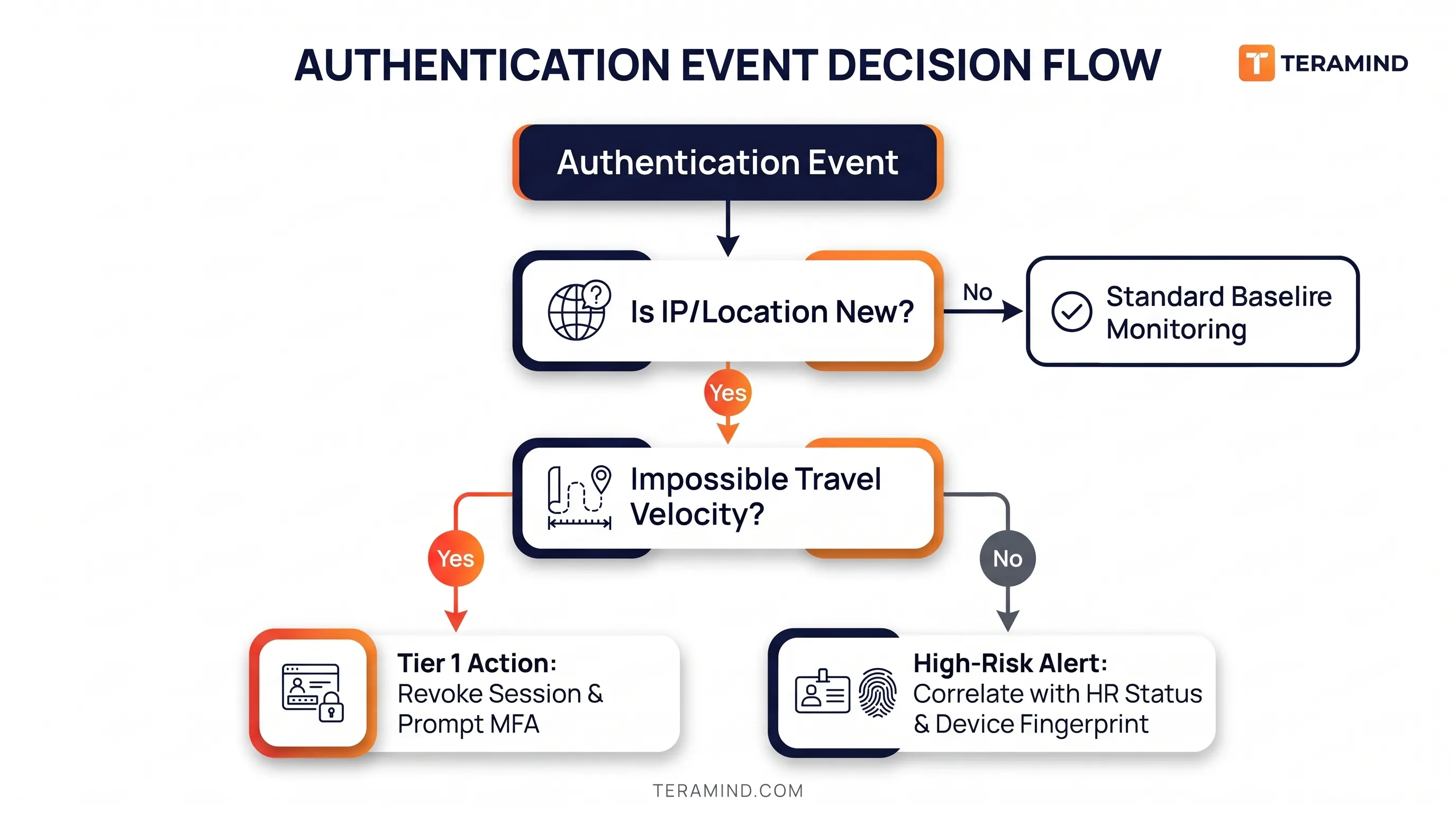
System session logging inspects source IPs, device IDs, and login durations.
- Threshold: Two or more concurrent active logins from disparate endpoints, logins during scheduled medical/vacation leave, or logins occurring during non-standard windows (2:00 AM–4:00 AM) more than twice a month.
- Risk context: Multiple simultaneous sessions or impossible travel scenarios generally reveal compromised credentials or illicit account sharing between employees.
Data movement and exfiltration vectors
Tracking data movement across endpoints, web applications, and peripheral hardware serves as the primary barrier against intellectual property theft.
File operations and removable storage
Endpoint file-event monitoring records file creations, alterations, deletions, and mass exports.
- Threshold: Mass file actions involving more than 20 files in one session, data access surpassing 150% of the employee’s 30-day baseline, or any unauthorized external storage transfer greater than 100 MB.
- Risk context: Employees preparing to transition to competitors frequently harvest data systematically, using small sequential extractions to stay under threshold warnings.
Web uploads and cloud storage synchronization
Web file monitors inspect transfers via web browsers and unapproved cloud drives.
- Threshold: Outbound uploads to personal cloud infrastructure (e.g., personal Google Drive, Dropbox) over 50 MB in a 7-day span, downloads surpassing 500 MB daily without a project link, or a 70%+ alteration in the upload/download ratio.
- Risk context: Uploads to unmonitored personal cloud storage domains represent a direct, low-friction vector for exfiltrating source code and customer databases.
Email and communication side-channels
In addition to scanning subject lines and recipient domains, email analytics inspect external routing patterns and attachment extensions.
- Threshold: External emails exceeding 25 MB in total attachments, routing data to non-corporate accounts more than five times a week, or any creation of outbound auto-forwarding rules.
- Risk context: The presence of client databases, .sql exports, or proprietary designs sent to a personal email inbox or direct competitor domain requires immediate triage.
Analog and hard-copy leakage (Printing analysis)
Physical media remains an overlooked blind spot for data theft.
- Threshold: Print volumes surpassing 100 pages per day, print increases of 150%+ above individual baselines, or printing sensitive resources outside 7:00 AM–7:00 PM (exceeding 25 pages weekly).
- Risk context: High-volume printing of roadmaps or customer lists following a resignation represents physical data transfer that bypasses network DLP controls.
Technical activity and privilege integrity
Malicious insiders with technical expertise routinely operate within administrative tools to cover their tracks.
Keystrokes and clipboard monitoring
Dynamic keystroke analytics evaluate typing rhythm, key combinations, and repetitive clipboard staging.
- Threshold: Repetitive clipboard actions exceeding 20 instances daily from restricted files, automated input sequences (>1,000 characters pasted at once), or frequent credential entry into unapproved desktop software.
- Risk context: Repeated sequences of Ctrl+A → Ctrl+C across proprietary directories, followed by pasting into messaging apps or browser windows, indicates rapid data staging.
Console commands and administrative escalation
Monitoring terminals (PowerShell, Bash, Command Prompt) captures complete string executions, parent binaries, and command parameters.
- Threshold: Execution of administrative scripts or terminal utilities by privileged users, log access/modification attempts, or security tool tampering.
- Risk context: Non-IT employees running network mapping commands (such as directory enumeration or network scans) point directly to environment reconnaissance.
Search reconnaissance and GenAI interaction
Search logging captures employee inquiries across search engines (Google, Bing) and public generative AI chatbots (e.g., ChatGPT).
- Threshold: Queries relating to security control bypass techniques, data scrubbing/anti-forensic software, or file obfuscation tools.
- Risk context: Inquiries into covert data destruction utilities (e.g., disk wipers) or exfiltration methods highlight malicious intent and active preparation.
How do security teams move from alerts to decisive containment?
Analytics without an established response workflow only produce alert fatigue.
Effective insider threat detection matches the behavioral signal’s fidelity to validation and containment measures.
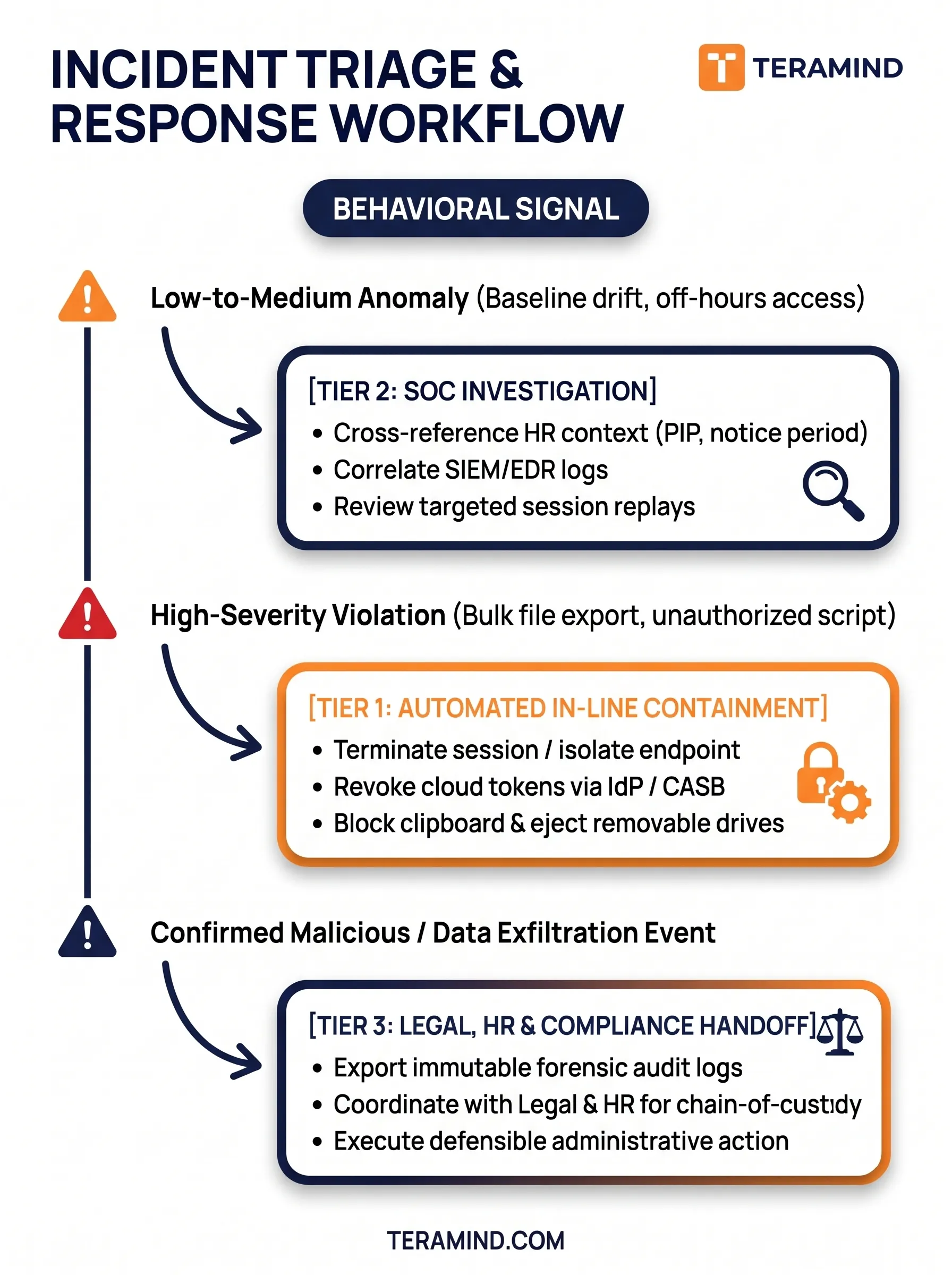
Tier 1: Automated in-line containment (Zero delay)
When policy-violating telemetry is detected, automated guardrails must fire immediately to prevent data loss:
- Storage quarantine: Automatically block and unmount unauthorized USB flash drives or external storage devices when transfers cross predefined thresholds (e.g., >100MB).
- Network and process interruption: Sever active sessions or suspend background processes executing unapproved network scans, credential dumps, or command-line scripting on non-technical endpoints.
- Data flow interception: Block clipboard copy actions containing sensitive content (regex-matched PII, source code) when the destination is an unauthorized AI tool or personal email.
- Identity session revocation: Integrate endpoint agents with your Identity Provider (IdP). Then, revoke OAuth tokens and enforce step-up multifactor authentication upon impossible travel or unauthorized configuration edits.
Tier 2: SOC deep-dive and forensic correlation
When behavioral deviations don’t warrant immediate automatic interruption, the incident response team triangulates technical telemetry against organizational context:
- HR trigger contextualization: Correlate user risk scores with employment milestones. An engineer downloading repositories represents a routine action; that same action taken within 14 days of a formal resignation, a negative performance evaluation, or a company restructuring elevates the risk score to critical.
- Video session replay verification: Eliminate ambiguity by inspecting video session recordings linked directly to the behavioral alert. Confirm whether an administrative command was an innocent mistake or deliberate evasion.
- Cross-vector pattern matching: Confirm whether the action represents an isolated event or a structured progression across stages: Reconnaissance → Staging → Exfiltration → Evasion.
Tier 3: Legal, HR, and compliance handoff
For verified, high-severity incidents, security teams must present defensible, tamper-proof evidence to external stakeholders:
- Forensic chain-of-custody: Secure immutable, cryptographic audit logs documenting every action taken by the subject, including file transfers, email receipts, timestamps, and network destinations.
- Dual-custody approvals: Enforce procedural sign-offs (e.g., SOC Manager + Legal Counsel) before exporting unredacted user sessions. This safeguards organizational privacy and evidentiary integrity.
- Proportional HR alignment: Present consolidated risk reports to HR. This allows for defensible administrative action, interview interventions, or legal preservation orders based on audited facts rather than subjective assumptions.
How can organizations balance threat analytics with employee privacy?
A common challenge in insider risk management is preserving employee trust and complying with privacy regulations (e.g., GDPR, CCPA, Works Councils).
Deploying monitoring without clear privacy boundaries invites employee pushback and creates regulatory liability.
Organizations should structure their monitoring framework around four key principles:
| Core Principle | Implementation Standard |
|---|---|
| 1. Data Minimization & Redaction | Mask passwords, PII, and non-work web interactions. |
| 2. Dual-Key Forensic Unmasking | Require two-party approval to view session replays. |
| 3. Peer-Group Baselines | Compare individuals to role norms, not company averages. |
| 4. Transparent Governance | Publish clear acceptable use and monitoring policies. |
1. Selective data masking and keystroke redaction
- Configure endpoint agents to disable character logging within banking apps, healthcare domains, personal messaging services, and password fields.
- Retain command sequences and security violations while hashing sensitive payload data at the agent level.
2. Dual-key forensic access control
- Restrict SOC analysts to pseudonymized user handles (e.g., User-8472) when reviewing alerts.
- Require two-party digital authorization (such as the DPO alongside the Head of Legal) to decrypt user identities and unmask underlying screen recordings during formal investigations.
3. Role-calibrated peer baselines
- Do not apply broad corporate averages to technical roles.
- Judge an engineer's command-line usage or Git transfer patterns against other software engineers. This prevents false positives and targets genuine behavioral outliers.
4. Transparent governance frameworks
- Formally document monitoring policies within acceptable use agreements.
- Clearly state which vectors are evaluated (e.g., work email, company cloud storage, administrative terminal commands) and emphasize that the objective is protecting organizational assets rather than continuous employee surveillance.
How does Teramind operationalize threat detection and response?
Modernizing your insider threat program requires a unified platform that pairs behavioral telemetry with automated enforcement. Teramind provides the visibility, risk correlation, and in-line response needed to protect intellectual property and sensitive corporate assets.
Here are its key features:
- Single-agent unified architecture: Teramind consolidates insider risk management, endpoint Data Loss Prevention (DLP), workforce analytics, and business process engineering into a single, lightweight software agent. This unified approach eliminates the need to deploy and manage sprawling vendor tech stacks and separate point solutions.
- Unified behavioral dashboards: Evaluate user activity across applications, GenAI, files, and networks. Monitor time allocation, idle trends, and data movement from customizable BI interfaces.
- Composite risk scoring and anomaly detection: Teramind’s Risk tab automatically prioritizes alerts. It tracks behavioral baseline deviations across teams and correlates individual events into an aggregated threat score.
- Patented real-time Optical Character Recognition (OCR): Teramind’s patented OCR engine extracts, indexes, and searches text embedded directly within live screens, images, and video recordings. This capability allows you to trigger automated policy alerts on visual on-screen text or remote RDP sessions.
- Shadow AI and agentic governance: Teramind extends visibility to employee AI usage, including unsanctioned generative AI tools, desktop AI apps, and headless autonomous agents like OpenClaw or Claude Code. It actively monitors internal command execution and flags superhuman behavioral velocity anomalies, such as an AI script firing hundreds of command-line instructions per second.
- In-app field parsing and process mining: The platform captures data at the individual form-field level within enterprise software. This enables organizations to validate standard operating procedure (SOP) compliance during data staging, map actual business process sequences, and pinpoint software friction points.
- Real-time automated rules and remote desktop control: Deploy in-line policies that block file transfers to unauthorized cloud destinations, prevent insiders from pasting sensitive information into generative AI tools, and terminate unauthorized commands instantly. Furthermore, built-in remote desktop control allows SOC analysts to freeze, assume control of, or lock down a compromised endpoint session in real-time.
- Immutable audit trails and video replay: When an alert fires, inspect Teramind’s contextual session recordings and unalterable audit trails to substantiate containment actions with clear forensic evidence.
Explore Teramind's Free Live Demo | Start Your Free Trial Today
What are the recommended first steps?
- Review current policies: Evaluate your active DLP and UEBA rules against the recommended baseline thresholds outlined above.
- Map high-value assets: Identify critical source code repositories, customer databases, and sensitive file shares to apply targeted file-monitoring rules.
- Explore the live environment: Test real-time behavior tracking, customizable risk dashboards, and endpoint session replays firsthand by visiting the Teramind Live Demo (no registration required).
FAQs
How does insider threat analytics differ from traditional data loss prevention (DLP)?
Traditional data loss prevention (DLP) inspects content at rest or in motion against static pattern-matching rules (like regex strings or credit card formatting). Insider threat analytics evaluates behavioral context, user intent, and multi-vector anomalies over time.
While legacy DLP tools can flag an outbound email attachment matching a confidentiality tag, they cannot determine if the sender recently submitted their resignation, logged in from an anomalous geolocation, or systematically exported files from a restricted repository.
Insider threat analytics combines endpoint telemetry, user activity baselines, and data movement tracking to identify exfiltration attempts across modern vectors (such as unapproved cloud drives, generative AI tools, and encrypted messaging) that bypass perimeter DLP.
How do analytics distinguish between malicious insiders, compromised insiders, and human error?
Insider threat analytics separates threat types by evaluating the sequence, cadence, and progression of actions across the entire kill chain rather than judging isolated alerts:
- Malicious insiders: Exhibit structured, progressive intent, moving chronologically from environment reconnaissance (probing uncharacteristic directories) to staging (bulk file compression, external storage transfers) and defensive evasion (modifying security logs or printing off-hours).
- Compromised insiders: Are characterized by sudden velocity anomalies and credential stress, such as impossible travel logins, concurrent active sessions from disparate geographic regions, or off-hours access from unrecognized IP addresses.
- Negligent insiders/human error: Appears as isolated mistakes without preparatory or evasive behaviors, such as misconfiguring a cloud bucket, misaddressing an external email, or clicking a phishing link.
By contextualizing activity against departmental baselines, security teams avoid treating accidental operational slip-ups as deliberate sabotage.
How does Teramind integrate with a Security Information and Event Management (SIEM) platform for threat hunting?
Teramind feeds high-fidelity behavioral telemetry into your Security Information and Event Management (SIEM) architecture, providing the user context and forensic visibility that standard network and system logs lack.
During proactive threat hunting, SOC analysts querying a SIEM (such as Splunk, Microsoft Sentinel, or IBM QRadar) can detect anomalous system events, but often lack visibility into what the user actually saw and executed at the endpoint.
Teramind enriches SIEM logs with contextual user activity, including clipboard transfers, file renaming sequences, and command-line arguments. When high-risk thresholds are crossed, analysts can transition directly from a SIEM alert to Teramind’s immutable audit trail or video-like session recording to inspect the incident within seconds.
How can security teams monitor privileged access without causing alert fatigue?
Monitoring privileged access without flooding the SOC with false positives requires dynamic peer-group baselining and granular role-based access controls rather than rigid, universal rules.
System administrators, DevOps engineers, and IT specialists routinely execute scripts, modify permissions, and manage databases as part of their daily responsibilities. Teramind calibrates behavioral baselines against specific peer cohorts rather than applying general corporate averages.
This ensures administrative scripting by technical staff is recognized as normal baseline activity, while triggering high-priority containment alerts only when an admin account exhibits anomalous behavior — such as tampering with security audit logs, accessing non-job-relevant HR files, or staging files to personal cloud repositories.
Does managing insider threats violate GDPR, employee privacy, or Works Council agreements?
Proactively managing insider threats does not require invasive employee surveillance; enterprise platforms like Teramind incorporate privacy-by-design safeguards to maintain full compliance with the GDPR, CCPA, and Works Council requirements.
Organizations achieve defensible compliance by implementing:
- Data minimization and redaction: Automated hashing and masking that strips personal banking logins, health portals, and keystrokes in non-work domains from forensic records.
- Dual-key forensic unmasking: Enforcing multi-party authorization (e.g., joint sign-off from Legal Counsel and the Data Protection Officer) before pseudonymized user profiles or video session replays can be unmasked for investigation.
- Granular role-based access controls: Ensuring that session recordings and behavioral metrics are strictly compartmentalized and accessible only to designated SOC analysts.
- Transparent monitoring policies: Establishing clear acceptable use standards that define corporate asset monitoring without infringing upon personal communications.
What makes insider threat analytics "actionable" compared to passive monitoring tools?
Passive employee monitoring tools merely log activity for post-mortem investigations, leaving a critical delay between threat detection and containment.
Actionable insider threat analytics couples high-fidelity detection with automated, in-line incident response. When an employee initiates a high-risk violation — such as attempting to transfer more than 100 MB of proprietary source code to an unapproved flash drive or pasting customer PII into a public AI engine — Teramind can:
- Immediately intercept the clipboard.
- Unmount the external drive.
- Terminate the process.
- Revoke the user’s IdP session tokens without waiting for manual human intervention.
