In 2026, protecting sensitive data requires more than a firewall; it requires total visibility.
As insider threats and AI-driven breaches grow more sophisticated, file activity monitoring tools have become essential for tracking how data is accessed, moved, and modified. Maintaining a secure environment now depends on turning every file interaction into actionable intelligence to ensure compliance and prevent data leaks.
This guide identifies the top 5 solutions currently leading the market, breaking down how they compare in performance, ease of use, and threat detection.
What Are File Monitoring Tools?
File activity monitoring (FAM) tools are specialized security solutions that provide granular visibility into how data is accessed and handled within a business.
Unlike traditional antivirus software that scans for external malware, FAM tools focus on the “who, what, where, and when” of internal data interaction. They capture a detailed audit trail of every action taken on a file — including creation, modification, renaming, and deletion — across local servers, cloud storage, and hybrid environments.
By providing a real-time record of file movement, these tools serve as a critical layer of defense against both accidental data loss and intentional insider threats.
How Did We Select the Best File Activity Monitoring Solutions?
Selecting the right file activity monitoring tools in 2026 requires looking beyond simple logs. We evaluated dozens of platforms based on their ability to handle the complexities of hybrid work and high-velocity data environments.
To ensure our top picks provide genuine value, we filtered them through four critical lenses:
- Key Features: We prioritized tools offering real-time visibility, automated file classification, and AI-driven behavior analytics to detect anomalies before they become breaches.
- Main Use Cases: We looked for versatility. Our selections excel at insider threat detection, regulatory compliance (GDPR, HIPAA, PCI DSS), and detailed forensic investigations.
- User Reviews and Market Reputation: We analyzed verified feedback from platforms like G2 and Capterra to ensure these tools perform reliably in real-world, high-pressure enterprise settings.
- Pricing and Scalability: We evaluated cost-effectiveness across different tiers — from accessible starter plans for SMEs to robust, custom-quoted solutions for enterprises.
What Are the Best File Activity Monitoring Tools?
1. Teramind
Teramind is a leading global provider of workforce analytics and data loss prevention (DLP) software. It provides a comprehensive, endpoint-centric approach to file activity monitoring that captures the granular detail of every file interaction.
By focusing on user behavior rather than just network traffic, Teramind offers unparalleled visibility into file movements — whether data is being handled on local Windows servers, through cloud applications, or even within encrypted offline environments.
Key Features
See Teramind’s file monitoring solution in action → Take a self-guided product tour
- AI Agent Governance: Monitors how humans and autonomous AI agents interact with files. Teramind can block sensitive file uploads or pastes into unauthorized LLMs, preventing Shadow AI data exfiltration.
- Behavioral DLP and Real-Time Enforcement: Identifies anomalies based on behavioral baselines. When Teramind detects a policy violation (such as suspicious file shares, uploads, or deletions), it automatically intervenes to block the action.
- OCR and Video Playback: Utilizes screen recordings synchronized with Optical Character Recognition (OCR) to track text and data within files that traditional tools might miss. Teramind provides an irrefutable audit trail, allowing security teams to reconstruct any file incident end-to-end for forensic investigations.
Best For
Teramind is the premier choice for highly-regulated industries — including finance, healthcare, and government — that must adhere to strict compliance frameworks like the GDPR, HIPAA, and SOC 2.
It’s also ideally suited for enterprise organizations with hybrid or remote workforces that require deep visibility into insider risks and employee AI use.
What Teramind Users Say
“Its intuitive interface and comprehensive monitoring capabilities make it easy to track and analyze user activity effectively. The real-time alerts and detailed reports help quickly identify risks and ensure compliance, enhancing overall security.” Read Full Review →
Pricing
Test Teramind before committing → Explore an interactive product demo
Teramind offers several pricing plans to accommodate businesses of different sizes:
- Teramind Starter: Basic productivity tracking. Starts at $14 per user per month.
- Teramind UAM: Deeper workforce analytics and security insights. Starts at $28 per user per month.
- Teramind DLP: Comprehensive data protection.Starts at $32 per user per month.
- Teramind Enterprise: Custom pricing for large enterprises and government agencies.
2. Imperva
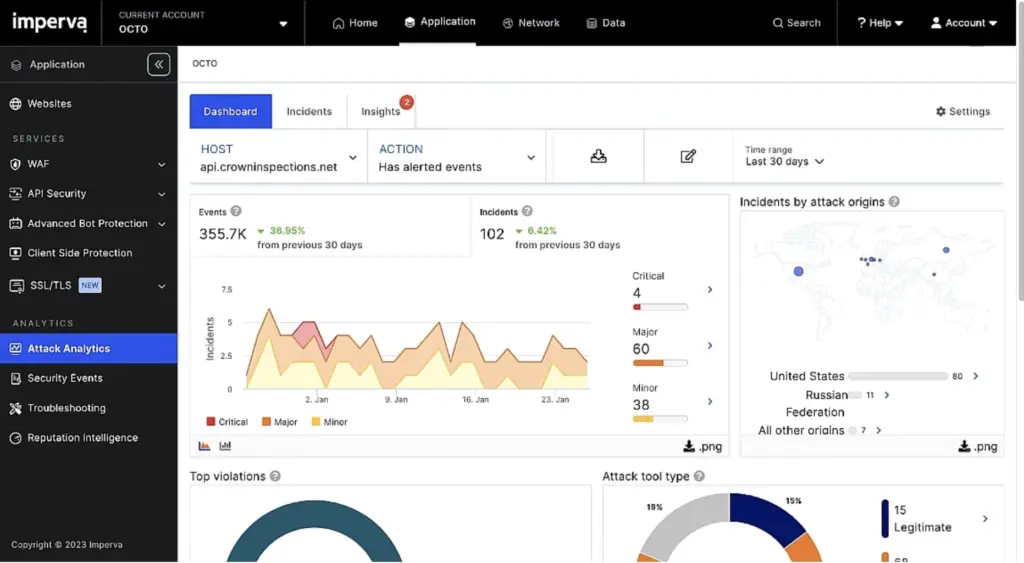
Imperva is a cybersecurity company that offers a comprehensive suite of data security and protection solutions, including file integrity monitoring (FIM) and user and entity behavior analytics (UEBA).
Its core file monitoring capabilities center on providing total visibility into what is happening across file stores and data assets, whether they reside on-premises or in hybrid and multicloud environments.
Key Features
- Data Activity Monitoring (DAM): Provides continuous monitoring of all data access and usage — including local privileged user and service account activity — to meet regulatory compliance obligations.
- ML-Driven Risk Analytics: Leverages machine learning to analyze abnormal behavior, detecting suspicious data transfers or unauthorized access attempts that cloud-native tools often miss.
- Discovery and Classification: Automatically scans and identifies sensitive data across structured databases and unstructured file repositories, providing critical context on data volume, location, and ownership.
Best For
Imperva is ideal for organizations in regulated sectors (banking, insurance) that manage massive volumes of sensitive data and require robust compliance auditing.
What Imperva Users Say
“What I like best about Imperva Cloud Data Security is its comprehensive visibility into sensitive data across cloud environments. The platform makes it easy to discover and classify data automatically, which is crucial for staying ahead of compliance and security risks.” Read Full Review →
Pricing
Imperva offers three plans with different levels of features: Data Assure, Data Secure, and Data 360. Contact the Imperva team for a quote.
3. Netwrix Endpoint Protector
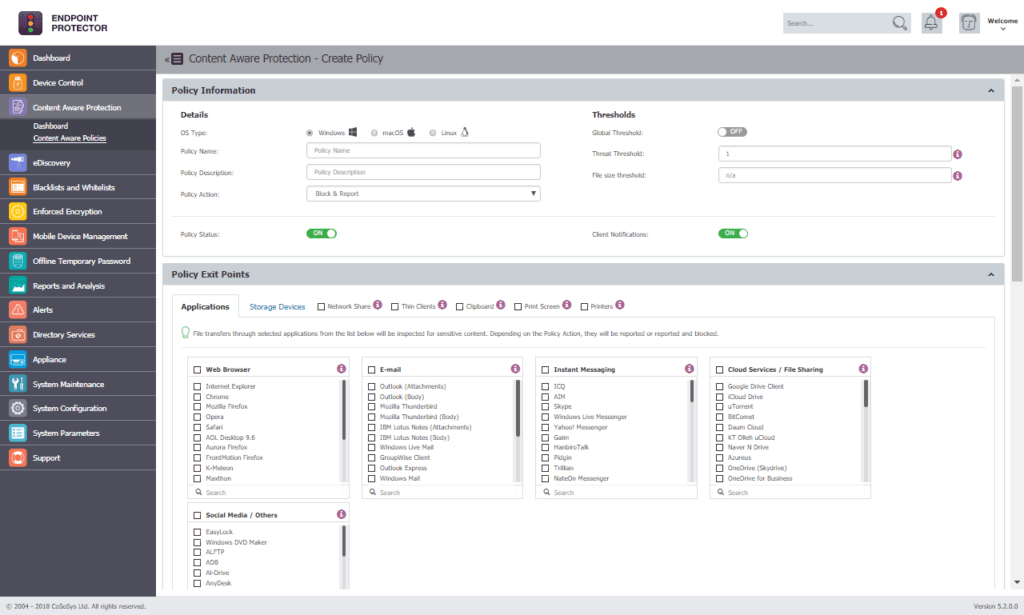
Endpoint Protector is a data loss prevention solution developed by CoSoSys and acquired by Netwrix in 2024. It’s designed to protect sensitive information across Windows, macOS, and Linux endpoints.
The platform offers advanced features to help organizations discover, monitor, and safeguard critical data from the risks of unauthorized access, data breaches, and regulatory non-compliance.
Key Features
- Content-Aware Protection: Scans data in motion, monitoring and controlling file transfers to prevent unauthorized access or leakage of sensitive information.
- Device Control: Provides monitoring and lockdown for USB and peripheral ports, allowing teams to whitelist or blacklist devices based on Vendor ID, Serial Number, and other criteria.
- IP and Source Code Protection: Utilizes advanced technologies like N-gram-based text categorization to identify and control the transfer of intellectual property, such as proprietary source code.
Best For
Endpoint Protector is ideal for organizations with mixed-OS environments requiring a consistent data security strategy across Windows, macOS, and Linux workstations.
What Endpoint Protector Users Say
“It works smoothly across Windows, Linux, and macOS, and the setup was super quick. The console is easy to use, policies are clear, and device control does what it should do.” Read Full Review →
Pricing
Visit the Endpoint Protector website to fill out a form and get a quote.
4. ManageEngine
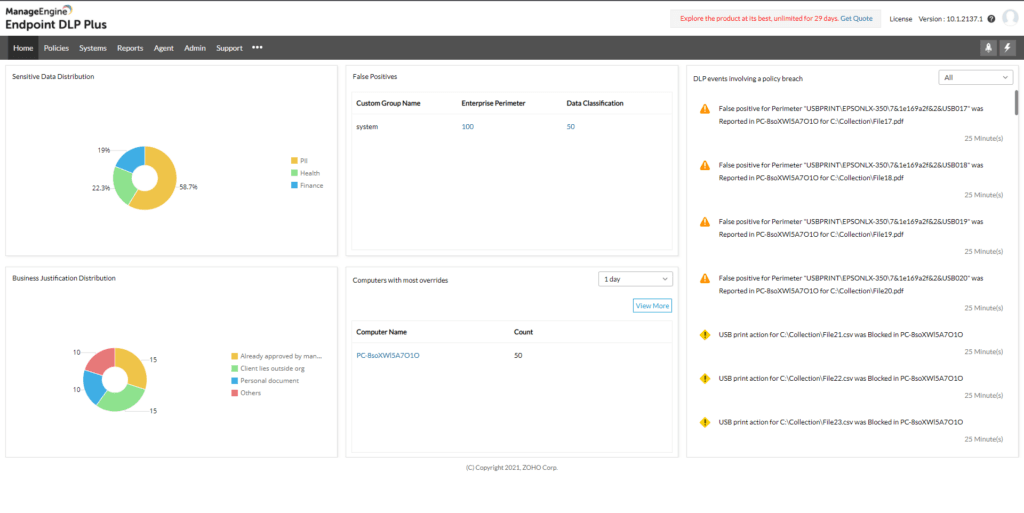
ManageEngine is an enterprise IT management and security solutions provider.
It offers three essential products relevant to critical file monitoring: ADAudit Plus, Endpoint DLP Plus, and DataSecurity Plus.
Key Features
- File Server Auditing (ADAudit Plus): Delivers real-time notifications for every file change across servers. Uses behavioral analytics to instantly flag anomalous access patterns.
- Advanced Content Discovery (Endpoint DLP Plus): Uses fingerprinting and RegEx patterns to pinpoint sensitive IP, PII, and financial records within structured and unstructured data.
- Real-time File Integrity Monitoring (DataSecurity Plus): Tracks file modifications as they happen and can trigger automated responses, such as executing scripts or isolating infected devices.
Best For
ManageEngine is an ideal choice for SMBs and large enterprises that need a modular, scalable solution capable of securing on-premises assets and multi-cloud environments.
What ManageEngine Users Say
“I love the simple and easy-to-use interface, and that it can almost manage any device in my environment that runs an OS. From my desktops, laptops, scanners, tablets, Windows servers, and even my Linux servers.” Read Full Review →
Pricing
ManageEngine offers a mix of pricing plans based on on-prem or cloud deployments, with monthly, annual, or perpetual fees. Visit the ManageEngine website to see the full range of options and add-ons.
5. InterGuard
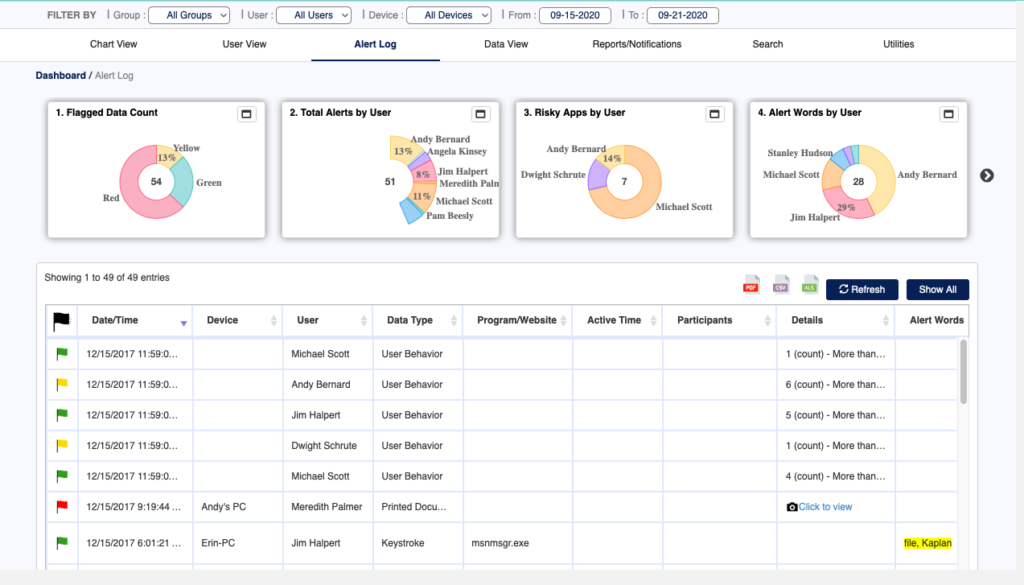
Interguard is an employee monitoring software solution that helps businesses track and manage workforce productivity.
The platform offers a range of real-time monitoring features, including computer and mobile device usage, detailed productivity metrics, and customizable alerts for suspicious behavior.
Key Features
- Endpoint-Level Monitoring: Tracks all file-related actions on the user’s device without requiring administrators to pre-define specific files. This ensures uninterrupted monitoring even when the device is off-network.
- Contextual Alerts with Screenshots: Triggers automatic screen captures whenever specific keywords are viewed or typed, sending email notifications that allow security teams to see the exact visual context of a potential leak.
- User Behavior Anomaly Detection: Identifies deviations from routine file activity patterns at the individual or team level, notifying administrators of suspicious shifts in behavior based on percentage or absolute volume.
Best For
InterGuard is particularly effective for organizations navigating remote work and increased employee mobility, where tracking file activity outside a traditional network perimeter is vital for maintaining security.
What InterGuard Users Say
“I like this software because of how it monitors the activity and really keeps track of what is being done on systems by staff. The reports are detailed and provide data that can be presented easily to management.” Read Full Review →
Pricing
Visit the InterGuard website to request a quote.
How Do the Best File Monitoring Tools Compare?
| Tool Name | Key Strength | Best For | Pricing |
|---|---|---|---|
| Teramind | AI Agent Governance & Behavioral DLP | Highly-regulated industries (Finance, Healthcare) & hybrid workforces | Starts at $14 – $32/user/month; Custom Enterprise plans available |
| Imperva | Multi-cloud & Hybrid Data Security | Large organizations managing massive volumes of regulated data | Contact for quote (Data Assure, Data Secure, and Data 360 plans) |
| Netwrix Endpoint Protector | Multi-OS cross-platform protection | Organizations requiring consistent security across Windows, macOS, & Linux | Contact for quote |
| ManageEngine | Modular, UBA-driven Change Auditing | SMBs & enterprises needing a scalable, modular IT security suite | Varies by deployment (On-prem vs. Cloud); Monthly, Annual, or Perpetual options |
| InterGuard | Endpoint-level monitoring for mobile workforces | Companies navigating remote work & increased employee mobility | Contact for quote |
What Should You Look for in File Activity Monitoring Software?
When evaluating file activity monitoring solutions, there are several key features to consider:
Cross-Platform Protection
Monitoring file activity across diverse operating systems is crucial for comprehensive data protection. Enterprises often have a mixed IT landscape, with Linux, macOS, and Windows environments coexisting.
A robust file activity monitoring solution should seamlessly integrate with this infrastructure, providing a unified view of file access and modifications regardless of the underlying system.
Granular File Access Rights
Granular control over file permissions is essential for enforcing the principle of least privilege and minimizing the risk of data breaches.
The software should allow administrators to set detailed access rights down to the individual file or folder level. This ensures that only authorized personnel can interact with sensitive information, reducing the attack surface and limiting the potential for accidental or malicious data exposure.
Abnormal File Activity Detection
Advanced analytics capabilities are vital for identifying suspicious file-related activities.
The software should establish a baseline of normal user behavior and leverage machine learning algorithms to detect anomalies, such as unusual access patterns or unexpected file modifications.
By highlighting these deviations, the solution can help security teams quickly identify and investigate potential security threats, such as insider incidents or unauthorized data exfiltration attempts.
Rapid Threat Response Enablement
Timely incident response is critical for mitigating the impact of security breaches.
Your file activity monitoring software should provide real-time alerts and comprehensive event logs, equipping administrators with the information they need to investigate and address any suspicious activities swiftly.
Rapid threat detection and response capabilities can help organizations minimize damage and ensure data integrity.
Device and USB Drive Blocking
Some solutions can monitor file activity and control access to specific devices or USB drives.
This feature can be particularly valuable for organizations with a mobile workforce or those handling confidential information, as it can prevent the unauthorized transfer of company data through removable media or external storage devices.
Screen Recording
Remote desktop recording can complement file activity monitoring by providing a visual record of user actions. This can be invaluable for forensic analysis, compliance audits, and training.
By capturing user interactions with files and applications, the software can offer a comprehensive audit trail that enhances an organization’s ability to investigate security incidents and demonstrate compliance with regulatory requirements.
What is the Best Tool for Real-time File Monitoring?
When it comes to protecting system files, there is no single “best tool”.
The right choice for your business depends entirely on your infrastructure and security priorities — whether you need protection for hybrid data environments like Imperva, modular change auditing like ManageEngine, or comprehensive multi-OS support for mixed device fleets like Netwrix Endpoint Protector.
For regulated industries and enterprises, Teramind stands out as an ideal choice. Why?
Because it monitors user activity in real-time and provides context-aware AI agent governance directly at the endpoint — the one place where every interaction is guaranteed to surface.
By understanding intent through behavioral analytics rather than just blocking actions, Teramind ensures your security posture remains airtight without disrupting legitimate business workflows. It allows your team to distinguish honest mistakes from deliberate exfiltration in minutes and provides the high-fidelity evidence required for compliance audits.
Gain granular visibility with Teramind → Book your demo with us today.
